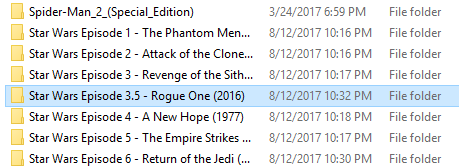
My Star Wars Episodes not sorting correctly
Episode 5 is listed before Episode 1, although I named them like this and sorted by title. So was wondering if there was a way to do this without manually editing the Sort Field
C:\Plex\Movies\DVD\Star Wars Episode 1 - The Phantom Menace (1999)\Star Wars Episode 1 - The Phantom Menace (1999).mkv
C:\Plex\Movies\DVD\Star Wars Episode 5 - The Empire Strikes Back (1980)\Star Wars Episode 5 - The Empire Strikes Back (1980).mkv
Most likely Plex is setting the sort title to something that is causing the problem. My fix is to use the date as a sort determiner. But note I prefer to see them in order of release rather than episode order. Something like editing the Plex entry and setting the sort titles to:
Star Wars Episode 01
Star Wars Episode 02
…
Star Wars Episode 05
…
Should work for you.
I recommend the two digit episode numbers because series like “Star Wars” could easily get into episode numbers greater than 9 even though there are only nine official episodes planed. However I do really doubt the there will ever be more than 999 episodes.
Also note that there has already been one “in between” episode ( “Rogue One” ) so you might want
use three digit numbering for the sort field kind of like.
Star Wars Episode 010
Star Wars Episode 020
Star Wars Episode 030
Star Wars Episode 031 (For Rogue One)
Star Wars Episode 040
Star Wars Episode 050
Star Wars Episode 060
Star Wars Episode 070 (For “The Force Awakens”)
I still prefer using release date in the sort field like:
Star Wars 1977
…
(movie name and folder name must match AND be compliant)
Then it’s a simple matter to use the Sort Title Field:
Star Wars (1977) [1080p].xxx
Star Wars 1977 <— Sort Title
The Empire Strikes Back (1980) [1080p]
Star Wars 1980 <— Sort Title
Return of the Jedi (1983) [1080p]
Star Wars 1983 <— Sort Title
and so on
Result:
I’ve got some duplicate ‘versions’ I split and haven’t yet assigned different posters to, but you get the idea. The best Sort Title I’ve found is the Same Name and then the Year ('cause that info is right there in the window you’re editing in) and if two Movies in the set come out in the same Year I add the Month
Yes I do know I can sort with the Sort Title Field, but if I were to move PC and rescan I would have to do it all over again. So was wondering if there was a way to do this without manually editing the Sort Field by a filename or a sort file or something.
I did find this and was wondering what the eng.srt file was, if that was maybe something I could use?
Movies
/Avatar (2009)
Avatar (2009).mkv
/Batman Begins (2005)
Batman Begins (2005).mp4
Batman Begins (2005).eng.srt
poster.jpg
@GenCode said:
Yes I do know I can sort with the Sort Title Field, but if I were to move PC and rescan I would have to do it all over again. So was wondering if there was a way to do this without manually editing the Sort Field by a filename or a sort file or something.
I did find this and was wondering what the eng.srt file was, if that was maybe something I could use?
Movies
/Avatar (2009)
Avatar (2009).mkv
/Batman Begins (2005)
Batman Begins (2005).mp4
Batman Begins (2005).eng.srt
poster.jpg
No you would not have to “do it again.” That is unless you also created a new server. Once you edit the sort field it gets locked, at least it is supposed to. If it does not auto-lock (turn the lock icon orange) you can manually lock it and a rescan will not modify any locked fields.
In fact you can even migrate the Plex database in most cases so putting the server on a new PC would not obliterate your work.
First thanks for all the great feedback its more than most forms and its informative.
Well this all came up for me because I had my stuff all the way I wanted it, sort fields and all.
At the time my folders were
/Movies/
I moved them yesterday to
/Movies/DVD/
/Movies/BD/
Then I removed and re-added my libraries.
So basically messed it up I know…so that’s why I was looking for a way to make it stick. After I made these changes I had to redo my sorting.