How do I get a 1.61 .deb 63 bit installer? I would like to try a downgrade.
1.91 has been good for me, 1.92 75% of everything I recorded stalled. Went back to 1.91 things seem good.
@BRBMan said:
1.91 has been good for me, 1.92 75% of everything I recorded stalled. Went back to 1.91 things seem good.
How many tuner devices are you using?
I’m using 2 HD Homerun Prime units, 6 tuners total. I have 3 of these units on the network, but I’ve only claimed 2 for Plex since the Apple TV Channels app was grabbing tuners and conflicting with what Plex thought was in-use.
1.6.1 has been rock solid since downgrading from the latest version. I’m scared to jump back to 1.9.1. Let me know if there’s anything you need from me or my system (logs, config, etc).
@gadgetgeek2000 said:
1.6.1 has been rock solid since downgrading from the latest version. I’m scared to jump back to 1.9.1. Let me know if there’s anything you need from me or my system (logs, config, etc).
1.9.1 won’t work with multiple devices. 1.9.3 (the current version) will.
@rodgerzeisler said:
@BRBMan said:
1.91 has been good for me, 1.92 75% of everything I recorded stalled. Went back to 1.91 things seem good.How many tuner devices are you using?
i have a connect and an extend. i cant use all of them because 1.93 is broken anyway. There is a bug some are experiencing where 1.93 only sees an audio stream not video regardless of channel or signal and plex crashes as soon as you start to record something. Plex knows but who knows how loing it will take them to figure out. I did see something tonight that confirms what I was afraid may be happening with recordings freezing at 100%. Plex doesn’t handle it well when the OTA signal pixelates. It freezes transcoding. I was recording a show on a channel with great signal and something happened, who knows a bird landed on the antenna, that caused the channel signal to dropout or pixelate for just a second or two, that show hung and when it finally freed up it had stopped exactly at that moment. It was the last lagre file in the transcoding folder and it was exactly on the freeze
@rodgerzeisler said:
@gadgetgeek2000 said:
1.6.1 has been rock solid since downgrading from the latest version. I’m scared to jump back to 1.9.1. Let me know if there’s anything you need from me or my system (logs, config, etc).1.9.1 won’t work with multiple devices. 1.9.3 (the current version) will.
It may work with multiple devices, but does it hang at 100% still? Are you saying the problem is fixed?
@gadgetgeek2000 said:
@rodgerzeisler said:
@gadgetgeek2000 said:
1.6.1 has been rock solid since downgrading from the latest version. I’m scared to jump back to 1.9.1. Let me know if there’s anything you need from me or my system (logs, config, etc).1.9.1 won’t work with multiple devices. 1.9.3 (the current version) will.
It may work with multiple devices, but does it hang at 100% still? Are you saying the problem is fixed?
I’m saying 1.9.1 doesn’t work with multiple devices, but 1.9.3 does. I have not had a 100% error after upgrading to 1.9.3.
I had the 100% issue on Ubuntu, after removing the software and reinstalling it seems to work fine now. Server version 1.93, HDHR extend, Ubuntu 17.04
@Kurnon said:
I had the 100% issue on Ubuntu, after removing the software and reinstalling it seems to work fine now. Server version 1.93, HDHR Connect, Ubuntu 17.04
Is there any chance the weather coincidentally changed for the better the same day you reinstalled? On 1.9.3 I have plenty of recordings that work just fine on my strongest channels, but with a glitchy signal from a week channel or during a thunderstorm I get the 100% hang symptom.
I continued having the 100% hang symptom on my Synology NAS after reinstall of 1.93. I reverted back to 1.6.1 - everything works perfectly. At things point, after all of these continued problems, I’m not sure I’ll ever be convinced to switch away from 1.6.1.
I’ve been helping to chase down this issue as I have been experiencing pretty much the same thing that many have been reporting and would like to share with you my experience and a hypothesis that has been added to our internal issue ticket with engineering. I’ve isolated the “100% stuck” recording issue to 1 network channel in my area that has lower signal strength than the others. Multiple shows I scheduled the recording of on that channel have consistently caused this error. My signal experience on that channel has been consistent even while watching Live TV on Plex Web (signal drops frequently). Plex Web is my plater of choice for these tests as Live TV tuning takes a little longer in browser as compared to a client like the NVIDIA SHIELD. I have been using a Mohu Leaf antenna mounted indoors against an exterior wall and have had the “convert video while recording” DVR option set to “transcode.” That same channel plays fine with the HDHomeRun app. I believe this usage scenario matches what many are experiencing. I’m suspicious that the signal-to-noise ratio (signal strength) could be the culprit.
First a little background as to why signal quality affects Plex DVR differently than the HDHomeRun app. Plex DVR requires a higher signal-to-noise ratio (stronger signal) than the HdHomeRun app. The HDHomeRun is basically a “conduit” that sends the transport stream to the player untouched. Plex has to analyze and segment the file (for server/client sharing) and as a result, Plex is more sensitive to signal degradation.
DVR Test Hardware
- Antennas
- 1x Mohu Leaf 30 indoor antenna
- 1x Mohu Sky 60 outdoor antenna
- Tuners
- 2x SiliconDust HDHomeRun Connect
- 1x two-way coaxial splitter
My next test involved reducing the amount of work Plex DVR does on the transport stream, to see if the “convert video while recording” setting has any affect on this. I turned that feature off and scheduled a 30 minute recording on the channel I have experienced issues with. As experienced in previous tests, the recording got stuck at 100%. The UI in the Recording Schedule shows the icon as complete, but still recording. No media is added to my library. This leads me to believe that the poorer signal is causing issues with the initial saving, not the transcoding part.
With the “convert video while recording” option crossed off my list as excluded, I steered my focus to my antenna: a Mohu Leaf indoor amplified antenna. My city is known for being notoriously difficult to access OTA television with an indoor antenna, without noticeable signal degradation. My next test involved swapping out my indoor amplified antenna with a larger, more amplified outdoor antenna: the Mohu Sky. To compare, I mounted it indoors right next to my Mohu Leaf and began watching the same channel with Live TV using Plex Web. Stream now matches the other network channels with no issues. I then scheduled another DVR recording on the same channel with the superior and more amplified antenna (Mohu Sky), this time with “convert video while recording” enabled. For the first time on this channel, no “100% completion” stuck issue. The show recorded and saved into my library.
This has all come down to signal strength. I’ve found that using a better, more amplified antenna indoors has helped a lot, and the Mohu Sky outdoor antenna with a 15dB gain amplifier placed in the same indoors location as the Mohu Leaf 30 has provided improved results, allowing me to get rid of this issue as all the network channels now come in with a stronger signal. While such an antenna might not be suitable for everyone’s usage environments, I suggest experimenting with antenna placement to improve reception. Use Plex Web and Live TV to spot any stream issues. If the stream is smooth, then the DVR recording should be successful.
I’ve provided my test experience and results to engineering and have referenced this thread. We’re at the point now where we think we’ve got the root cause, but for the time being just assume that you’ll need good reception for Plex DVR & Live TV. Test your channels with Plex Web using Live TV and adjust your antenna’s location. If you want to invest in better hardware, get a better antenna with a higher gain amplifier. We do need to handle these reception issues more gracefully and are looking into it.
@diskmon said:
I continued having the 100% hang symptom on my Synology NAS after reinstall of 1.93. I reverted back to 1.6.1 - everything works perfectly. At things point, after all of these continued problems, I’m not sure I’ll ever be convinced to switch away from 1.6.1.
In 1.6.x we weren’t segmenting, so the recording process was different. Good to know the different experience you’ve had with these two versions.
@kinoCharlino said:
This has all come down to signal strength. I’ve found that using a better, more amplified antenna indoors has helped a lot, and the Mohu Sky outdoor antenna with a 15dB gain amplifier placed in the same indoors location as the Mohu Leaf 30 has provided improved results, allowing me to get rid of this issue as all the network channels now come in with a stronger signal. While such an antenna might not be suitable for everyone’s usage environments, I suggest experimenting with antenna placement to improve reception. Use Plex Web and Live TV to spot any stream issues. If the stream is smooth, then the DVR recording should be successful.
I’ve provided my test experience and results to engineering and have referenced this thread. We’re at the point now where we think we’ve got the root cause, but for the time being just assume that you’ll need good reception for Plex DVR & Live TV. Test your channels with Plex Web using Live TV and adjust your antenna’s location. If you want to invest in better hardware, get a better antenna with a higher gain amplifier. We do need to handle these reception issues more gracefully and are looking into it.
What does that say for me, however, that is using only HD HomeRun Prime with Comcast Cable? I have no antennas in my system. Do you believe I have a signal strength problem with my Comcast Cable?
I didn’t have trouble with a single channel in my system…it would fail on many different channels. Is there some diagnostic information I could provide about channel strength to the developers? 1.6.1 is rock solid. If segmenting is causing this is there an option that we could enable/disable in the newer version to turn off this segmenting? Disable the newer features that require segmenting in favor of more reliable recordings? On 1.6.1, I have what seems to be about 60 successful television show recordings in the last week.
@kamererhouse said:
@Kurnon said:
I had the 100% issue on Ubuntu, after removing the software and reinstalling it seems to work fine now. Server version 1.93, HDHR Connect, Ubuntu 17.04Is there any chance the weather coincidentally changed for the better the same day you reinstalled? On 1.9.3 I have plenty of recordings that work just fine on my strongest channels, but with a glitchy signal from a week channel or during a thunderstorm I get the 100% hang symptom.
The weather has been consistent. I will say that my setup is relatively new, only a couple weeks. I did make a slight adjustment to my antenna, but of the 5 stations I truly care about 3 are %90+. I’ve had the stations (pbs abc) record fine since I reinstalled. I will also note that I added mythtv to my system to try it out after I reinstalled pms. Both seem to be working well. I also changed the transcoding to “heavy” on my hdhr. Obviously, I made a few changes to my system so I may not have helped to pinpoint the main issue. I am keeping an eye on everything for now. I haven’t cut the cord quite yet.
I completely uninstalled Plex from my system and reinstalled. I made no changes to my antenna nor it’s placement. It’s been running for over a week on 1.9.2 and not one error yet.
If you haven’t done a “complete” uninstall I am recommending that step. There are downfalls, everything is “unwatched” again and you’ll have metadata fixes to make.
But, like me, you might get all your shows, live tv, etc.
Thanks, Kino. I agree with you that I think it is a stream quality issue. I suspect some glitch in the signal messes up the process that rejoins all the segments. However, the reality of the situation is that it is almost an impossibility to continuously receive a full hour (or several hour) of wireless signals without some glitch occurring. If such a glitch is going to mess up the entire hour of recording (and even mess up future recordings, as frequently happens), then the DVR is simply not going to be acceptable for antenna usage. I can check the video stream of the TS file recorded with 1.6.1 and see that there are errors in the stream. They are often errors that have no impact on the watching of the file. The errors even ultimately have no impact on other encoding and editing of the TS streams. But, they for some reason cause the whole Plex recording engine to stall. The Plex recording engine should be made to handle these inconsistencies. I can see that it is possible, because 1.6.1 can do it. At least one option is to go back to the 1.6.x manner of recording. Another option is to build in some contingency or error handling. I say this as an engineer/programmer using the product. I obviously don’t know how complicated the coding for this engine is, what the trade-offs between 1.6.1 and 1.9.3 are, and do not mean to sound like I’m complaining. I’m a Plex Pass user, love the software, and am proud to support it. But, a DVR engine that will crash on a minor glitch in a signal is not ready to be labeled for use with antennas, which I suspect the majority of users are doing. Also, a lot of users are probably using those indoor antennas where glitches are common. If the DVR is not made to work with that, there are going to be a lot of complaining users out there.
Maybe it would help to start gathering more specific numbers as far as when recordings are successful vs. failing? I did a lot of digging in years’ past when I was having signal issues with OTA/ClearQAM and Windows Media Center. These links helped me in understanding where my problems lied:
Comcast HSI Signal Levels - dslreports.com/faq/16085
HDHomeRun Troubleshooting Guide (check out ‘Signal Strength and Signal Quality’) - silicondust.com/hdhomerun/hdhomerun_troubleshooting.pdf
I’ll start:
I have NOT been experiencing any of the stuck recording issues, and my numbers from a recent recording using Comcast and a HDHomeRun PRIME:
- Signal Strength 93% (-4.8 dBmV)
- Signal Quality 100% (36.4 dB)
- Symbol Quality 100%
Maybe the results of this research could be that “Plex DVR requires XX% signal strength and XX% signal quality in order to stream and record shows properly” or something along those lines…
Just had the 100% issue again on 1.9.3.4290. It’s still currently hung on a recording of THE MICK that ended 16 minutes ago and because it didn’t let go of that tuner, PLEX then aborted the recording of the next show on that same channel BROOKLYN NINE-NINE.

Meanwhile the actual tuner shows that it’s not currently in use, but PLEX sure seems to think it still is. So apparently it’s not really hanging on to the tuner, PLEX is just not finishing whatever post processing/muxing it needs to do, and not telling itself the tuner is now free to use again.
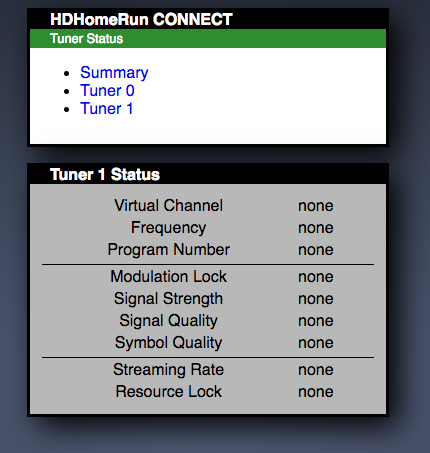
Logs attached.
