
about 90% of the time when I try to use a shared server from any Android device, I get this error. I’ve tried an S10e running Android 10, an S8 running Android 9, and an ancient J7 running Android 7, even my Fire tablet running (I think) Android 6.
But when I dig my old iPhone SE out of the bottom drawer, it works just fine.
I also get this every time I open a shared server via the Android app. Even though literally every other thing on the device recognizes that it’s online, I still get this error. Then, when I disconnect my device from Wi-Fi and then reconnect it, I get an error telling me that that server is offline. Even though, again, I can still access it just fine from an iPhone.
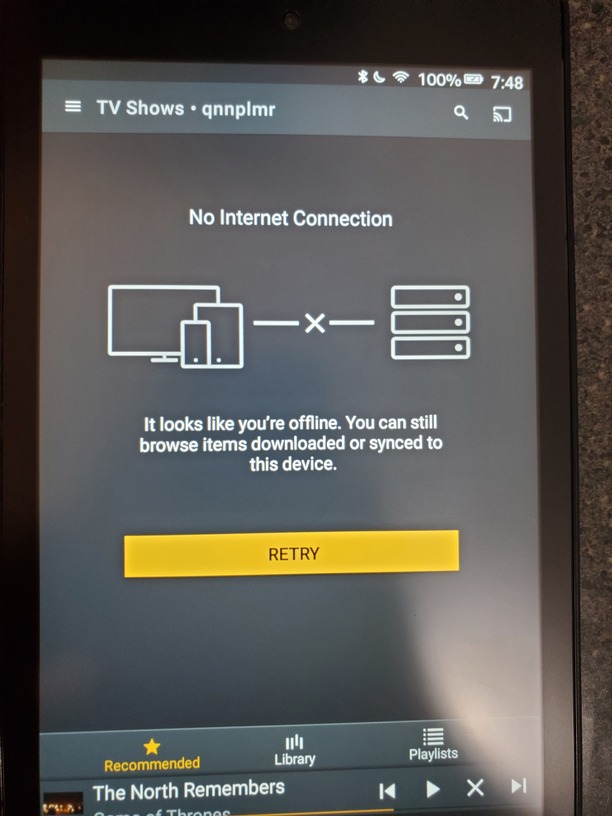
Can you reproduce the error then get me the log from the Plex for Android app. https://support.plex.tv/articles/201573117-android-android-tv-fire-tv-logs/
Here it is after I got the “it looks like you’re offline” error plex-log-RedPlammer.zip (305.5 KB)
And here it is after the playback error plex-log-RedPlammer.zip (305.5 KB)
That’s the exact same log. I think you looked in the wrong email.
plex-log-RedPlammer.zip (277.5 KB)
In both of your logs, when the app is trying to connect to that “qnnplmr” server, it’s trying 2 different addresses. 1 works but the other doesn’t. The app should only be trying 1 address. It might be caching some old information.
I would suggest deleting the data for the Plex app, which will clear out any old information and use just the latest.
Please provide me another log if it still doesn’t work.
Ok so here’s what I did:
- Replicated “no connection” error
- Replicated playback error
- Cleared app cache and data
- Could not replicate “no connection” error
- Still replicated playback error.
Logsplex-log-RedPlammer.zip (248.4 KB)
Huh, now it’s connecting from a totally different 3rd IP, but this one at least appears to be working.
The playback is causing some sort of odd error I’ve never seen before. I’m going to have to discuss this with the devs to see what it could mean.
Would it be possible for you to get the PMS logs from your friend that is sharing that server to you?
Sure. Can you tell me how to get PMS logs?
I appreciate all the help
Info on getting logs at https://support.plex.tv/articles/200250417-plex-media-server-log-files/.
Another thing you can try is to sideload the 8.1 beta from Android (mobile) beta release notes. Since you don’t have a Plex Pass, the app can’t be activated so you’ll only see 1 minute of playback, but that will at least tell us if the bug has already been fixed. You can uninstall the beta and reinstall from the play store to get the regular version again afterwards.
I don’t have Pass but I have payed for unlimited playback on Android and iPhone. Dunno if that helps.
That won’t help. When you sideload the app, it can’t check for this purchase, which is why a Plex Pass is typically needed. The beta should at least play for 1 minute to verify if the bug still exists in that version.
Right now I can’t tell why the app is giving the error I see. There is nothing in your friend’s PMS logs so that did not help.
Ok I downloaded and installed “Google Play (armv7a)”. The “no internet connection” error happened again, but the playback error is gone. I tried to replicate it with Game of Thrones and Dune (1984), both of which have had nearly 100% failure rate in the past and not only did both work, they both permitted more than one minute of play.
This is on my Android 10 phone, I’m going to try it on my Fire tablet in a minute.
Would logs from my iOS device help? As mentioned in op they never experience either error.
Android Logs
Logs: plex-log-RedPlammer.zip (374.7 KB)
Here’s the logs from the Fire tablet before installing the beta
plex-log-RedPlammer.zip (292.0 KB)
And here are the logs from after. In this case, the “no connection” error occurred once, the playback error is gone, and it is permitting more than one minute of playback.
plex-log-RedPlammer.zip (292.4 KB)
