Stop. Changing. My. Posters

I’ve yet to see evidence of manually selected posters not getting locked.

I agree, it would be nice to have a lock indicator on posters. It’s not something we’re looking at in the short term but it’s definitely something we have in the backlog.

This wasn’t a server update, this is all on the backend metadata service. It doesn’t matter what server version you are on.

lrHavOh

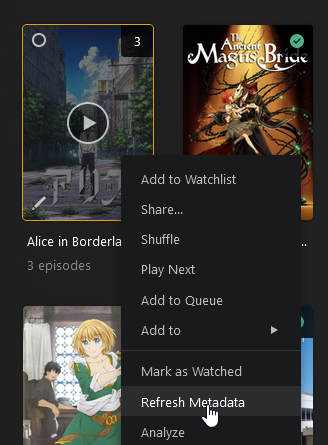
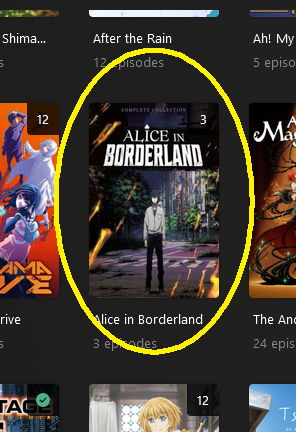
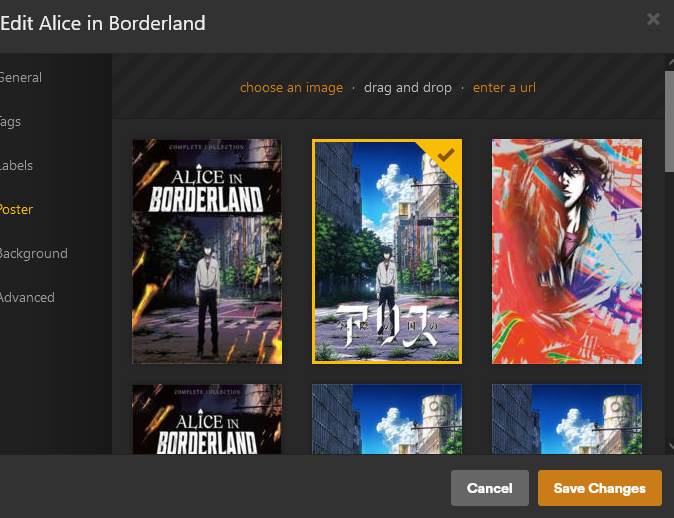
Hmmm… let’s look at this show here, “Alice in Borderland”

Screenshot 2024-04-15 at 04-39-47 Plex

It appears I’m using a personally selected poster. :astonished:

It’s would be a shame if something were to happen to it… :smiling_imp:

refresh

notmyposter

2 Likes

I’m not sure if it’s been mentioned already - but there was an api call you could use to lock all movie and tvshow (series and season) posters.

When I updated to the new library types I immediately locked all my posters this way before doing the refresh. I did lose a few posters (never could work out why) but everything has stayed the same since.

I’ve since been exported all my movie posters/backgrounds and changed to local assets - but tv/anime series have been holding strong.

Did you go into that show and change the poster from the default to something else beforehand?

If not, that poster is not locked. Please try to add that to your steps and see if you can reproduce an issue, then provide the server logs so I can take a look.

EDIT: maybe there is some confusion here about the position of the selected poster, just be aware that the first poster in the list doesn’t imply it’s the default. The default poster could be anywhere in the list.

Just as a lock icon would be good - maybe some sort of indicator for default would be useful aswell?

That’s personally tricked me a few times early on.

I’m pretty sure I did change this poster before. It’s possible this issue only happens with older items that had their custom poster set in an older version of PMS, before the database changes.

If the position of the currently-selected poster does not mean anything as to whether it’s a custom-selected one or not this is going to be more difficult to figure out -- since you don’t give us any visual indicator whether a poster is locked or not.

1 Like

i’ve definitely had previously selected posters change to a different one, and i’ve had to back in and re-select the post i had previously selected.

i’ve had to add a weekly manual check to my “things to do” to see what posters plex has decided to change without any input from me requesting it to be changed.

the fact you have no idea whether the poster is locked or not makes it impossible to keep track.

3 Likes

Agreed, although it’s not impossible it’s just not very user-friendly to figure out.

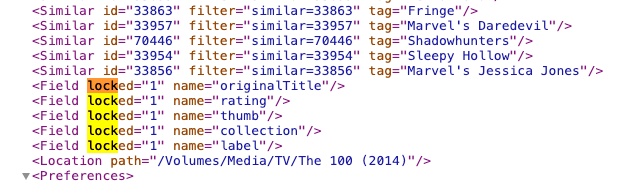
If you select “Get info” and “View XML” for the item you can see if the item’s poster or art are locked inside the XML data:

image

If it has this inside the XML then it means the thumb (poster) art is locked. If name="art" it means the background art is locked.

1 Like

the XML only shows the “current” status though? not the previous status?
let’s assume there is a bug where a previously locked poster gets changed without user intervention, will that lock field still show locked or not?

however, my opinion would that, regardless of the lock status, posters should not be getting changed without user intervention. the only time a poster should be selected automatically would be on first import. any change after that point should always require user intervention regardless of lock status.

There’s no Get Info/View XML for entire TV series though, which is what I was looking at. You can only look at the info for individual episodes and that would not include the poster for the series.

View the XML for an episode, then change the ratingKey in the URL to the grandparentRatingKey.

Or install my user script and you can just press CTRL+I on any media page to view the XML.

the XML only shows the “current” status though?

Yes, current state. This is what makes this bug so difficult to track down. By the time you realize the poster is changed it’s already too late to get the state before the change. Someone needs to be able to reproduce the change manually in a controlled way, with the before and after state logged. I have tried to manually reproduce this myself and even thought I was on to something and submitted a bug report to Plex, but it turned out to be wrong.

I’ll add another layer of complexity to the on going poster problems with plex.

I created this thread 1954 movie Sabrina has blank artwork on en-GB watch.plex.tv which alas has been ignored.

However, as you can see even with the new gracenote metadata provider they are blank. However, what is bizarre is that even with local poster assets I ended up with blank posters on my local server. I had to rename poster.jpg and fanart.jpg to something different (1poster.jpg and 1fanart.jpg) force refresh the metadata and the rename them back again to get plex to pick them up correctly.

Something funky is afoot.

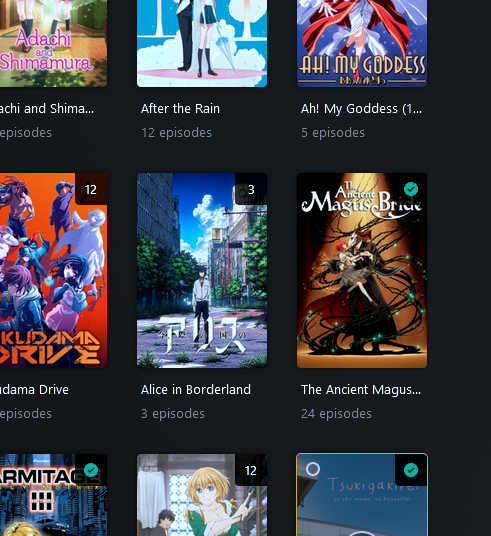
That is absolutely, beyond any shadow of a doubt, NOT true. Posters (for both Movies and TV Shows), do NOT lock “automatically” when changed, nor has there ever been any option (that I’m aware of) to manually lock them (nor any user interface indication of locked/unlocked status of a Poster). This has been an ongoing issue for YEARS and has (as several others have pointed out) become much more of an issue recently.

I change 90+ percent of movie posters and roughly 50% of TV show posters manually when I add them, as my preferences rarely agree with the “popular” opinion. I have witnessed, on occasions too numerous to mention, posters… that I know with 100% certainty that I have manually changed… being subsequently changed to something else. And this is NOT due to a poster being retired or removed for some reason. In the vast number of cases, I’m able go right back and manually select the same poster again. I’ve even had it happen to the same title on multiple occasions over time.

To be clear, I’m not confused about what’s happening or misremembering changes I’ve made. I’m not confused about server settings. I’m not new to Plex (almost 10 years now). I don’t have some unique or oddball setup. I don’t use local artwork of any kind for anything. I am not exaggerating for effect. And this is not some isolated occurrence.

Manually selected artwork absolutely does NOT, "….lock like every other field automatically when changed," (and just not have an icon for it). Or IF it does or is supposed to, it does NOT do it with ANY consistency or reliability whatsoever. The fact that you appear to be unable to duplicate this issue says more about your test methodology than anything else, in my opinion.

How would one go about “testing” it, anyway? Set up a mid-to-large library, manually change posters, note EVERY change, and then wait some number of days/weeks/months for the inevitable refresh that overwrites one or more, and THEN go back and find it? Perhaps this is why this issue has languished in obscurity for so long. It is difficult to definitively prove something that can, in some cases, take an extended period of time to occur.

Regardless, I’m beyond weary of having to go back and undo poster changes seemingly every time I scroll through a library now. Posters exist to help identify media quickly. If they keep changing, it completely defeats the very reason for their existence. STOP changing them!
5 Likes

Look at the XML for an episode and get the grandparentKey

it will be something like grandparentKey=“/library/metadata/33976”

then edit the URL with that key. In the example below replacing the 34011 which is the episode key with 33976

https://1XXX>XXX>XXX>XXX.1febb64b0c104b93b93be76a9dbb3de9.plex.direct:32400/library/metadata/34011?checkFiles=1&includeAllConcerts=1&includeBandwidths=1&includeChapters=1&includeChildren=1&includeConcerts=1&includeExtras=1&includeFields=1&includeGeolocation=1&includeLoudnessRamps=1&includeMarkers=1&includeOnDeck=1&includePopularLeaves=1&includePreferences=1&includeRelated=1&includeRelatedCount=1&includeReviews=1&includeStations=1&X-Plex-Token=-removed

at the bottom of the first section will something like this which shows locked items. “thumb” is the poster

192-168-86-79_1febb64b0c104b93b93be76a9dbb3de9_plex_direct_32400_library_metadata_16946_checkFiles_1_includeAllConcerts_1_includeBandwidths_1_includeChapters_1_includeChildren_1_includeConcerts_1_includeExtras_1_includeFields_1_includeGeolo

@BigWheel and @drzoidberg33 ,

If the assumption is that locking the field means it won’t change, and its possible that maybe it doesn’t always lock, is their a way to lock all posters in one swoop?

For example, it’s possible a lot of the confusion on this is posters changing after you’ve gone through 1000/5000/10000 movies. You might curate your list and update say 1500 of those 10000, but you spent the hours looking at EACH and every poster. Now, 2 weeks later Plex updates meta data and some of those 8500 you didn’t lock but liked how they looked are now changed. This is what bothers me personally, as had I known it would change at random I would have started the practice of locking all poster fields years ago. I did the painful process of going through my 9k+ library and I gave up a few months ago when I found hundreds are trash posters again just by letters #-C.

Maybe it’s not a win win, but an automated way to lock all posters could mean I can go through each letter at a time and lock them all at once when I know I like them, whether I picked it or Plex did.

Let me be clear I understand the desire to use the interface and I do believe y’all when you say this is happening to y’all. We simply cannot reproduce it an no one seems be able to give us reproducible steps.

I understand the interface is easy if you don’t want to manually find posters. But I am just curious If you care that much about posters to change that many posters why do you not spend the time to just put an image file with the movie? ( I am not trying to dismiss the issue)

Open your browser console in Plex Web, and run this command.

Replace <librarySectionID> with the correct ID for your library.

fetch('http://localhost:32400/library/sections/<librarySectionID>/all?type=1&thumb.locked=1&X-Plex-Token=' + localStorage.getItem('myPlexAccessToken'), {method: 'PUT'})

You can also change the type=# to select movie/tv/season posters depending on the library ID used.

  • Movies - type=1
  • TV Shows - type=2
  • Seasons - type=3

Or if you want to do it using Python.

from plexapi.server import PlexServer

plex = PlexServer('http://localhost:32400', token='XXXXXXXXXXXXXXXXXXXX')
plex.library.section("Movies").lockAllField('thumb')  # Movies library - movie posters

plex.library.section("TV Shows").lockAllField('thumb')  # TV Shows library - show posters
plex.library.section("TV Shows").lockAllField('thumb', libtype='season')  # TV Shows library - season posters
5 Likes

They very much do and you can test this yourself as discussed above (Stop. Changing. My. Posters - #74 by drzoidberg33).

If you can provide examples of where this doesn’t happen please document all the steps you take carefully and provide server logs.

I believe this is exactly what needs to be done as I kind of referenced above. Someone needs to set up a way to constantly monitor their libraries with a way to capture the before and after state. Then send an alert when a poster changes so the logs can be gathered immediately. This is not a trivial task to accomplish.