Exactly which is why the remote source going away doesn’t matter. Had to test this to be thorough but I wasn’t expecting it to break (although that would have been great as I would have been able to find an issue to fix).
It might just be that something else happened in conjunction with the remote poster being removed and it looked like that was the issue when in fact it was probably just a coincidence.
I’ve certainly been convinced based on the evidence of the testing we have done here. The poster remains even after its been removed from the online source.
So, something else must be deleting it. I’ll continue to keep an eye on this and if something happens I’ll update the thread.
I don’t really have any new info to add, but since I ran my script to select and lock all my posters, I occasionally re-check all my poster providers and nothing has changed in the last 3 months. Locked posters have remained locked.
Except I know for 100% certainty that I have changed countless posters that I have to change again. I’ve said it before in here, but I have gone through every single piece of media I have had, after having had to fix this before, and manually picked a different poster.
So if “thumb” is actually the poster, then it wasn’t actually being locked.
There really needs to be a way to lock them on mass like with other fields.
There also needs to be a way to tell the “Refresh MetaData periodically” option to NOT update posters and background art.
Again, we’ve been trying to figure out what might be causing this in this thread but so far nobody has come up with any way to reproduce the issue.
I’ll need something to go off to try and track down any potential issue but at the moment I’m not going to chase something I don’t understand (and I’ve never seen personally on my servers either).
Why not just go with the more simple option and giving something for users to force a lock?
Add a lock symbol within the “Poster” and “Background” section to represent if something is LOCKED there. That way, a user can select multiple items and click that “Lock” symbol to then lock all of those items.
This would then have it more consistent with other fields and be a user-friendly way of handling this.
As it is now, there is no way for a user to tell if something is locked unless they actually check the XML. That is the exact opposite of something being user-friendly.
That would provide a more customer-friendly Product and since that has zero impact on making plex a social media network, there is no way Keith would ever approve resources to engineer a global lock setting. Double whammy on the reasons we’ll never see that setting.
just noticed i’ve had 2 tv shows have their poster changed at some point in the past week or so.
i had specifically set the poster i wanted to use on both.
plex has then changed the poster to a different one. i went back into the tv show, the poster i had previously set was still there as an option (it was the 2nd on the list for 1 of the shows and 3rd on the list for the other, so hadn’t been removed). i have now set it back to that poster.
as i don’t know the exact date/time when it was changed by plex providing logs is most likely going to be nigh on impossible.
PMS is 1.40.3.8555.
scanner is “Plex TV Series”
agent is “Plex Series”
the 2 shows were “Band Of Brothers” and “The IT Crowd”.
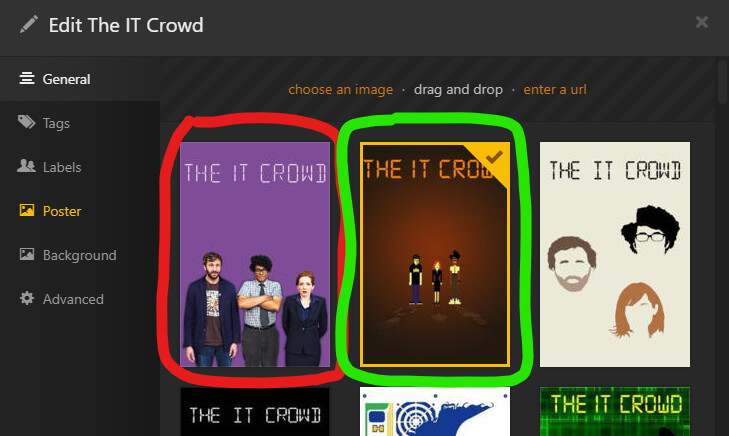
poster in green was what i had manually set it to (and to what i have, again, set it back to)
poster in red is what plex had changed it to
You know what would be super helpful, a function in Plex to either make custom/selected posters permanent by exporting the images so they sit next to their corresponding media file or someplace else we can manage them. There are a few scripts that claim to do this but many are either too old or too complicated.
no, what would be more helpful is if the existing process actually worked properly and didn’t randomly change posters without the users consent.
i don’t want/need posters to be another file that sits in the folder with the media file.
Agreed… once I’ve picked a poster, it should damn well stay. I haven’t got time to go through several thousand manual corrections every time plex decides to randomise everything again.
Thankfully… I’ve found that posters I’ve added manually via providing a URL link seem to be fixed - so I’ve gotten into a habit now of doing that for every single file. Kind of defeats the purpose of having the automated poster download though…
If there’s nothing official coming anytime soon, @SwiftPanda16 do you happen to have a script that could do that? Having something to dump all the currently used posters (and possibly the background images too) next to the movie files would be amazing. It would solve all the unwanted changes we’re experiencing.