It was posted above how to check the XML data for the lock.
the expectation is that someone should go thru every item in the library manually to see if such a lock exists in an XML file? that’s not a reasonable request.
also the instructions you linked to aren’t correct from what i can see.
“get info” only exists as an option when viewing a specific episode, not the top level of the tv shows, and as it’s the top level tv show poster that is being changed then viewing the episode XML file wouldn’t be relevant?
No, it is not the expectation, but it is a method for you to check.
Change the number in the URL in your address bar to the grandparentRatingKey from the episode XML to get the show data.
Example: Find grandparentRatingKey="262680" in the XML and change the URL to /library/metadata/262680.
Of if you use browser userscripts, you can install my script to just press CTRL+I on any page (i.e. the show page) in Plex to automatically open the XML data for that item.
Tools like Tautulli can also export data from your entire library so you can check everything at once.
using this, rather convoluted method, i have check “The IT Crowd”, which is the one i specifically mentioned further up the thread where i noticed plex had changed the poster even though i had specifically selected one previously.
i have since changed it back to the one i had previously selected.
on checking this XML there is no mention of name=“art”
and the only mention of field locked is
Field locked=“1” name=“contentRating”

Field locked=“1” name=“thumb”
so this would suggest that, regardless of previous mention of locks, there is indeed no lock in place for a poster that a user has selected from the available posters.
“thumb” is indeed the poster.
ok so either we have 2 outcomes here
- the lock is not being honoured
- the lock is not being applied even 100% of the time when a poster is manually selected.
it could be either because i know i specifically selected a poster for The IT Crowd on this brand new clean plex server install, then some point later the poster was changed, i then manually changed it back to the poster previously selected.
this is document in the screenshots posted earlier in the thread.
sorry - yes. I was meaning that in reply to the plex employee
But in terms of selecting a poster from HD or from URL…
I’ve found if I use the ‘choose an image’ or ‘enter a URL’ options from this screenshot… the image I select or link to appears to apply/honour the lock.

But if I select from the posters that Plex has already pre-selected… there is no lock, or the lock is not honoured.
So I’ve now gotten into the habit of finding a poster URL (Usually from TPDB) and selecting it even if the result is exactly the same as the plex pre-selected offerings.
Shouldn’t have to do it… but it seems to be a valid workaround.
FYI I converted my movies library (5,500 movies) from the old scraper to the new scraper. I can’t say for sure exactly which locked posters got changed, but I know at least several films for which I made and uploaded custom posters to TMDb got changed, and it seems very unlikely they were not locked because my whole point to upload those posters was to set them locally.
I checked through the films (including films without locked posters) and found that approximately 1,300 (26% of the library) had been replaced by posters that weren’t just different than the ones the films had before, they were actively bad posters: cluttered with text (see: Citizen Kane), bizarre fonts, AI generated style, huge clickbait floating heads. The worst ones are the ones that look like dollar store DVD releases of the films. I can confirm these were all Plex defaults because in many cases when I was searching posters on Google Images to try to show friends how obviously terrible the posters were, the result that surfaced near the top was from the Plex CDN.
In trying to fix this, around 80% of the films could be fixed just by switching to TMDb’s top poster, so this is a case where actually doing less work and defaulting to TMDb would significantly improve the quality of results. After around 2 days of work I got my library back to acceptable shape.
I have not yet catalogued cases outside these 1,300 – but there are also lots of cases where iconic and beloved posters for films got swapped for visually acceptable but worse posters. As an example of what I mean, the poster for Edward Yang’s A Brighter Summer Day is acceptable: https://images.plex.tv/photo?size=medium-360&scale=2&url=https%3A%2F%2Fmetadata-static.plex.tv%2Fc%2Fgracenote%2Fc91ce63aabedcc3f3735b667dc8c6ae3.jpg it’s a screenshot of the film, vectorized and posterized in sort of an awkward and not especially appealing effect, with a bottom half that lists the title in a not particularly well considered or composed font. Something like this image is on Mubi and Amazon, so I assume it’s from Gracenote originally. By contrast, TMDb has 9 (6 non-duplicate) English language posters for this movie, all of which are better than the Plex choice: A Brighter Summer Day (1991) - Posters — The Movie Database (TMDB) . The iconic art used for the Criterion release comes first and would be my preference. Three posters feature the exact same image from the Plex poster, but without the posterized filter and with better and more thoughtful text. This movie isn’t the important thing, the same process could be easily repeated with any number of movies.
This reinforced to me two issues:
-
The major issue here is not just that posters being changed, it’s how unbelievably, indescribably, obviously bad the Gracenote posters are. People are going to notice and react when their library is ugly as hell and they know it wasn’t like that before. If the posters were changing to cool looking posters, I think no one would notice. And there are objective criteria here: what you think is the best most artistic poster might differ from me, but no one wants pictures of DVDs, or covers with paragraphs of unreadable texts, unnecessary awards laurels, etc.
-
It sure seems to me like at least during the library conversion process, poster locks were not being respected for some or all of the films I had custom posters set. Since I didn’t preserve the logs or set up debug logging in advance of the conversion, I’m afraid I can’t prove this, but now I can add my personal experience to the wall of people saying it happens.
Another reddit thread of randomly changing poster changes. Just give us a global lock and be done with it:Reddit - Dive into anything
@drzoidberg33 so the issue I reported here Some Posters not showing up and disappears - #13 by dokuro is 100% definitely still happening and has repeatable steps.
Basically because a number of movies have changed their titles on tmdb …
Constantine: City of Demons - The Movie (2018) -> Constantine: City of Demons (2018)
Deathstroke: Knights & Dragons - The Movie (2020) -> Deathstroke: Knights & Dragons (2020)
Justice League: Crisis on Infinite Earths Part One (2024) -> Justice League: Crisis on Infinite Earths, Part One (2024)
Justice League: Crisis on Infinite Earths Part Three (2024) -> Justice League: Crisis on Infinite Earths, Part Three (2024)
Justice League: Crisis on Infinite Earths Part Two (2024) -> Justice League: Crisis on Infinite Earths, Part Two (2024)
… I use filebot to fix these up renaming the folder and media file to match the change. When I do that and after plex scans the local assets are no longer picked up and either a blank poster/fanart or default plex poster/fanart are displayed.
I do wonder if others are running into a variation of this which is causing their artwork to change or be removed.
@anon5074910 I tried to reproduce with the above examples but I wasn’t seeing anything odd. Local and previously selected posters remained after changing the folder and scanning the library and/or refreshing metadata. I also attempted your Airplane! example. This one was a little odd but eventually resolved back to either the local or previously selected poster/art.
After changing the folder and file names either +/- !, I would run a library scan and/or a metadata refresh. During the scan/refresh, while on the details page, I could see the poster/art pick a non-local poster but would eventually flip back to local poster. If a poster was selected from the available options before changing anything this poster remained. The selected poster continued to be locked in the XML. I also ran some bundle cleanups and DB optimizations in-between steps.
Maybe I’m missing a step.
- Add movie
- Select a poster (or have local asset enable and a poster.jpg)
- Rename folder and file
- Scan or refresh
- Observe details page
Thanks for taking the time to look into this.
All my artwork is local assets - poster.jpg and fanart.jpg. I then have Use local assets enabled on my libraries. I’m not talking about locked artwork in this example. Anyhow, this is what happens for me …
Add a movie - in this example I’ll use \Borderlands {tmdb-365177}\Borderlands [1080p HEVC].mp4. Here is exactly how it appears on disk …
[mcurran]-[dokuro]:/data/MediaServer/14b-Movies/Movies from -> 0-D/Borderlands {tmdb-365177}$ pwd
/data/MediaServer/14b-Movies/Movies from -> 0-D/Borderlands {tmdb-365177}
[mcurran]-[dokuro]:/data/MediaServer/14b-Movies/Movies from -> 0-D/Borderlands {tmdb-365177}$ ls -1
'Borderlands [1080p HEVC].mp4'
fanart.jpg
poster.jpg
[mcurran]-[dokuro]:/data/MediaServer/14b-Movies/Movies from -> 0-D/Borderlands {tmdb-365177}$
I have a movie in my library and the poster and fanart I have added appear fine. No problem so far …
Now, lets change this to \Borderlands 2024 {tmdb-365177}\Borderlands 2024 [1080p HEVC].mp4 (again, name does not matter as long as it changes).
[mcurran]-[dokuro]:/data/MediaServer/14b-Movies/Movies from -> 0-D/Borderlands 2024 {tmdb-365177}$ ls -1
'Borderlands 2024 [1080p HEVC].mp4'
fanart.jpg
poster.jpg
[mcurran]-[dokuro]:/data/MediaServer/14b-Movies/Movies from -> 0-D/Borderlands 2024 {tmdb-365177}$
Now perform a scan for plex to pickup changes. Once this completes the poster will change to being either blank or the default cloud poster from plex and the fanart will be removed (see screenshot):

Doing a metadata refresh does not restore the local assets.
To workaround this I can edit the movie in plex and tab down through poster (tab not an actual poster) and background (again, just the tab not an actual background) and select cancel. Refreshing the metadata then picks up the local assets again.
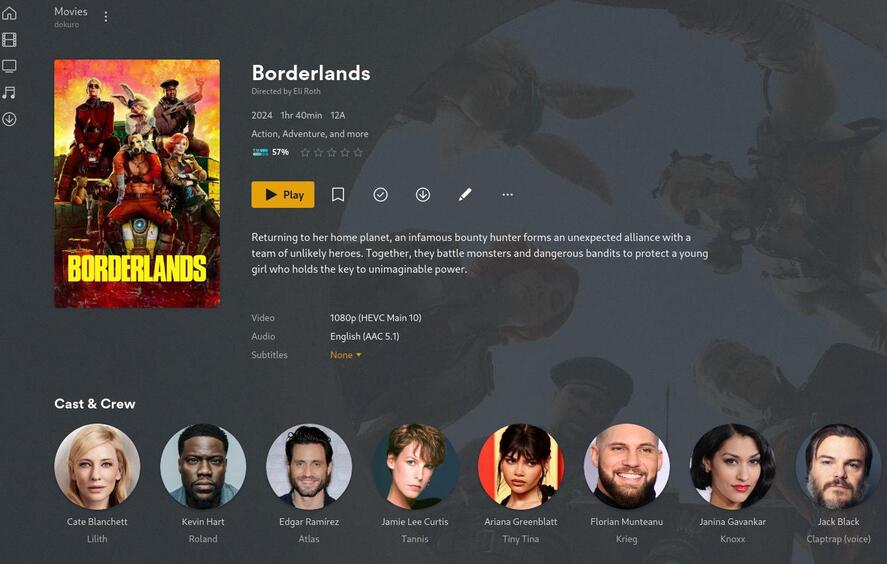
As I’ve just done this now I have collected the logs if you want them. I can send them via a DM.
Please! And thank you for the additional details.
Has this been fixed? Reddit has been pretty quiet on this as well as I have not been made fun of for the gracenote posters downgrade in a while.
Nope. I still notice this happening on any posters that I haven’t manually changed either by drag/drop or providing a url.
Another reddit post requesting a global lock on movie posters instead of the gracenote downgrade.
https://www.reddit.com/r/PleX/comments/1hh97o2/how_to_or_can_you_even_lock_your_movie_posters/
Just give us a global lock. That’s all that’s needed.
Following up - why can’t you just give us a global lock for posters? Why don’t you give us a global lock?
I had to refresh all metadata for movies library due to “extras and trailers” automatically being selected from plex on a backup server “magically” being turned on by default. I now have the pleasure of changing over 500 posters because of the Gracenote downgrade.
Here to also ask why a lock function can’t be provided by default on all posters. Seems like the Plex Devs aren’t interested in fixing this issue, considering it’s been around for MONTHS. So here’s my +1 asking Plex Devs to LEAVE MY POSTERS ALONE.
There— we get another 3 months of this thread being open.
How are we coming with our global lock request?

