They’re all Friends and Family.
Friends and Family get special treatment.
Always have, always will (despite my hard exterior I’m really a marshmallow).
… and I get cake when I show up - and for cake I’ll do just about anything…lol
2 Likes
I work in the IT field. People had routinely taken advantage of my willingness to offer support. To the point where family or friend gatherings weren’t fun, they were work. I’ve had to set boundaries so that I can enjoy family and friend gatherings with the people, instead of their broken technology. I may still offer help from time to time, but that’s my own choice, and not a reason to invite me over. It’s far better for my own mental health. Cake… does help though. 
2 Likes
Oh I see what the problem is…
You haven’t lived long enough to make the Friends and Family that are left Valuable
and In Short Supply.
In 40 years, you too will be made of sugary, puffy stuff that goes well in a Smore…
… and I also help wayward strangers on the internet that need guidance…
… a real push-over I am…
Cold Blooded Killer to Captain Kangaroo - in no time flat.
(day before yesterday’s trip to the cancer doc to cut out a basal cell carcinoma also makes me even softer and cuter - or at least the codeine has)

2 Likes
I relate to this 100%
1 Like
So, now that I’ve dabbled a bit in reencoding here, with better results, but not fully confident on it… could I ask you how you would go about dealing with a movie like: Disney’s 1993 movie - The Three Musketeers where the movie has black bars on the top as well as the sides when directly ripped to mkv?
Those are a PITA.
Why don’t you upload that one to G-Drive then PM me the sharable link and we’ll find out.
I don’t recall what I did exactly.
1 Like
My G drive is stuffed. Let me see what I can come up with.
Let you know when I’ve got something shortly. My better half may want to go on a hike in a few minutes before I get something sorted… but I’ll keep you posted.
All sorted.
I’ll fiddle with it later and let you know what happened.
Looks like the New Handbrake makes it almost idiot-proof:
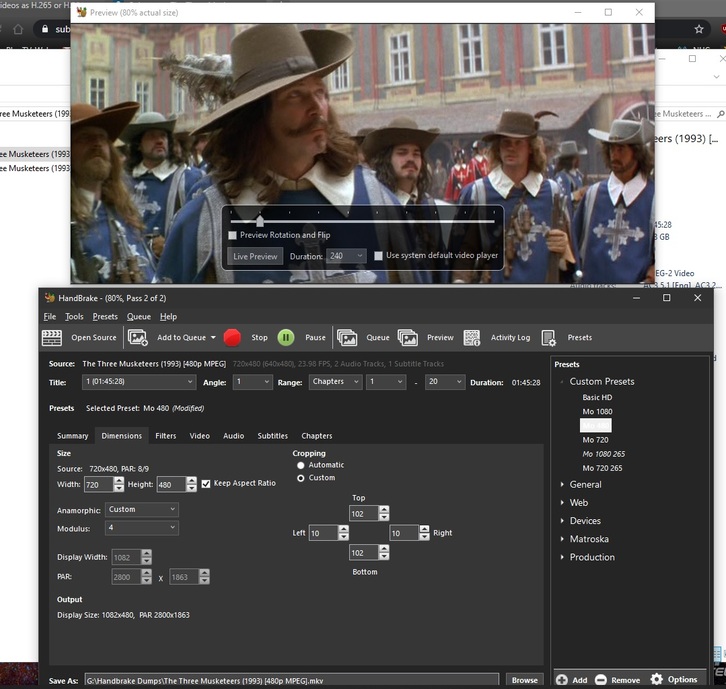
It showed up all out of whack with bars everywhere.
I dropped it on Handbrake in my 480 Profile with Custom Anamorphic and AutoCrop already in progress.
The original 720x480 was all messed up (712x360 something when Autocrop got done with it), but by rolling everything back to 720x480 Autocrop almost had it right. With a few little tweeks to some side cropping HB didn’t quite catch, 1082 will be the width and that’ll be just right for the flavor of widescreen this happens to be.
Painless. It’s in the queue:

…looks like 25 minutes might do it…
I also got some srt subs at subscene that are close enough…

Good news. I will give that a look. Just got back from a 4.5 mile hike with my better half. Dinner time, then I will dig in.
Those settings did the trick. Far better experience than watching the movie in a sea of black borders.
Thanks for the settings @JuiceWSA
Regarding those oldies:
Those were designed for Analog TV Sets, so yea they’re intentionally ‘out of whack’. In fact the reason we have Zoom on our Widescreen Displays is because of those old DVDs. Nobody could watch them otherwise and the ‘Zoom’ is perfectly set to bring that ‘keyhole’ right up to the right size…:
General
Unique ID                                : 207833889799281295777740580397703607659 (0x9C5B59E71527F3C5C9D5131D56A1B56B)
Complete name                            : D:\MakeMKV Dumps\The Three Musketeers (1993) [480p MPEG].mkv
Format                                   : Matroska
Format version                           : Version 2
File size                                : 3.18 GiB
Duration                                 : 1 h 45 min
Overall bit rate mode                    : Variable
Overall bit rate                         : 4 318 kb/s
Encoded date                             : UTC 2017-10-14 20:52:19
Writing application                      : MakeMKV v1.10.7 win(x64-release)
Writing library                          : libmakemkv v1.10.7 (1.3.3/1.4.4) win(x64-release)

Video
ID                                       : 1
ID in the original source medium         : 224 (0xE0)
Format                                   : MPEG Video
Format version                           : Version 2
Format profile                           : Main@Main
Format settings                          : CustomMatrix / BVOP
Format settings, BVOP                    : Yes
Format settings, Matrix                  : Custom
Format settings, GOP                     : M=3, N=12
Codec ID                                 : V_MPEG2
Codec ID/Info                            : MPEG 1 or 2 Video
Duration                                 : 1 h 45 min
Bit rate mode                            : Variable
Bit rate                                 : 3 733 kb/s
Width                                    : 720 pixels
Height                                   : 480 pixels
Display aspect ratio                     : 4:3
Frame rate mode                          : Variable
Frame rate                               : 23.976 (23976/1000) FPS
Original frame rate                      : 23.976 (24000/1001) FPS
Color space                              : YUV
Chroma subsampling                       : 4:2:0
Bit depth                                : 8 bits
Scan type                                : Progressive
Scan order                               : 2:3 Pulldown
Compression mode                         : Lossy
Bits/(Pixel*Frame)                       : 0.451
Time code of first frame                 : 01:00:00;00
Time code source                         : Group of pictures header
GOP, Open/Closed                         : Open
GOP, Open/Closed of first frame          : Closed
Stream size                              : 2.75 GiB (86%)
Language                                 : English
Default                                  : No
Forced                                   : No
Original source medium                   : DVD-Video

Audio #1
ID                                       : 2
ID in the original source medium         : 189 (0xBD)128 (0x80)
Format                                   : AC-3
Format/Info                              : Audio Coding 3
Commercial name                          : Dolby Digital
Codec ID                                 : A_AC3
Duration                                 : 1 h 45 min
Bit rate mode                            : Constant
Bit rate                                 : 384 kb/s
Channel(s)                               : 6 channels
Channel layout                           : L R C LFE Ls Rs
Sampling rate                            : 48.0 kHz
Frame rate                               : 31.250 FPS (1536 SPF)
Bit depth                                : 16 bits
Compression mode                         : Lossy
Stream size                              : 290 MiB (9%)
Title                                    : Surround 5.1
Language                                 : English
Service kind                             : Complete Main
Default                                  : Yes
Forced                                   : No
Original source medium                   : DVD-Video

Audio #2
ID                                       : 3
ID in the original source medium         : 189 (0xBD)129 (0x81)
Format                                   : AC-3
Format/Info                              : Audio Coding 3
Commercial name                          : Dolby Digital
Codec ID                                 : A_AC3
Duration                                 : 1 h 45 min
Bit rate mode                            : Constant
Bit rate                                 : 192 kb/s
Channel(s)                               : 2 channels
Channel layout                           : L R
Sampling rate                            : 48.0 kHz
Frame rate                               : 31.250 FPS (1536 SPF)
Bit depth                                : 16 bits
Compression mode                         : Lossy
Stream size                              : 145 MiB (4%)
Title                                    : Stereo
Language                                 : French
Service kind                             : Complete Main
Default                                  : No
Forced                                   : No
Original source medium                   : DVD-Video

Text
ID                                       : 4
ID in the original source medium         : 189 (0xBD)32 (0x20)
Format                                   : VobSub
Codec ID                                 : S_VOBSUB
Codec ID/Info                            : Picture based subtitle format used on DVDs
Duration                                 : 1 h 42 min
Bit rate                                 : 3 332 b/s
Count of elements                        : 1114
Stream size                              : 2.45 MiB (0%)
Language                                 : English
Default                                  : Yes
Forced                                   : No
Original source medium                   : DVD-Video

Menu
00:00:00.066                             : en:Chapter 01
00:07:49.218                             : en:Chapter 02
00:11:29.939                             : en:Chapter 03
00:22:51.586                             : en:Chapter 04
00:25:06.054                             : en:Chapter 05
00:34:49.504                             : en:Chapter 06
00:39:05.393                             : en:Chapter 07
00:48:16.443                             : en:Chapter 08
00:55:38.218                             : en:Chapter 09
01:02:21.621                             : en:Chapter 10
01:05:18.464                             : en:Chapter 11
01:13:31.790                             : en:Chapter 12
01:15:26.572                             : en:Chapter 13
01:19:57.042                             : en:Chapter 14
01:23:27.052                             : en:Chapter 15
01:33:14.472                             : en:Chapter 16
01:36:31.836                             : en:Chapter 17
01:37:42.439                             : en:Chapter 18
01:40:48.108                             : en:Chapter 19
01:45:27.671                             : en:Chapter 20
That 4:3 is the killer…
The post apocolypse version has the correct ratio:
General
Unique ID                                : 72436940905171253036428365991905592239 (0x367ED8EC61DF06287901E61FDE9403AF)
Complete name                            : I:\80s - 90s\The Three Musketeers (1993) [480p x264]\The Three Musketeers (1993) [480p x264].mkv
Format                                   : Matroska
Format version                           : Version 4
File size                                : 1.35 GiB
Duration                                 : 1 h 45 min
Overall bit rate                         : 1 837 kb/s
Encoded date                             : UTC 2020-07-16 21:49:01
Writing application                      : Lavf58.42.100
Writing library                          : Lavf58.42.100
ErrorDetectionType                       : Per level 1

Video
ID                                       : 1
Format                                   : AVC
Format/Info                              : Advanced Video Codec
Format profile                           : High@L3
Format settings                          : CABAC / 4 Ref Frames
Format settings, CABAC                   : Yes
Format settings, Reference frames        : 4 frames
Codec ID                                 : V_MPEG4/ISO/AVC
Duration                                 : 1 h 45 min
Bit rate                                 : 1 450 kb/s
Width                                    : 720 pixels
Height                                   : 480 pixels
Display aspect ratio                     : 2.25:1
Frame rate mode                          : Variable
Color space                              : YUV
Chroma subsampling                       : 4:2:0
Bit depth                                : 8 bits
Scan type                                : Progressive
Stream size                              : 1.04 GiB (77%)
Writing library                          : x264 core 157 r2935 545de2f
Encoding settings                        : cabac=1 / ref=2 / deblock=1:-1:-1 / analyse=0x3:0x113 / me=hex / subme=6 / psy=1 / psy_rd=1.00:0.15 / mixed_ref=1 / me_range=16 / chroma_me=1 / trellis=1 / 8x8dct=1 / cqm=0 / deadzone=21,11 / fast_pskip=1 / chroma_qp_offset=-3 / threads=12 / lookahead_threads=2 / sliced_threads=0 / nr=0 / decimate=1 / interlaced=0 / bluray_compat=0 / constrained_intra=0 / bframes=3 / b_pyramid=2 / b_adapt=1 / b_bias=0 / direct=1 / weightb=1 / open_gop=0 / weightp=1 / keyint=240 / keyint_min=24 / scenecut=40 / intra_refresh=0 / rc_lookahead=30 / rc=2pass / mbtree=1 / bitrate=1450 / ratetol=1.0 / qcomp=0.60 / qpmin=0 / qpmax=69 / qpstep=4 / cplxblur=20.0 / qblur=0.5 / ip_ratio=1.40 / aq=1:1.00
Language                                 : English
Default                                  : Yes
Forced                                   : No
Color range                              : Limited
Color primaries                          : BT.601 NTSC
Transfer characteristics                 : BT.709
Matrix coefficients                      : Identity
matrix_coefficients_Original             : BT.601

Audio
ID                                       : 2
Format                                   : AC-3
Format/Info                              : Audio Coding 3
Commercial name                          : Dolby Digital
Codec ID                                 : A_AC3
Duration                                 : 1 h 45 min
Bit rate mode                            : Constant
Bit rate                                 : 384 kb/s
Channel(s)                               : 6 channels
Channel layout                           : L R C LFE Ls Rs
Sampling rate                            : 48.0 kHz
Frame rate                               : 31.250 FPS (1536 SPF)
Bit depth                                : 16 bits
Compression mode                         : Lossy
Stream size                              : 290 MiB (21%)
Title                                    : Surround 5.1
Writing library                          : Lavc58.77.101 ac3_fixed
Language                                 : English
Service kind                             : Complete Main
Default                                  : Yes
Forced                                   : No

Menu
00:00:00.334                             : :Chapter 1
00:07:49.448                             : :Chapter 2
00:11:30.335                             : :Chapter 3
00:22:51.725                             : :Chapter 4
00:25:06.105                             : :Chapter 5
00:34:49.622                             : :Chapter 6
00:39:05.776                             : :Chapter 7
00:48:16.660                             : :Chapter 8
00:55:38.566                             : :Chapter 9
01:02:22.051                             : :Chapter 10
01:05:18.502                             : :Chapter 11
01:13:31.970                             : :Chapter 12
01:15:26.878                             : :Chapter 13
01:19:57.439                             : :Chapter 14
01:23:27.232                             : :Chapter 15
01:33:14.778                             : :Chapter 16
01:36:32.226                             : :Chapter 17
01:37:42.545                             : :Chapter 18
01:40:48.297                             : :Chapter 19
Doing the fix in the old HB was a right PITA.
The New HB handles it much better, but you still have to watch that ‘storage’ and keep it at 720x480.
As far as the quality - it’s not bad.
I’ve seen worse - much worse.
I added it to my library so it’s gonna be there until a replacement comes around and I’ll probably watch the 480 version… never seen it…lol
1 Like
That’s certainly what I thought, and I made a similar assumption, but it’s weird and non-intuitive. Independent of the source material bit depth, H.265 10-bit or 12-bit encoding can increase quality at a given output bitrate, or allow you to target a lower bitrate w/ equivalent quality.
This is the best (short) explanation I’ve seen:
http://x264.nl/x264/10bit_02-ateme-why_does_10bit_save_bandwidth.pdf
And a fun calculator/comparison tool:
It really is another meaningful consideration in the equation of quality/bitrate/speed.
I think that’s a bad bet for a number of reasons. I think H.265 is dead but just doesn’t know it yet. I think AV1 and/or H.266 are much more likely to have the same lifespan that H.264 has enjoyed.
The idea of re-encoding from H.264 to H.265 confuses me, for some of the reasons others have said. It’s not worth the time and effort for a marginal size reduction. It reduces client playback compatibility slightly. But I have more bandwidth than CPU time, and I have zero patience with playback tech support.
It’s reasonable to create H.265 encodings from DVD/BR. But it seems nuts to recompress, again, and add MPEG2 or H.264 → H.264 → H.265 artifacts into any files. I can even acknowledge that the quality is probably “just fine”.
My experience has been mostly like Tom’s, I think.
The OTHER variable people haven’t mentioned is which encoding effort/preset is selected. That might explain some of this difference.

Compare just a few points. Look at the size of the H.264 file at “veryfast 20” vs. “ultrafast 20”, and how much smaller it gets. H.265 files, on the other hand, don’t get smaller with “harder” presets.
I wonder if the folks seeing less bitrate reduction had “higher effort” H.264 files in the first place.
The files gets smaller as you slow down the profile preset (in Handbrake, at least) because as the slider gets more toward slow - more reference frames are added - and yes that will make the file smaller. Make it something slower than fast and you’ll quickly add 16 reference frames - and we know what happens with 16 reference frames - and it’s all bad.
There are no reference frame adjustments for 265 (that I can find) so the file can’t be compressed any further.
265 is going to be replaced - eventually - with AV1… then in a little while it’ll be replaced with the next great thing - and so on… The files will look the same, but it’ll be the greatest ever - and that’s the way it goes.
This will always happen, I can not wait for H.270, then H.-?
Do you have a reason to target bitrate instead of quality?
If you target quality, the encoder won’t waste bits when it doesn’t need to, so file size can be smaller. It also can use more bits on complicated scenes, improving quality. It can also do the job in one pass, instead of two, so it can be faster.
The documentation is opinionated about this. Have you chosen to use bitrate deliberately?
Always use constant quality unless you have a specific reason not to.
HandBrake Documentation — Adjusting quality
Eventually we’ll just need a description of a screenplay, and the entire thing will be rendered. Nearly infinite compression.
Big Bang Theory, “The one where the insufferable roommates obsess over things that don’t matter.” will be enough to expand out to 7 minutes of acting and 13 minutes of them looking at the camera with a laugh track.
I have never seen more quality out of CQ than I have from a decent, for me, bit rate.
CQ delivers wildly erratic file sizes - and I mean Gigs different, not a few MB. It’s absolutely INSANE.
I can have one 480p episode of The Man From UNCLE at 900Kbps and the very next one at 4500kbps - AND THEY BOTH LOOK EXACTLY THE SAME - all determined by some algorithm designed by the same guys that turn every dam SRT file into ASS with unnecessary formatting so it’ll transcode on everything I own.
What makes them right and me wrong? Can they see the media I’m looking at?
I have a limited upload pipe and a desire to have everything that goes up through it THE SAME SIZE and at a quality I have specifically determined to be OK as far as I’m concerned and it pleases every eyeball that has ever looked at it and I hear things like ‘It looks better than Netflix’! - and if you’ve ever seen Netflix Basic - every 480p encode I’ve ever made in my life has been superior to that and some of it better than Netflix Super Duper.
My Server is also My Gaming Rig. The material on it Direct Plays for me locally, and for Family and Friends scattered hither and yon all over this planet and I can fit 2 to 4 multiple streams up that pipe - all Direct Play - while I’m having my ass kicked by some horrid monster or enemy game soldier because I’m no longer good enough, maybe, not because the transcoder kicked in.
So here comes a perfect stranger, without any axe to grind, really wondering what it’s all about, decides to try it, creates something that his eyeballs, not mine, told him was perfectly acceptable viewing material - and without ever seeing it - I’m hauled up Spike Hill to be stretched out in the sun over a fire ant hill for giving out bad juju to the masses.
Has anyone in this thread besides @Uh_Oh even looked at anything made with these subversive, underground, heinous settings? No, mostly I’m vilified ‘cause my bit rates simply can’t make material worth watching - and nobody has to even look at it to KNOW THAT. Apparently - except poor ol’ Uh_Oh, not knowing any better, using his eyeballs and not seeing the nightmarish presentation described by others, but never actually seen.
I’ve tried it both ways.
I’ve decided what works best for me and mine.
I’m doing that because it’s what I want.
I offer this help - because nobody else is - and some people actually want the help.
… and I always say - if what they’re seeing isn’t what they want, they should start somewhere and then go up until they are happy… but here comes justice to stand me up against the wall.
FIRE! Feed him to the hogs - then kill the hogs - and their families.
Sorry… my nose hurts this morning (I am glad I still have one to hurt)… dam cancer operation is going to leave a scar on this pretty face and I’m unhappy…

PS:
If you’re doing single pass encodes at 10000 kbps
My 2 pass encodes at 1450 are better.
Guaranteed.
1 Like
What was the problem? That’s closer to what I would expect than the settings you changed to.
Is that DVD a 4x3 format DVD with the movie letterboxed down to 2.35:1? The vintage of that DVD, the amount of cropping you applied, “640x480” in the “Source” analysis, and 4:3 in the MPEG2 all make me think so.
You mention correcting Handbrake and restoring 480 vertical pixels. That sounds backwards to me.
I can’t think of a time or reason to ever forcibly increase the destination height (or width) like that.
All DVDs are encoded on the DVD as 720x480, whether 4x3 or 16x9 ratio, letterboxed or anamorphic. DVD is pretty weird and either squishes or stretches those 720 pixels horizontally on playback, but it’s always (*) encoded at 720 pixels wide.
So most (*) encodings from NTSC DVD sources should be 720px wide.
Some encodings from DVD sources will absolutely be 480 pixels tall. That’s most commonly true for full-frame 4x3 media. It’s also true for 16x9 media when encoded as 16x9 anamorphic.
But it shouldn’t be true if the media is cropped during encoding. DVD doesn’t support 2.35:1 aspect ratio, so 2.35:1 is always letterboxed. If you are cropping during encoding, the encoded file shouldn’t be 480px tall. Widescreen media on older 4x3 DVDs will also be letterboxed and will be less than 480px tall when cropped.
If letterboxed, some of those encoded pixels are forever empty, and some of the DVD’s 480 vertical pixel budget was spent on empty letterboxing bars, instead of image resolution. If 204 pixels were spent letterboxing, you can’t get that detail back - you only have 276 pixels of detail now.
If letterboxing is present in the video, then some of the pixels were already “thrown away” to the letterboxing gods. They’re gone. Nothing to miss. Crop 'em.
If the media is cropped during encoding, to remove letterboxing or for any other reason, the output file should now be under 480px tall. If you force it back up to 480px tall, you’re forcing the video to be stretched unnecessarily.
If you force a video file to stretch unnecessarily, miscellaneous ominous things will happen to you.
(* except for the exceptions)
The old DVDs created for Analog TV look like this:
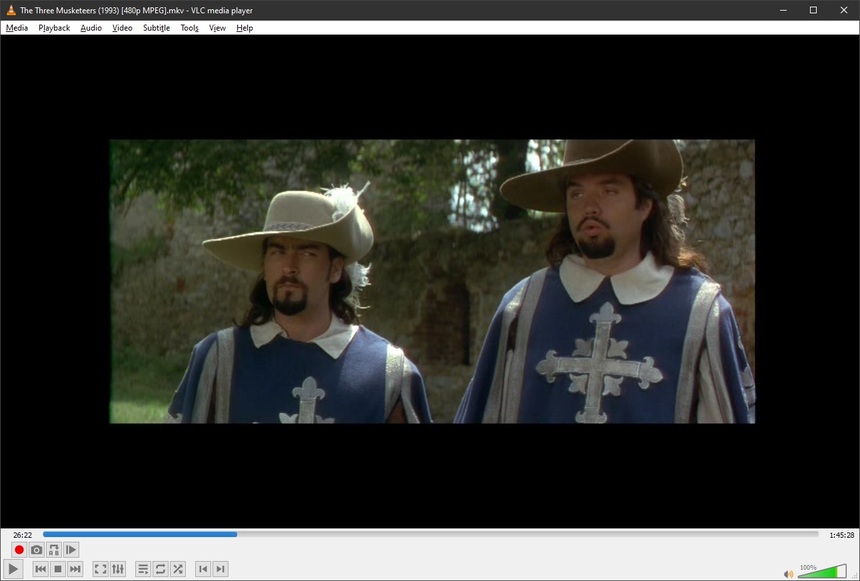
Sure, you can fix those with the Zoom on your TV - that’s why it’s there, after all.
They look like that in VLC and they look like that in Plex 'cause the anamophic flag is WRONG - fiddled with before Widescreen TV’s existed so they’d display letterboxed on AN ANALOG TELEVISION.
The ‘Fixed’ old DVDs designed for Analog TV now look like this:
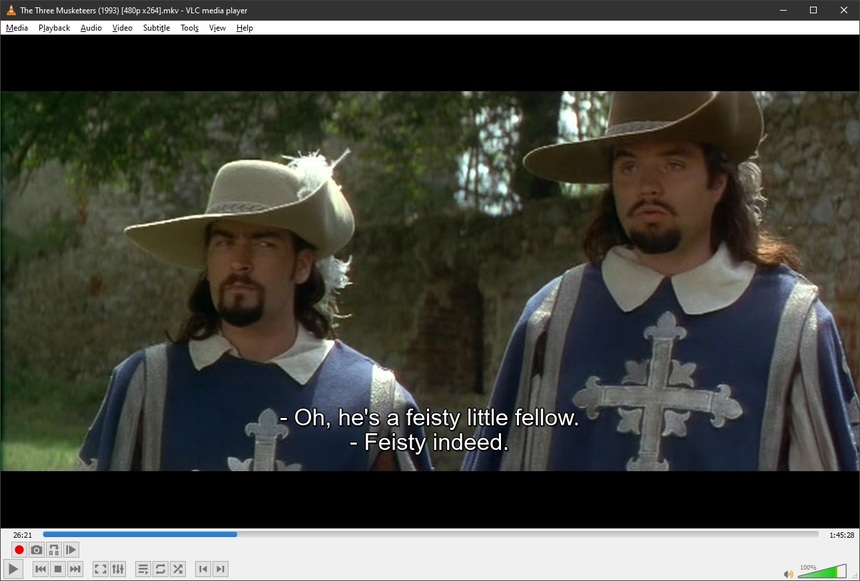
The image portion - not the black bars is 480p
If you don’t roll HB back to 480p, leaving it at 360, or whatever it was, your 480p is now only 360p, or whatever - but if you don’t think you need that 120 pixels of vertical resolution HB just robbed from you in an Autocrop then do whatever you think is best. <— I’m getting those 120 pixels back.
Personally, when I’m dealing with 480p I like to get 480p - or they start looking like that crap on YouTube or scene group SD that’s really 720x400.
When I’m looking at what Plex is calling my media I know anything under 480p is called SD. All my 480p says 480p 'cause I made dam sure it was 480p when I encoded them.
