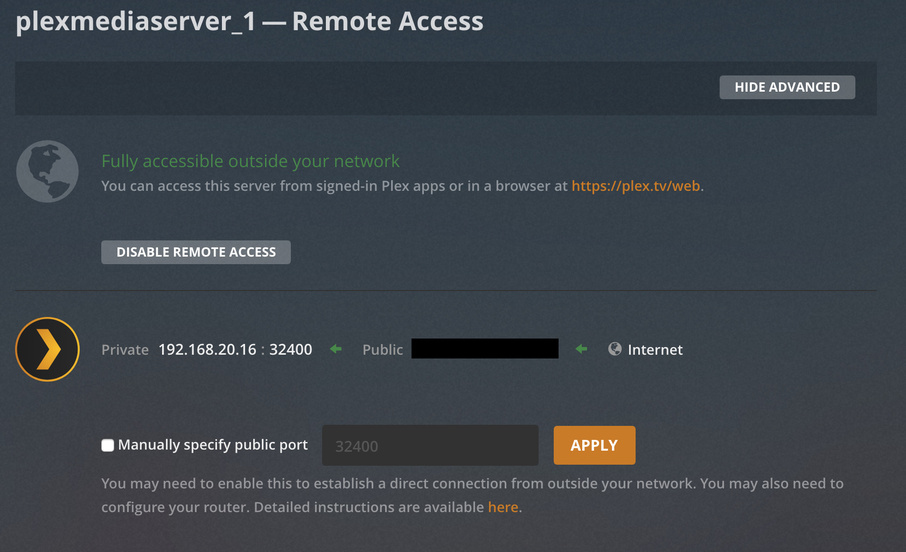
I’m running a Plex Server (the latest version of the plugin) on my FreeNAS 11.1 server, but I’m having a performance problem. I have 35 Mbps upload (and nothing else on the network), however, my Plex server is unable to stream at more than 1-3 Mbps – I’ve tried streaming via the web interface on my laptop, Android TV (both wired and wireless), a TCL TV (Roku), and a Roku Streaming Stick. All experience the same problem. I’ve also streamed locally via web, Android TV, and Amazon Firestick and never encountered a problem (including now).
The server has an Intel NIC (82579LM), a Xeon 1230v3, and 32GB of RAM. So hardware shouldn’t be the problem. Additionally, I’ve also ran a speed test on my home network over wifi and consistently get 20-35 Mbps uploads. Lastly, this is a new issue – I didn’t have any issues streaming in the past and no changes were made before this issue began occurring.
So the problem is with remote access?
First check if you put any limits in your remote access or network settings on your PMS. Then check if your clients are actually making a direct connection to your server or not. If they are using an indirect connection, then the speeds are limited.
Where would I find both settings?
These settings are found under your server setting using Plex Web.
I looked there but the only thing I saw that sounds remotely related is the ‘Transcoder’ section.
Actually, just check the Remote Access section. Make sure you have Show Advanced enabled.
That feature is limited to Plex Pass subscribers – I got a subscription and set it to 35 Mbps up and no limit. However it still can’t stream more than a few Mbps – it also take a long time for a video to start playing (even at 1 Mbps), which also never happened before.
Oh sorry. Didn’t notice you didn’t have a Plex Pass.
Please play something then get me the log from PMS.
Please post the entire log as a file. Do not cut and paste.
Your logs indicate that the Roku could not create a direct connection to your server so it was using what we call a “Relay” connection. This connection limits the throughput. This typically happens when your remote access is not set up properly. From your earlier screenshots I saw that you were letting PMS make an automatic connection through UPnP. I find UPnP ro be very buggy and don’t recommend users use it. Try setting up a manual port forward and see if that helps.
I went into my router and forwarded port 32400 to the local IP/port of my PMS and checked the ‘manually specify public port’ box. Under the remote access tab, it shows that the PMS is fully accessible outside the network and that the forwarding is being done manually. However, it still has the same performance issue.
Accidentally didn’t reply directly to you.
Restart PMS, don’t do aaything else, just let it sit there for about 3 minutes. Then playback that same file on your Roku. Let it play for 1 minute. Grab both the logs from the Roku and from PMS.
I didn’t have access to the Roku at the moment, so I use the Plex web interface (remotely) – which also has the same problem.
FWIW, the file that was being played was only a 1.1Mbps stream and it was still occasionally (albeit rarely – once every five minutes or so) freezing.
Please turn off verbose logging and try again.
Does Verbose logging do anything other than add the Verbose lines? (I attached a copy with those removed).
I’m not seeing anything in your logs to indicate a slowdown. Do you happen to have an Android device? We actually track file throughput speeds in our Plex app there so I can better see the problem. Right now, everything looks fine.