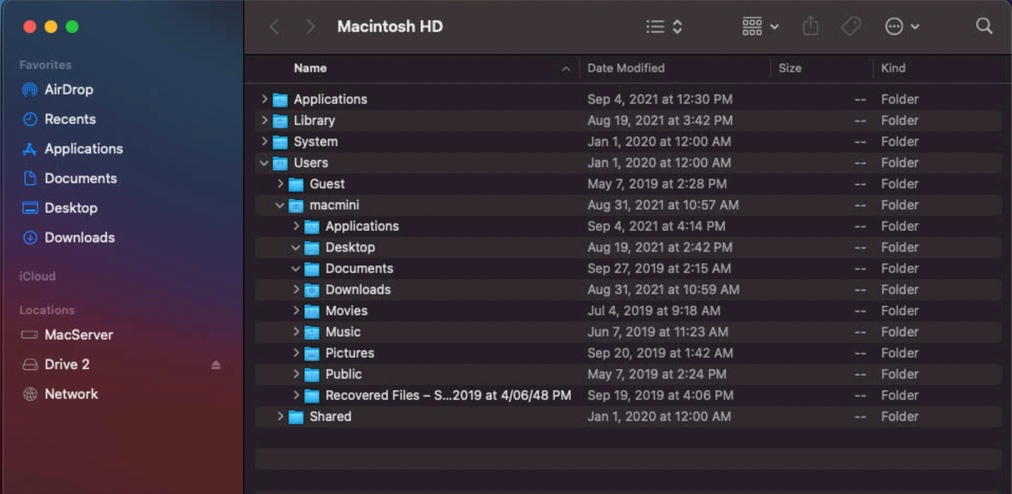
I am having a very similar issue. Mac Mini (Intel) on Big Sur 11.5.2. Installed Plex Server 1.24.1.4931. Using Chrome and Safari when I attempt to add My Media I get back to the Get Plex Media Server screen (127.0.0.1). When I try the machines IP direct I get the same thing. The hook may be something with my account as I have a Windows Server for nearly 10 years running Plex, and it recently had a complete hardware failure and is not recoverable in anyway so clearing keys wont work for me.. I have deleted it from my account in the My Devices section - nothing connects or allows me to add Media.
I have also gone the other direction and created a completely new Plex account on the Mac with a new email - same thing. Trying to add My Media and I get the Download Plex Server prompt.
Any assistance would be greatly appreciated as I am stumped.
tom80H
August 31, 2021, 9:17pm
2
You’re getting what same thing?
OP’s original post is the same issue I described.
“Just downloaded and installed PMS. But it doesn’t seem to open. I want to me able to connect to my own media but the app tells me I need to install PMS, and I’ve already done that twice. When it wouldn’t work at first I uninstalled it and reinstalled it and it still doesn’t work.”
I get stuck in a loop telling me to install PMS - I have no log file in the PMS folder in the Library folder on the local PMS server
tom80H
September 1, 2021, 4:14pm
4
Make sure to complete the setup of your server by accessing it through the bundled web app, using the server’s local IP address. If you’re on the same machine, you can open http://127.0.0.1:32400/web in your browser – if the server is on a different device inside your home network, use http:[PMS IP address]:32400/web instead.
This will guide you through the setup finalization where you can name your server and link it to your account. You can also establish your libraries during this process (or at every point after the setup is complete).
Once the server is linked to your Plex account you can also access it through other clients or the hosted version of the web app (https://app.plex.tv/desktop ). Before your server is linked to your account, those apps won’t see your server.
Still the same issue. 127.0.0.1 from a fresh install on the local machine - log in using existing Plex account - select Your Media from the left column - Get Plex Media Server prompt.
tom80H
September 1, 2021, 9:05pm
6
Did you already go through the setup wizard for that server before?Settings… do you see your server or only your account / Plex Web settings?
If you had previously installed a PMS on that machine you might want to go nuclear and get rid of any previous presence (Plex will e.g. remember if you already had a server as a different user on a device and consider you an unauthorized user).
In Settings I only get my account details. When I step through the link provided to nuke anything that may be currently cached the first issue is there is no Plex entry in Library/Preferences - for the hell of it I used the terminal command provided in the guide and get this back
Domain (com.plexapp.plexmediaserver) not found.
tom80H
September 1, 2021, 9:59pm
8
You should be able to access the files through Finder
Stop your Plex Media Server
Open Finder and click Go To > Go To Folder (or ⌘+⇧+G)
Enter ~/Library/Preferences/
Look for com.plexapp.plexmediaserver.plist and rename the file (e.g. to com.plexapp.plexmediaserver_old.plist)
Restart your PMS
Sorry for the delayed response. There is no file in preferences listed as you noted - in fact no Plex files of any kind. I have quadruple checked for sanities sake that PMS is installed, its in the Application list and I can start and stop the service normally.
tom80H
September 4, 2021, 7:51pm
10
Are you running your PMS as a different user? In that case the preferences should be located in the Library folder of that user.
Still no luck - only a single user on the machine (Admin account) Guest is not active - no other user accounts.
tom80H
September 5, 2021, 12:01am
12
That’s weird.
Open Activity Monitor
Find the Plex Media Server record and select that line
Click the ⓘ icon in the app header
Go to the Open Files and Ports tab
Check for an entry using com.plexapp.plexmediaserver.plist and verify the full path of that file
Learn how to use Activity Monitor on your Mac to view information about how apps are using the processor, disks, memory, network, and more.
Nothing either - I can post the output if it helps
tom80H
September 5, 2021, 9:55am
14
I suppose that might help. You can post it here or DM it to me.
cwd
/
txt
/Applications/Plex Media Server.app/Contents/MacOS/Plex Media Server
txt
/Applications/Plex Media Server.app/Contents/Frameworks/libsoci_core.dylib
txt
/Applications/Plex Media Server.app/Contents/Frameworks/libsoci_sqlite3.dylib
txt
/Applications/Plex Media Server.app/Contents/Frameworks/libcurl.dylib
txt
/Applications/Plex Media Server.app/Contents/Frameworks/libidn2.dylib
txt
/Applications/Plex Media Server.app/Contents/Frameworks/libnghttp2.dylib
txt
/Applications/Plex Media Server.app/Contents/Frameworks/libfreeimage.dylib
txt
/Applications/Plex Media Server.app/Contents/Frameworks/libopencv_core.3.4.dylib
txt
/Applications/Plex Media Server.app/Contents/Frameworks/libopencv_imgproc.3.4.dylib
txt
/Applications/Plex Media Server.app/Contents/Frameworks/libtag.1.dylib
txt
/Applications/Plex Media Server.app/Contents/Frameworks/libfmt.8.dylib
txt
/Applications/Plex Media Server.app/Contents/Frameworks/libicuucplex.69.dylib
txt
/Applications/Plex Media Server.app/Contents/Frameworks/libicuioplex.69.dylib
txt
/Applications/Plex Media Server.app/Contents/Frameworks/libicui18nplex.69.dylib
txt
/Applications/Plex Media Server.app/Contents/Frameworks/libicudataplex.69.dylib
txt
/Applications/Plex Media Server.app/Contents/Frameworks/libsqlite3.dylib
txt
/Applications/Plex Media Server.app/Contents/Frameworks/libpython27.dylib
txt
/Applications/Plex Media Server.app/Contents/Frameworks/libxml2.2.9.10.dylib
txt
/Applications/Plex Media Server.app/Contents/Frameworks/libexslt.0.8.20.dylib
txt
/Applications/Plex Media Server.app/Contents/Frameworks/libxslt.1.1.34.dylib
txt
/Applications/Plex Media Server.app/Contents/Frameworks/libavcodec.58.dylib
txt
/Applications/Plex Media Server.app/Contents/Frameworks/libavformat.58.dylib
txt
/Applications/Plex Media Server.app/Contents/Frameworks/libavutil.56.dylib
txt
/Applications/Plex Media Server.app/Contents/Frameworks/libswscale.5.dylib
txt
/Applications/Plex Media Server.app/Contents/Frameworks/libswresample.3.dylib
txt
/Applications/Plex Media Server.app/Contents/Frameworks/libavfilter.7.dylib
txt
/Applications/Plex Media Server.app/Contents/Frameworks/libminiupnpc.17.dylib
txt
/Applications/Plex Media Server.app/Contents/Frameworks/libhdhomerun.dylib
txt
/Applications/Plex Media Server.app/Contents/Frameworks/libboost_atomic.dylib
txt
/Applications/Plex Media Server.app/Contents/Frameworks/libboost_chrono.dylib
txt
/Applications/Plex Media Server.app/Contents/Frameworks/libboost_date_time.dylib
txt
/Applications/Plex Media Server.app/Contents/Frameworks/libboost_filesystem.dylib
txt
/Applications/Plex Media Server.app/Contents/Frameworks/libboost_iostreams.dylib
txt
/Applications/Plex Media Server.app/Contents/Frameworks/libboost_locale.dylib
txt
/Applications/Plex Media Server.app/Contents/Frameworks/libboost_program_options.dylib
txt
/Applications/Plex Media Server.app/Contents/Frameworks/libboost_random.dylib
txt
/Applications/Plex Media Server.app/Contents/Frameworks/libboost_regex.dylib
txt
/Applications/Plex Media Server.app/Contents/Frameworks/libboost_system.dylib
txt
/Applications/Plex Media Server.app/Contents/Frameworks/libboost_thread.dylib
txt
/Applications/Plex Media Server.app/Contents/Frameworks/libboost_timer.dylib
txt
/Applications/Plex Media Server.app/Contents/Frameworks/libssl.1.1.dylib
txt
/Applications/Plex Media Server.app/Contents/Frameworks/libcrypto.1.1.dylib
txt
/Applications/Plex Media Server.app/Contents/Frameworks/libpion.dylib
txt
/Library/Preferences/Logging/.plist-cache.nB9CVQ0S
txt
/usr/share/icu/icudt66l.dat
txt
/private/var/db/timezone/tz/2021a.1.0/icutz/icutz44l.dat
txt
/private/var/db/analyticsd/events.whitelist
txt
/private/var/folders/8n/cq8607d501q59c44652mzsdm0000gn/0/com.apple.LaunchServices.dv/com.apple.LaunchServices-2548-v2.csstore
txt
/System/Library/CoreServices/SystemAppearance.bundle/Contents/Resources/SystemAppearance.car
txt
/System/Library/CoreServices/SystemAppearance.bundle/Contents/Resources/DarkAqua.car
txt
/System/Library/CoreServices/SystemAppearance.bundle/Contents/Resources/FauxVibrantDark.car
txt
/System/Library/CoreServices/SystemAppearance.bundle/Contents/Resources/VibrantDark.car
txt
/usr/lib/libobjc-trampolines.dylib
txt
/System/Library/Fonts/SFNS.ttf
txt
/System/Library/CoreServices/SystemAppearance.bundle/Contents/Resources/Aqua.car
txt
/System/Library/Fonts/Helvetica.ttc
txt
/Applications/Plex Media Server.app/Contents/Resources/Plex.icns
txt
/System/Library/Caches/com.apple.IntlDataCache.le.kbdx
txt
/System/Library/Keyboard Layouts/AppleKeyboardLayouts.bundle/Contents/Resources/AppleKeyboardLayouts-L.dat
txt
/System/Library/CoreServices/SystemAppearance.bundle/Contents/Resources/FauxVibrantLight.car
txt
/System/Library/CoreServices/SystemAppearance.bundle/Contents/Resources/VibrantLight.car
txt
/Applications/Plex Media Server.app/Contents/Resources/StatusItemTemplate@2x.png
txt
/Applications/Plex Media Server.app/Contents/Resources/StatusItemTemplate.png
txt
/Users/macmini/Library/Application Support/Plex Media Server/Plug-in Support/Databases/com.plexapp.plugins.library.db-shm
txt
/Users/macmini/Library/Application Support/Plex Media Server/Plug-in Support/Databases/com.plexapp.plugins.library.blobs.db-shm
txt
/usr/lib/dyld
txt
/System/Library/CoreServices/CoreGlyphs.bundle/Contents/Resources/Assets.car
0
/dev/null
1
/dev/null
2
/dev/null
3
/dev/urandom
4
count=0, state=0xa
5
->0xb84dbfcbe47edeef
6
->0x41928fe2bfd0b58e
7
count=0, state=0x8
8
->0x88058d528e722612
9
->0x6fd819d78b14a24d
10
/Users/macmini/Library/Logs/Plex Media Server/Plex Media Server.log
11
->0xd598639760d09185
12
->0xd598639760d09315
13
->0xd598639760d0924d
14
/plex_dlna_mutex
15
/Users/macmini/Library/Application Support/Plex Media Server/Plug-in Support/Databases/com.plexapp.plugins.library.db
16
/Users/macmini/Library/Application Support/Plex Media Server/Plug-in Support/Databases/com.plexapp.plugins.library.db-wal
17
/Users/macmini/Library/Application Support/Plex Media Server/Plug-in Support/Databases/com.plexapp.plugins.library.db-shm
18
/Users/macmini/Library/Application Support/Plex Media Server/Plug-in Support/Databases/com.plexapp.plugins.library.db
19
/Users/macmini/Library/Application Support/Plex Media Server/Plug-in Support/Databases/com.plexapp.plugins.library.db-wal
20
/Users/macmini/Library/Application Support/Plex Media Server/Plug-in Support/Databases/com.plexapp.plugins.library.db
21
/Users/macmini/Library/Application Support/Plex Media Server/Plug-in Support/Databases/com.plexapp.plugins.library.db-wal
22
/Users/macmini/Library/Application Support/Plex Media Server/Plug-in Support/Databases/com.plexapp.plugins.library.db
23
/Users/macmini/Library/Application Support/Plex Media Server/Plug-in Support/Databases/com.plexapp.plugins.library.db-wal
24
/Users/macmini/Library/Application Support/Plex Media Server/Plug-in Support/Databases/com.plexapp.plugins.library.db
25
/Users/macmini/Library/Application Support/Plex Media Server/Plug-in Support/Databases/com.plexapp.plugins.library.db-wal
26
/Users/macmini/Library/Application Support/Plex Media Server/Plug-in Support/Databases/com.plexapp.plugins.library.db
27
/Users/macmini/Library/Application Support/Plex Media Server/Plug-in Support/Databases/com.plexapp.plugins.library.db-wal
28
/Users/macmini/Library/Application Support/Plex Media Server/Plug-in Support/Databases/com.plexapp.plugins.library.db
29
/Users/macmini/Library/Application Support/Plex Media Server/Plug-in Support/Databases/com.plexapp.plugins.library.db-wal
30
/Users/macmini/Library/Application Support/Plex Media Server/Plug-in Support/Databases/com.plexapp.plugins.library.db
31
/Users/macmini/Library/Application Support/Plex Media Server/Plug-in Support/Databases/com.plexapp.plugins.library.db-wal
32
/Users/macmini/Library/Application Support/Plex Media Server/Plug-in Support/Databases/com.plexapp.plugins.library.db
33
/Users/macmini/Library/Application Support/Plex Media Server/Plug-in Support/Databases/com.plexapp.plugins.library.db-wal
34
/Users/macmini/Library/Application Support/Plex Media Server/Plug-in Support/Databases/com.plexapp.plugins.library.db
35
/Users/macmini/Library/Application Support/Plex Media Server/Plug-in Support/Databases/com.plexapp.plugins.library.db-wal
36
/Users/macmini/Library/Application Support/Plex Media Server/Plug-in Support/Databases/com.plexapp.plugins.library.db
37
/Users/macmini/Library/Application Support/Plex Media Server/Plug-in Support/Databases/com.plexapp.plugins.library.db-wal
38
/Users/macmini/Library/Application Support/Plex Media Server/Plug-in Support/Databases/com.plexapp.plugins.library.db
39
/Users/macmini/Library/Application Support/Plex Media Server/Plug-in Support/Databases/com.plexapp.plugins.library.db-wal
40
/Users/macmini/Library/Application Support/Plex Media Server/Plug-in Support/Databases/com.plexapp.plugins.library.db
41
/Users/macmini/Library/Application Support/Plex Media Server/Plug-in Support/Databases/com.plexapp.plugins.library.db-wal
42
/Users/macmini/Library/Application Support/Plex Media Server/Plug-in Support/Databases/com.plexapp.plugins.library.db
43
/Users/macmini/Library/Application Support/Plex Media Server/Plug-in Support/Databases/com.plexapp.plugins.library.db-wal
44
/Users/macmini/Library/Application Support/Plex Media Server/Plug-in Support/Databases/com.plexapp.plugins.library.db
45
/Users/macmini/Library/Application Support/Plex Media Server/Plug-in Support/Databases/com.plexapp.plugins.library.db-wal
46
/Users/macmini/Library/Application Support/Plex Media Server/Plug-in Support/Databases/com.plexapp.plugins.library.db
47
/Users/macmini/Library/Application Support/Plex Media Server/Plug-in Support/Databases/com.plexapp.plugins.library.db-wal
48
/Users/macmini/Library/Application Support/Plex Media Server/Plug-in Support/Databases/com.plexapp.plugins.library.db
49
/Users/macmini/Library/Application Support/Plex Media Server/Plug-in Support/Databases/com.plexapp.plugins.library.db-wal
50
/Users/macmini/Library/Application Support/Plex Media Server/Plug-in Support/Databases/com.plexapp.plugins.library.db
51
/Users/macmini/Library/Application Support/Plex Media Server/Plug-in Support/Databases/com.plexapp.plugins.library.db-wal
52
/Users/macmini/Library/Application Support/Plex Media Server/Plug-in Support/Databases/com.plexapp.plugins.library.db
53
/Users/macmini/Library/Application Support/Plex Media Server/Plug-in Support/Databases/com.plexapp.plugins.library.db-wal
54
/Users/macmini/Library/Application Support/Plex Media Server/Plug-in Support/Databases/com.plexapp.plugins.library.db
55
/Users/macmini/Library/Application Support/Plex Media Server/Plug-in Support/Databases/com.plexapp.plugins.library.db-wal
56
/Users/macmini/Library/Application Support/Plex Media Server/Plug-in Support/Databases/com.plexapp.plugins.library.blobs.db
57
/Users/macmini/Library/Application Support/Plex Media Server/Plug-in Support/Databases/com.plexapp.plugins.library.blobs.db-wal
58
/Users/macmini/Library/Application Support/Plex Media Server/Plug-in Support/Databases/com.plexapp.plugins.library.blobs.db-shm
59
/Users/macmini/Library/Application Support/Plex Media Server/Plug-in Support/Databases/com.plexapp.plugins.library.blobs.db
60
/Users/macmini/Library/Application Support/Plex Media Server/Plug-in Support/Databases/com.plexapp.plugins.library.blobs.db-wal
61
count=0, state=0xa
62
->0x7c2ccb657dc5df55
63
->0xdd59393554837341
64
*:32400
65
localhost:32401
66
67
localhost:55254->localhost:55132
69
->0x800c3eea0318efac
73
macserver.lan:55390->ec2-108-128-10-254.eu-west-1.compute.amazonaws.com:https
74
macserver.lan:55209->184.105.148.112:https
75
->0xd598639760d088ed
76
[ctl com.apple.netsrc id 6 unit 40]
77
->0xca8b44477376dd60
78
macserver.lan:55329->viziocastdisplay.lan:http-alt
80
->0xbbf1ea4f9ba8ddc0
88
->0x11a094cb562eb2ca
99
count=0, state=0xa
103
->0xa7a5c8906cca6abe
105
->0xc2ab23156afd9f37
106
*:32414
108
*:32410
109
*:32412
110
*:32413
111
localhost:62963
112
macserver.lan:51282
113
localhost:63226
114
macserver.lan:54400
115
*:fjicl-tep-a
116
macserver.lan:53839
120
macserver.lan:55163->ec2-108-128-10-254.eu-west-1.compute.amazonaws.com:https
tom80H
September 5, 2021, 9:59pm
16
Just checked myself and it appears Plex will only briefly open the preferences file during startup and when changing some settings – therefore it’s not actually showing under the open files/ports.
I take it your active user is called macmini and as you stated before there’s no /Users/macmini/Library/Preferences/com.plexapp.plexmediaserver.plist config file?
There is no Library folder under that user. Checked the Application folder under macmini user and the only app listed is Chrome
tom80H
September 6, 2021, 6:39pm
18
There’s Library folders for all users – macOS will however hide them by default.
Open Finder and click ⇧+⌘+G
Enter /Users/macmini/Library/Preferences/and click OK
It ended up being Command Shift . and I could access the hidden Library file. I updated the plist file as you noted (_old) - restarted the service. Eventually I could get to the setup page and all seems to be plugging along.
Thanks very much for your perseverance and expertise, you an an asset to the luddite community members like myself. Take care