I tried to open my Plex from applications and it will not open. I had to do it from Safari. Once i opened it, it did not show my libraries so I thought it was because of the new policy of having to pay for use - so I bought a subscription. Tried to download and open and nothing! I am now quite pissed about this!! I can’t even get support by email!!!
If the server icon is showing in the menu bar at top right with other things it is already running. and using a web browser like safari is how you access it.
try right clicking on it and choose open rather than double clicking. sometimes the " you downloaded app from internet do you want to open" gets mistakenly answered no and it won’t opem from double click
it may not open is if your server database is corrupt. in which case you can restore a database backup
If you want to get your server logs and attach them here we can take a look.
Are you sure your trying to open Plex Media Server app normally as Plex app for Mac will open automatically to the desktop. Both look the same when launched.
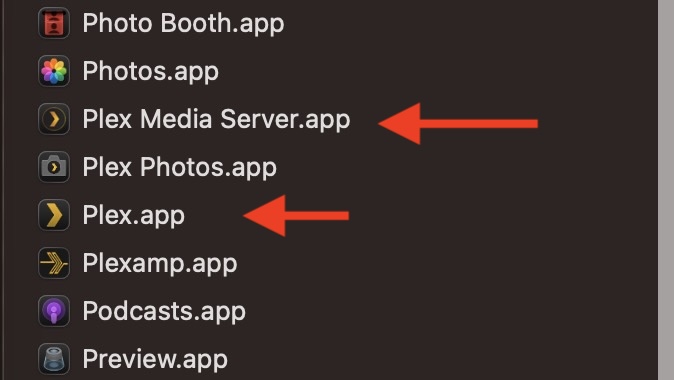
For me, I find it best to designate a non default Browser (Example: Firefox) for Plex Media Server and make the Home page https://app.plex.tv/desktop/#, then PMS will open independently instead of from Applications or App Launcher / Then using Menu bar Chevron.
Also add PMS app to Login Items so when a restart or Start up of your server machine occurs your already to go.
When I double click Plex Media Server in Applications the Plex icon appears in the top bar for a millisecond and then disappears. I have tried everything you have mentioned but nothing. I recently updated my OS to Tahoe 26.2….. could this be the issue? Could it be Safari? I am really getting frustrated because I have tried everything in the forum to install it and fix databases etc, but nothing!
Oh, and I can’t find the server logs - even manually. There is no Plex Media Server installed. It won’t do it
This is usually the caused by a corrupt database.
You said you clicked on it in applications. Are you saying you never successfully launched it ever on that computer?
Which model Mac is this? What version of macOS?
I have been able to use it up until I upgraded my OS to Tahoe 26.2 (I assume because I tend to go for a few months without watching….) I run on 3 Mac Minis - one is am M4 that I use for my photography, one is an old model that I use as a backup for all the drives, and the M1 is the one I use Plex on and to which I have all my HDD’s connected. I can launch the web page but the app will not load at all. The web page one no longer shows my libraries and I can’t find where to add them anymore…. I can connect to my friend’s libraries though. Its almost like Plex uninstalled me and all my data…..

I did that and still nothing. Remember, Plex will not install on my computer. I can run the web based but can’t access or download my libraries to there…. frustrated!!
The Mac Mini I am running (or had been running) Plex on is an M2 with Tahoe 26.2. I said M1 before, but I was wrong…. That’s the older one I have as a backup computer….
@tom80H Can you please help out this guy
It still might be helpful to see your logs.
- Open Finder
- Click
Go Toin the menu and selectGo To Folder - Go to
~/Library/Logs/Plex Media Server/– most relevant files should bePlex Media Server.logand its numbered “predecessors” (Plex Media Server.[1-5].log…)
If the Plex Media Server won’t start and doesn’t even get to the stage where it’ll be writing to the server logs, you can attempt the following procedure to see if there’s any error messages on the OS level:
- Open Finder and navigate to
/Applications - Select
Show Contentfrom the context menu of thePlex Media Server.appitem - Navigate to
Contents/MacOS - Open the
Terminalapp - Drag the
Plex Media Serverexecutable from the Finder window (#3) into the Terminal Window and pressReturnto execute it
This is no different from running the app, so it won’t succeed – but you should get a more specific error message about what’s causing it to fail starting.
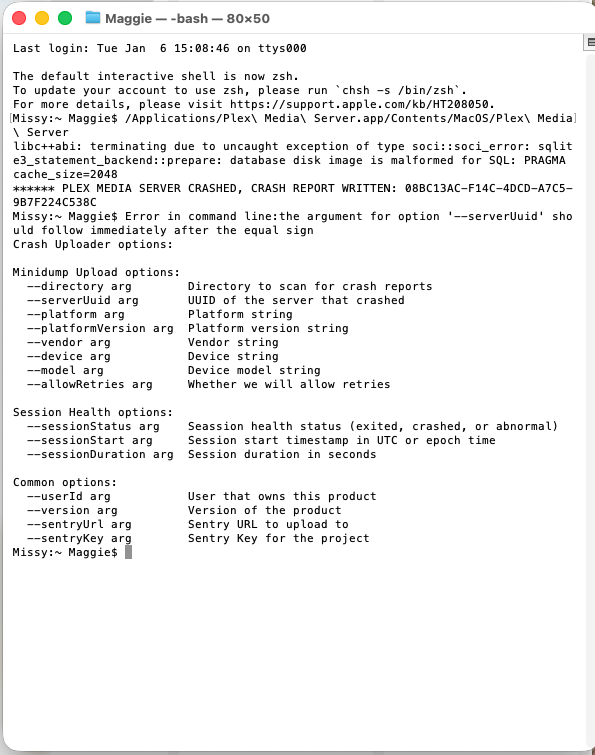
Does this screenshot help?
Oh, Also, there is NO Plex Media Server in Logs or anywhere else. It won’t install
That screenshot confirms what BigWheel suggested earlier.
Your server’s database has been corrupted to a state which it can no longer recover.
This can happen if a working server is shutdown while it was writing to the database (possibly cumulating corruption over time). On Macs, I’ve also seen that after users restored servers from a Time Machine backup. Time Machine takes a snapshot of your database without considering if it’s just being written to or not – potentially resulting in a similar issue as if the server is shut down mid writing to the database).
Your options are:
- if it’s a new setup… manually delete the database file and start over → https://support.plex.tv/articles/201198426-restart-plex-media-server-setup-from-scratch/
- if you had your server configured to create regular backups of its database, you can attempt to restore such a database backup → https://support.plex.tv/articles/202485658-restore-a-database-backed-up-via-scheduled-tasks/ (as posted above by BigWheel)
- attempt to repair the database; you can either follow the linked guide or check out the more sophisticated (but also slightly more complex) database maintenance/repair script → GitHub - ChuckPa/DBRepair: Database repair utility for Plex Media Server databases
If you wish to start over, follow the following…
Then set up ChuckPa DB repair to run as maintenance once a month
https://support.plex.tv/articles/201941078-uninstall-plex-media-server/
The only issue I have with all of these is that there is no Plex anywhere in my libraries or on the computer at all. Like I had mentioned, it is like it was all deleted somehow and I can’t get it back. Now that is not an issue where my libraries are concerned because all of my media files are fine on my HDD’s. I figured that I may have to start from scratch with a new install but it will NOT install!! I download the zip file, open it and get to the point where I get the message to move it to the applications folder. It does not move it no matter how many times I ask it to, so I manually move it and opening that file in applications does absolutely nOTHING! I get (on the first try) about a nano-second of the chevron in the upper bar but nothing else after that.
I really appreciate everything you guys are doing to get this going again, but if the program won’t install on my computer, then aren’t all of these fixes moot? Is there any way to just start all over and find a file that will actually let me install the program?

Yes I am. Nothing there at any stage - either after I try installing or when there is no install copy on the computer. I just ran the uninstall through terminal like you suggested so now what….? try reinstalling again?
