Stuck "uploading and processing" to v1.29 on QANP

Server Version#: 1.28.2.6151
Player Version#: 4.87.2
QNAP Version#: 5.0.1.2173
I tried upgrading to v1.29 but the QNAP interface just sits there saying “Uploading and Processing”.
I did see some other threads around going to this version but the advice was to leave it as this version may take more time to update
Eventually the NAS interface times out so I removed that this morning and it’s been sitting at the same stage for almost 4 hours.

Other QNAP apps have been upgraded fine yesterday.

Log out and log back in again to QTS, then check the status of your PMS

Plex is running still on v1.28

Cool…

Now do the following:

  • In the QTS AppCenter, stop Plex Media Server (PMS)
  • Delete the downloaded qpkg file from your workstation
  • Redownload from plex.tv
  • Install it in the AppCenter
  • Start PMS from the AppCenter
  • Wait for at least 5 min

Then check if it’s working, and report back

Plex disabled in the AppCenter and downloaded again.
Left it for an hour and it’s doing the same.
plex-upgrade

Okay, so we need to see what’s going on here…

Do you know how to make an SSH connection to your QNAP?

yes, I’m fine with SSH

Cool, then go here:

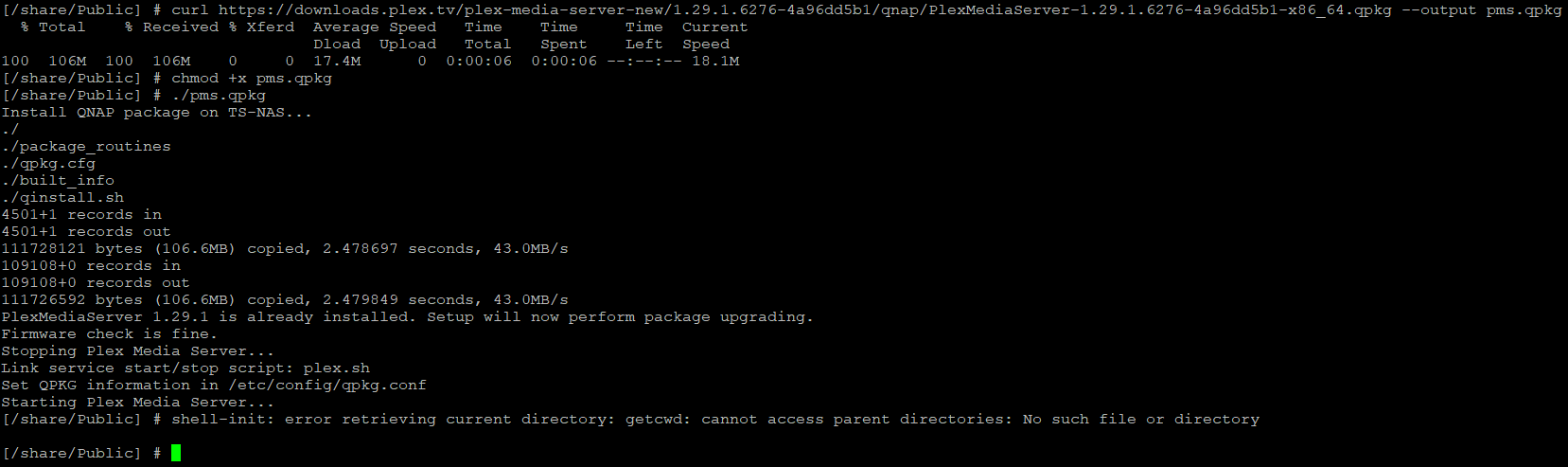
And show a screen capture of the terminal after it fails

This is the output


but the version has been updated in the AppCenter to 1.29 and the server looks to have started fine.
Thanks for your assistance

1 Like

This topic was automatically closed 90 days after the last reply. New replies are no longer allowed.