Server Version#: 1.24.1.4931
Player Version#: 1.33.0.2444-a220eae4
I recently reformatted my computer with a fresh install of Win10 and have been having playback errors since. Prior, I could play files locally flawlessly. I’ve turned off Remote Access to confirm that the playback is not going out and coming back, but instead playing locally. I can also access that same show or movie directly via the address bar in file explorer and play it using Window’s “Movies and TV” program and it plays just fine.
Subnet mask on both the server computer and player computer (using Plex for Windows, latest version) are 255.255.255.0.
From my limited understanding of IP addresses both follow the format of 192.168.1.# and therefore shouldn’t be the issue either.
Where Plex shows you the server name, on hover it says nearby and I have a green lock icon.
I’m by no means a networking nor a Plexpert. Would greatly appreciate any assistance possible because this is making me want to pull my hair out. Thank you.
Do you experience the same stuttering on other Plex apps (e.g. via browser) or after upgrading the Plex for Windows client to the latest version (should auto-update on app restart)?
Hi Tom,
So when I use the (outdated, I know) PMP there’s no stutter. As far as via a web browser is concerned, I currently have remote access turned off and none of my libraries come up as a result.
you mentioned that I’m using an outdated Plex for Windows client, I just downloaded it a few days ago from the Plex website and am currently unaware of how to obtain a newer version.
Anyone able to help?
Plex for Mac/Windows should be at v1.34.1 – the app is supposed to auto-update on restart. If you’re still on 1.33 it might be worth to manually download/upgrade to the current version to verify if what you experience might have been addressed/fixed with that release (though the release announcement isn’t mentioning playback related fixes/changes).
If the stuttering persists… what information do you see on the server dashboard when streaming a file using Plex for Windows?

Focus points: any transcoding, playback listed as local as per your OP?
Hi Tom,
When I visit the hyperlink you provided, I’m still only seeing v1.33 as presented in the screenshot I’m uploading, so I’m not sure/clear on what’s going on there. I’m running Win10, with an i7-9700k CPU and navigating the website with the latest version of Chrome.
As far as what the dashboard is showing, I’ve also included a screenshot of that as well.
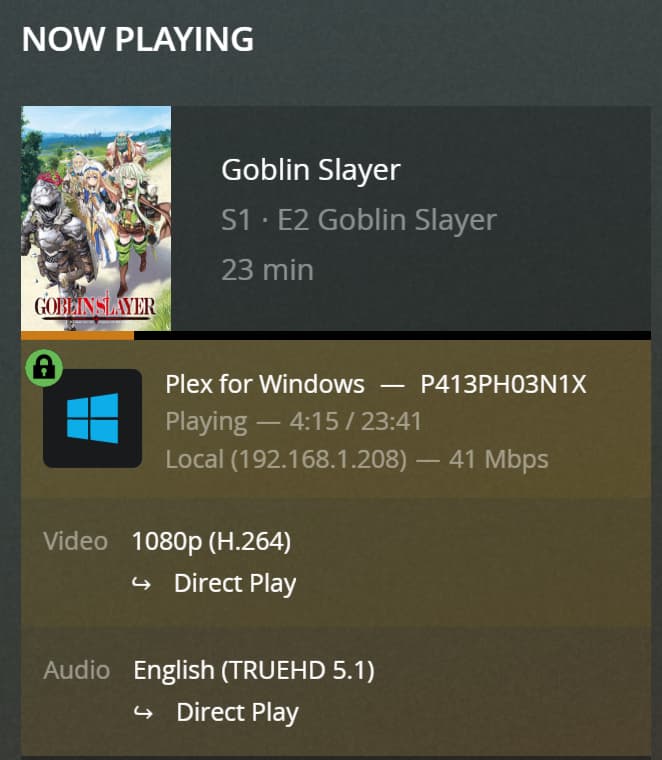

You’re right; it seems the 1.34 update was buggy and pulled back.
Do you have Settings > Plex for Windows > Player > Use Hardware Decoding enabled? If so… does the stuttering persist after disabling it? – I’ve been reading there’s currently some issues with that.
There’s an experimental build available in the forum to test a potential fix.
Hi Tom,
I’ve tried having “Hardware Decoding” checked and unchecked and the issue persists both ways. I can go ahead and download one of the experimental versions you’ve posted, however I’m not sure if that would open a new box of issues and make troubleshooting for you more difficult.
Hi Tom, was hoping for some additional or guidance here, thanks and I appreciate your help thus far.
Sorry… I haven’t seen any updates beyond what’s discussed in that thread
Okay, are there any other tips or things you can think of that may be causing the issue?
