Server Version#: 1.26.2.5797
Player Version#: 5.38.1/10.0.22000.4964
I can’t figure out why I’m getting stuttering & buffering. I’d appreciate any suggestions the community can give to help resolve my issues.
PMS 1.26.2.5797 running on Win11. CPU: Ryzen 5 4600H (6 cores/3.0GHz), RAM: 32GB (2933), GPU: AMD RX 5600M (6GB).
Client: Plex for Xbox app on Xbox Series X (5.38.1/10.0.22000.4964), 4k Gaming Monitor.
LAN/Wifi, eero 6+ (dual band, concurrent 2x2 Wifi 6/802.11ax) / Server Killer(R) Wi-Fi 6 AX1650x 160MHz Wireless Network Adapter (200NGW) / Client 802.11ac dual band (5GHz & 2.4GHz), 2x2
Media:
Duration 1:49:26
Bitrate 33619 kbps
Width 3840
Height 1600
Aspect Ratio 2.35
Video Resolution 4K
Container MKV
Video Frame Rate 24p
Video Profile main 10
Part
Duration 1:49:26
Size 25.70 GB
Container MKV
Video Profile main 10
Codec HEVC
Bitrate 32979 kbps
Language English
Language Tag en
Bit Depth 10
Chroma Location topleft
Chroma Subsampling 4:2:0
Coded Height 1600
Coded Width 3840
Color Primaries bt2020
Color Range tv
Color Space bt2020nc
Let’s rule out the simple things…
-
have you verified your all wireless connections are capable to deal with the 34 Mbps average bitrate of your file? That file will likely require a 45-50 Mbps bandwidth to deal with the maximum bitrate of the file.
-
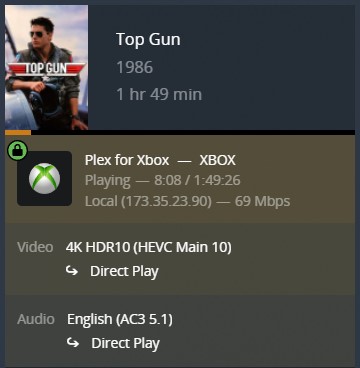
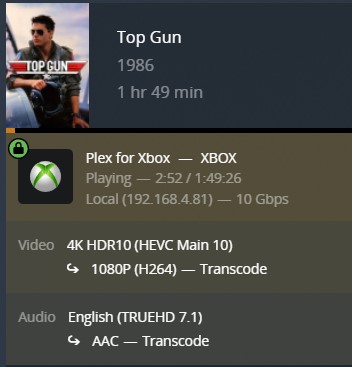
What information is showing in the “now playing” tile for that playback on the Plex server dashboard? Primarily… are all tracks streaming directly or is there any transcoding; is the connection considered Local, Remote or Indirect?

Server Status and Dashboard | Plex Support
As far as I can tell, my bandwidth bottleneck would be the Xbox at 802.11ac speed (theoretical 1300, x2 = 2.6 Gbps, practical 800 Mbps or so) which shouldn’t be a problem for pushing 50 Mbps.
The file is transcoding, but with my hardware specs it shouldn’t be an issue.
Hardware acceleration on/off doesn’t change anything in the slightest.
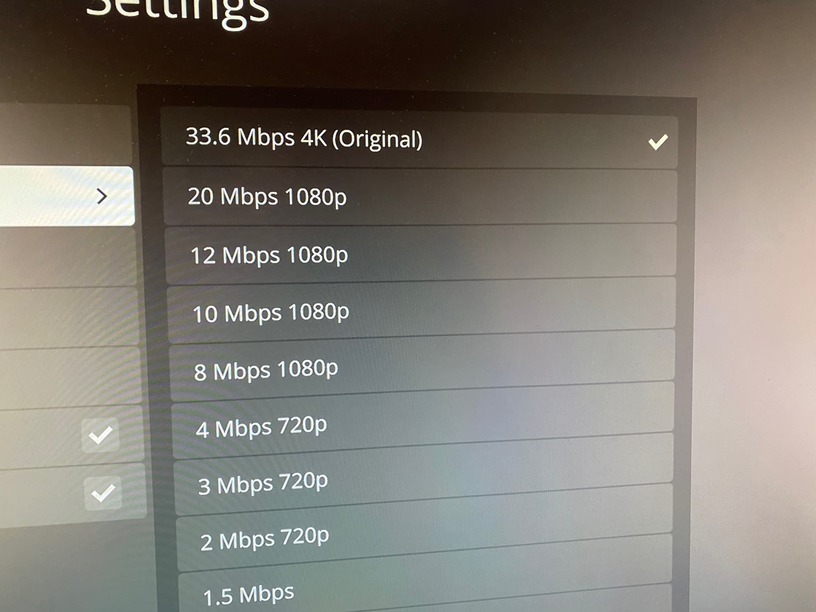
Also, I’m not sure why it’s showing it’s transcoding 4K down to 1080p as the client is showing Original quality.
There can be a massive difference between lab condition bandwidths and real-life ones… all it takes is a competing WLAN of a neighbor, some furniture, walls… and you’ll get significantly lower bandwidths between the devices.
As for the transcoding… your CPU is powerful. From what I’ve seen it should have a PassMark score (benchmark) of approx. 14000 points. However transcoding 4K HDR HEVC to 1080p H264 can require an even more powerful CPU (reference is a PassMark score of approx. 17000 points). Also… transcoding high-quality audio codecs requires surprisingly much power too. So it looks like the buffering/stuttering you’re experiencing might actually be related to the CPU not being able to transcode your video in real-time.
Can I get my GPU to help out?
I’ve enabled hardware acceleration and set PlexTranscode.exe to use the discrete GPU but resource monitoring on my GPU doesn’t change when transcoding.
Plex hw accelerated transcoding will work with “some” AMD GPUs but isn’t tested/verified on many… I’m not sure if yours will work.
From https://support.plex.tv/articles/115002178853-using-hardware-accelerated-streaming/
*Note: Our hardware-transcoding system has technical support for many dedicated AMD graphics cards, but we haven’t done official, full testing on those. Support for AMD GPUs is provided “as is” and your mileage may vary. It is recommended that you use Intel Quick Sync Video or a dedicated NVIDIA GPU.
Make sure it’s fully enabled inside Plex (Settings > [Server Name] > Transcoder > Use hardware acceleration when available)
I switched the audio on my client and got it to direct play, and it works fine now 
Thanks!