Ok, so I started a thread over on reddit looking for suggestions and the common answer was “use a third party plugin” or “rename your files” and well I think maybe I should chuck this here because both of those solutions don’t fit with the rest of how plex works making subs inconsistent to a degree. Yes I know subs are not the same as metadata, but they should be simpler than they are.
My suggestion is this.
Base detection of subs off the folder structure exactly how everything else works. Now it relies on the actual filename or being embedded in the files or being an external file.
Happy to hear thoughts from others or even suggestions that aren’t “rename all your files” or “get a plugin” as well.
So you’re saying that you would have a TV show as follows (going to just use American Dad! since I’m adding episodes right now):
American Dad!\Season 18\01.mkv
American Dad!\Season 18\02.mkv
American Dad!\Season 18\03.mkv
While the scanners can be forgiving and pickup media that does not conform to the standards recommended here, Naming and Organizing Your TV Show Files | Plex Support, if what I showed as an example is how you name it, you are excluding what that article considers the most important part.
You could try:
American Dad!\Season 18\s18e01.mkv
American Dad!\Season 18\s18e02.mkv
American Dad!\Season 18\s18e03.mkv
That might make a difference as sXXeXX is what is considered the important information.
And yes, that would mean you need to rename all your stuff, but if you deviate drastically from what Plex recommends, that is a risk you are going to be taking.
that’s correct, when i bought my collection to plex it was already in this format and plex scrapes correctly with this format. Also, don’t get me started on American Dad! haha
edit
I find it interesting that the scraper would require the season number when it already has that info from the folder. Does this mean people dump entire shows in the root of their showname folder and just rename the files sXXeXX?
I still don’t know what you mean. subtitles file names have to match the episode title as always to know which subtitle goes with which episode file. (out side of language code or forced if you choose to add those)
if you choose to not follow the recommended naming then yeah you may run into issues.
now i’m confused, my naming is identical to what you’ve posted @BigWheel and seems to throwback all sorts of random subs at me from other shows and stuff.
I will experiment with a show using the aforementioned sXXeXX naming that @shark2k posted and see if that helps. I was hoping to not go down the renaming route as it seemed unnecessary given that everything else works just fine. (we’re talking a LOT of renaming).
I did think that subs being different to just metadata may be different, but it’s definitely given me something to think about.
It’s kind of a pain because I rarely need subs (only for non-native speaking parts) so not a big deal but i just shared my library with someone who prefers them on all the time, thus it’s become a thing now.
Thanks for the suggestions guys, I like to not add plugins if plex can do something natively and this one had me stumped as to why it felt so random.
Yeah, my bad on forgetting to include the subs in my example. Like BigWheel said, if they are named the same with the only difference being the ext (and if you add it for the sub, the 3 digit language code), they should show up.
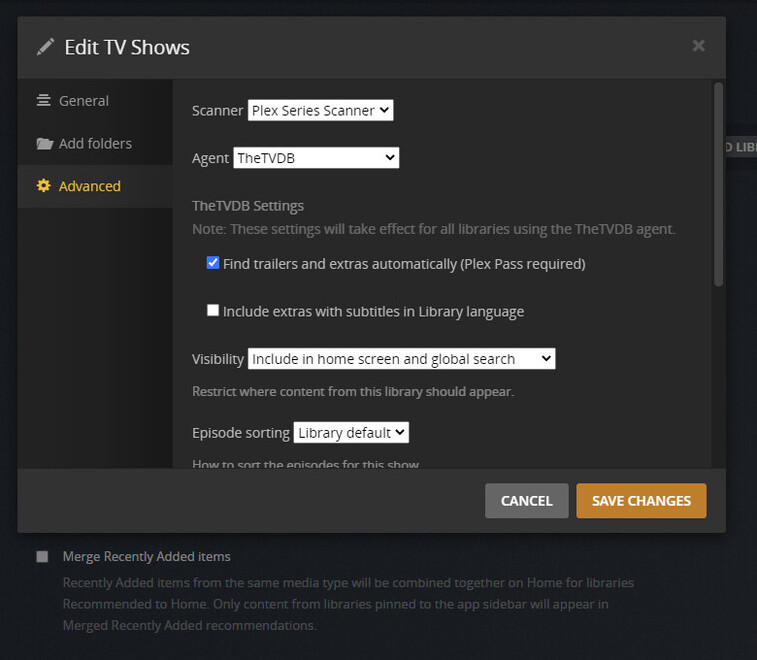
Now that we’ve gotten a little further, if you go to Settings for the server and then on the left menu click on Agents then click on Shows and then the correct agent (I’m still on the old one so it’s TheTVDB for me), is your local media assets (TV) checked and near the top?
If you are on the new agent, I think you need to edit the library and go to advanced from there, but BigWheel could probably confirm that, let you know better than me.
I’m wondering if your issue is that your local media assets option is not checked or near the bottom of the list (mine is the 2nd option under TheTVDB) and therefore the external subs are not being picked up.
I rarely use local srt’s (mostly for movies, which never have issues anyway) and these are always selectable if present sorry if I didn’t make that clear enough, the issue revolves around media that does not have srt’s or embedded (generally much older media). I was more referring to the file naming.
Not sure what agent however. this is what my library and agents look like.
Final bit of info, I named a single season the same as your suggestion so from my earlier format to sXXeXX and subs are now present… unless there’s a magical way to make my old format work I’m in for a ton of renaming.
edit
Scratch that no it doesn’t. It’s still just as confused. It needs Showname sXXeXX.ext
Thanks @BigWheel for the correction regarding the new agent (knew ya could give the correct answer ).
This is making me think there is some miscommunication going on here. I just re-read the thread and I think myself and BigWheel are probably not understanding exactly what you are asking, so I think we should back up and try to get a clearer picture.
Based on what you said there and what I saw re-reading the thread, you are referring to some other type of subtitles it sounds like. So, I’m going to ask a few questions and get the answers from you to help with the clarity of what is going on.
If the file has embedded subtitles (whether they are srt, ssa, ass, pgs or vobsub formats) they appear for you, correct?
Even though you rarely use them, if you have external subtitles that are srt (.srt extension) and named the same way as your original format for the file, you see those correct?
If you use an external media player, like VLC for instance, you are able to see these subtitles that you cannot see in Plex?
If yes to #3, does VLC refer to these as closed caption by any chance?
Let’s get the answers to those questions before we continue on with the troubleshooting as it should hopefully be easier when we are all on the same page (especially BigWheel since they are a Plex employee ).
1 - yes
2 - yes
3 - unknown i have really only just started fiddling with subs as i do not require for anything other than non-english subs which are usually easy.
4 - as above.
alright let’s just put it this way.
renaming my episodes to showname sXXeXX.ext now means subtitles.org has picked up and can display subs.
Hope that makes sense? It kind of goes back to my original question which is plex knows what show it is, knows what season it’s in, knows what episode it is and can correctly play the file and load metadata for it. however, it has no idea what subs to associate with this file that it knows everything else about.
You mentioned subtitles.org in your reply. Are you using the Plex feature to be able to find subtitles by any chance? I don’t use that feature myself, but I just did a quick check of it and it does use the filename in order to find the information. However, this is just speculation as we would need to understand how you are trying to get these subtitles.
From what I can see when I select the search option from the subs drop down on an episode (or even movie even though that’s not part of the topic, just wanted to check), Plex takes the file name and then uses that for the search criteria. I would think Plex would actually be able to create that format based on the metadata they pulled and just add the extension, but my guess is they did it this way because just taking the file name was easier, even if it does mean assuming the end user is using the recommended naming convention (or a close enough variant of).
As you mentioned you have a fair amount of renaming ahead of you if you have to go this route, you could look at something like FileBot. It does have a one time cost, but you can put criteria for the format so that it will rename it to what you want, for example Show Name - sXXeXX - Episode Title.ext
if that is what you want.
I know there are some other tools that would do the same thing that some people have mentioned throughout this forum but I’m not sure what they are as well as they may possibly be Windows only tools.
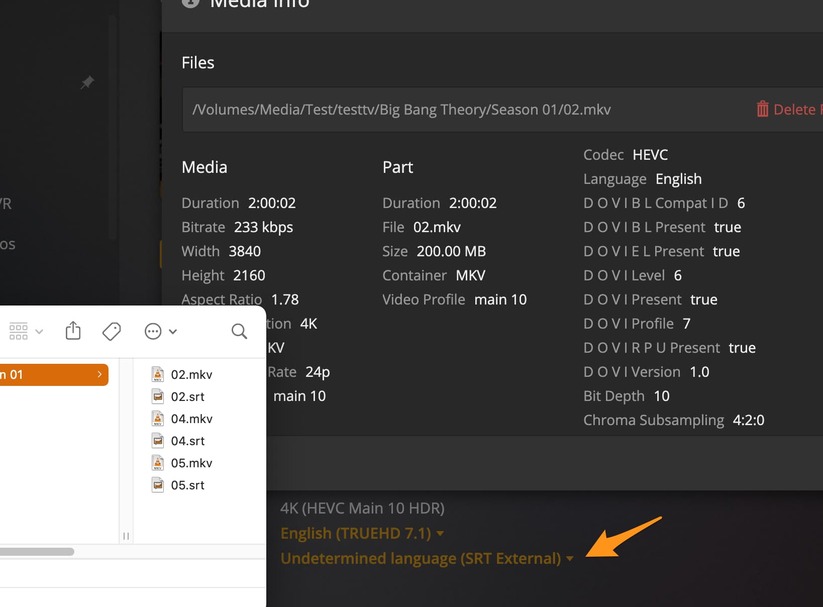


 ).
).


 .
.