Dear Plex developer team,
thank you for doing your best to support not only video playback, but also displaying subtitles.
I have a number of suggestions on how to make subtitle management for a user more efficient - and the help that the Plex Web and player device UI can offer.
A) Why is subtitle management important for a number of users?
Managing subtitles is more important for some Plex users than it is for others. The typical English or US movie viewer only uses it on certain occasions.
But movie viewers in non English-speaking countries often encounter so-called “forced” subtitles for their native language. For example, if a movie contains English dialogue (i.e. in Uncut sequences) that have no local synchronization, or to translate written text within the movie. Series like Narcos, for example, also contain a lot of dialogue in Spanish - that does not get synchronized in order to keep the Narco original flair…
Forced subtitles do not contain all of a movie’s dialogue, but only non-local-language content.
Then, there are the so-called “full subs” for different languages - if somebody wants original language, but help for translation - just to mention one use case.
Of course, there are also subtitles for “hearing-impaired” persons, that do not only cover dialogue, but also description for other movie sounds.
Then, there are “subtitles” which are of a graphical nature, that may not only contain text, but also other design elements - like banners, etc. - often used in Manga, for example.
B) How does the industry cover this?
Well, a number of standards for delivering and showing subtitles have been developed and are widely used in the movie business and TV broadcast.
A basic difference is:
- embedded subtitles (subtitle data tracks of different kinds, following a number of rules)
- “burned in” subtitles (text as part of the video stream, not changeable, fix)
- external subtitles (separate subtitle files of different kinds)
“Burned in” subtitles can only be handled “AS THEY ARE”. To hide them, the viewer needs to crop the video and loose video content.
Since certain (especially older) video formats don’t allow for “tracks”, a video player needs to take care of embedded as well as external subtitles. Also, subtitle databases can be found on the internet which allow a user to load a set of subtitles for a certain cut of a movie. These can only be external subtitles. Plex uses such a system.
Plex supports external as well as embedded subtitles.
C) Common subtitle formats are:
SRT Embedded (subtitle track of type “subrip”) or External (SRT file)
ASS (graphical subtitle) Embedded (subtitle track of type “ASS”) or External (ASS file)
VOBSUB Embedded (subtitle track of type “dvd_subtitle”) or External (two files IDX/SUB)
PGS (subtitle track of type “hdmv_pgs_subtitle track”)
There are others, but the above are quite common.
To make things more complex, embedded subtitle tracks may or may not be accompanied with metadata and flags.
The most commonly used flags for subtitle tracks are:
- flag “forced”: See above for explanation / more than one subtitle track can be marked as forced.
- flag “default”: Players who respect this flag choose that subtitle as default subtitle “pre-chosen” if user does not overrule and if user has enabled usage of subtitles by default. More than one track might have set such a flag - which is nonsense, but possible technically.
- metadata “title”: string containing explanation on what that subtitle is about. Here yo may or may not find info on "forced / full / sdh [subtitle for Deaf and Hard of Hearing] or whatever the creator felt necessary.
- language identifier (mandatory): different digit or character based codes based on a number of standards
D) Is Plex current behaviour for analyzing subtitle tracks “state-of-the-art”?
The short answer to this is: NOT AT ALL.
Plex is not acting on ALL standard flags, is not showing titles.
But even more important, the DVD/BluRay industry is creating subtitle tracks containing only a subset of those subtitles being flagged as forced.
Plex is not analyzing (or at least not showing the result of that), if a subtitle track not flagged as “forced” per se contains a subset of captions marked as forced.

See here for non-Plex discussion of that:
https://www.avsforum.com/forum/26-home-theater-computers/1176923-movies-forced-subtitles.html#post17135548
(the whole thread makes up for an interesting read) or here…
https://handbrake.fr/docs/en/latest/advanced/subtitles.html
(see the chapter about forced subtitles)
E) What is common usage for subtitles?
Of course, different needs cause different use cases.
Following are a couple of assumptions for common use cases and user types:
- I think that it is fair to assume that the nomral cineast is usually not aware if a movie or TV show episode contains subtitles that add more value to the viewing experience.
- Which kind of subtitle is adding more value to a user’s viewing experience, is dependant of that user’s needs (SDH, usually want certain full subtitle, forced preferred, none wanted)
- For common viewing experience, it is not important, what technical format a subtitle has, but there are users who prefer graphical subtitles if they contain design elements over text-based.
F) How should subtitle preferences be handled by Plex?
In agreeing to the above, we can fairly say, that subtitle handling preferences should be user-based - and it partly is.
The current status is like this:


If you switch on Plex automatic audio & subtitle mangement, then it looks like this:
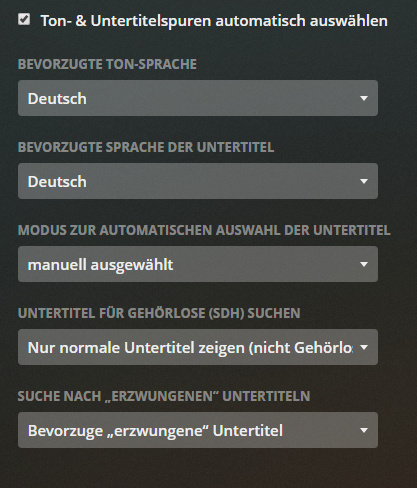
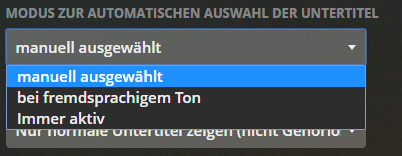
You actually can freely choose a preferred audio and subtitle language.
But you cannot actually set your choice for the following classic scenario:
- For preferred audio, choose only FORCED or CONTAINING FORCED subtitles AND
- For foreign (ie. non-preferred, but manually chosen) language audio, always choose ONLY NOT SDH subtitles of preferred subtitle language.
For each Plex or Plex home user, there should be a subtitle preference like:
- Enable / disable subtitles (enabled: default)
If enabled:
-
Choose standard subtitle language for FULL and SDH subtitles
-
Choose standard subtitle language for Forced subtitles
-
Choose standard subtitle language for audio not being preferred language
-
Choose between use cases: in a menu like with Plex metadata agents, just bring SDH, FULL and FORCED subtitles into the right order and enable/disable each type
For example, I am not hearing impaired, but I am German. If watching a movie with German audio, I only want to see the FORCED German subtitles and nothing else.
But from time to time, I want to watch a movie using English audio. Then I’d like to be able to have the German FULL subtitles chosen automatically.

My partner is hearing impaired and needs to choose between either Full or SDH subtitles in German (SDH if possible, but FULL are better than none).
By now, Plex manages subtitle handling (a) user-based and (b) player-based.
This should be extended.
G) How to present subtitle choice in Plex Web? What is important and what is not?
By now, you can choose from a list of subtitles in Plex Web as well as the different kind of player UIs.
For the typical user, who wants to check subtitles, it looks like this by now:
Before you click to choose a subtitle, it looks always the same … like this:

As a Plex user, one cannot see if a movie or tv show episode offers subtitle support or not. You have to click the menu to see this.
Here, it would be better to have different colors of the clickable subtitle menu. If you are looking for subtitles, you would quickly learn if a movie has subtitles or not without clicking. If you decide to search for subtitles via internet, you could still click on it to do so.
Here’s how it should look like to make up for a different user experience:

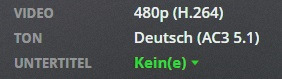
Left means: no internal or external subtitles there / Right: subtitle(s) found
After clicking, you find no or a number of available subtitles:

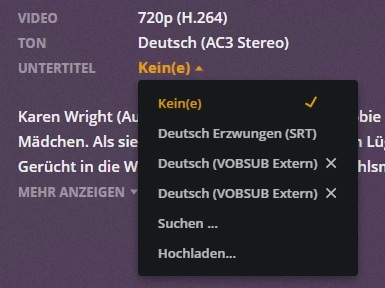
The menu presents the LANGUAGE (very important), if a subtitle contains FORCED subtitles (also important) and a technical representation of that subtitle.
While that technical representation is important in how a player needs to process it in order to play it, the usual VIEWER has no need of that information.
There is one exception to this: You need to setup each Plex player device if you want “Automatic” subtitle processing or “Only image formats” (or “Always”). And if the viewer knows, which technical representation means “image format” and which doesn’t, the user can configure the pleyer in a way to avoid transcoding.
That sounds strange for a not tech-savvy user, but can be explained by historical development reasons.
Of course, “AUTOMATIC” subtitle management (earning its name) should be able to handle ASS subtitles also (if the device and the player software is ready to display these), so Plex needs to fix this internal handling in the player devices and server logic.
But as you can see on the above images, Plex also needs to change the subtitle choice presentation from
LANGUAGE [FORCED] (TECH FORMAT)
to something like:
LANGUAGE [FORCED / FULL / SDH / CONTAINING FORCED]
or
LANGUAGE [FORCED] [metadata “title”]
CONTAINING FORCED would only be displayed if Plex starts to demux certains subtitle tracks to find out if those tracks contain captions marked as forced.
With a movie containing a number of subtitles, the current subtitle menu is not helpful:
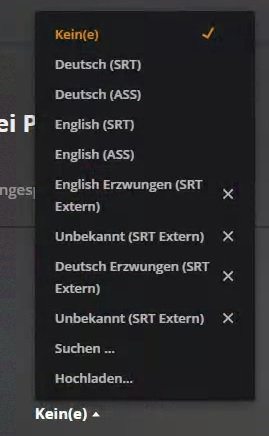
The embedded subtitle tracks all contain metadata and if Plex would display the content of the title tag PLUS expand subtitle management for external files, it could look like this:

You can see, that two “UNKNOWN” external subtitle files are shown. the file names of all those external files are:
movie.eng.forced.srt
movie.eng.full.srt
movie.ger.forced.srt
movie.ger.sdh.srt
If you compare, the “.forced” file name extension is correctly mapped, but the “.full” or “.sdh” extensions lead to the language not being correctly identified.
All is correct according to current Plex naming conventions which do not know a way of differentiating between full and sdh subtitles.
It’s time to change tihs.
For embedded subtitle tracks, the “title” metadata could be missing, empty or containing nonsense. But often (and in my case: very often) that flag contains those keywords “full” “sdh” “forced”…
H) How to handle “default” flagged subtitles?
Movies have subtitles flagged as default for a reason. If only one such track exists, a pleayer should either respect that, or ask the user if he wants to use that.
I) How to handle “forced” flagged subtitles?
If you follow the user preference suggestions above, they are handled by user preference.
But for now, subtitles in the library or subtitle language flagged as FORCED should be set as default by Plex.
If Plex knows about tracks “CONTAINING a subset of captions marked as forced”, then it would need also to only display those captions maked as forced according to the preference set by the user.
J) Player subtitle handling - Difference between AUTO and “Only image formats”?
Really, it is time to get rid of this player configuration and handle subtitles differently.
If Manga viewers need special requirements to prefer ASS subtitles over non-graphical, ask for this on a per-user basis via prefereces in user settings.
The mutual viewer does not know about the technical details, does not want to learn about these and it can become quite cumbersome if “automatic transcoding” takes the PMS hardware beyond the edge (or reduces audio to stereo just because of subtitle handling in the player is not optimum; or fails to play at all like with the new video player at the moment - QNAP server plus fire tv player).
If really hope to have a fruitful discussion with you Plexies about this.
K) Avoid transcoding for subtitles if possible
Plex ecosystem transcodes audio and video whenever it comes to the conclusion that some media file is not directly playing or streaming.
And it does a good job. This feature is one of the milestones of Plex.
But of course, Direct Play or Direct Stream is always superior to Transcoding - if possible. For quality reasons as well as for more technical reasons, too.
If audio needs to be transcoded, then be it. If subtitle needs to be transcoded, then be it. Most of the times, the server’s horse power is good enough to do a good job. But if both audio and subtitle get transcoded, video is getting transcoded. And not all PMS hardware does a fantastic job on this - not to speak about reduced quality.
In fact, development must take care to get as much out of audio and subtitle management as possible to avoid transcoding.
There are enough necessary scenarii where transcoding is not avoidable - slow internet lines, uncommon video formats, old player hardware - among others.
Latest Edits:
- 3/21/2020: further images to make clear how Plex web should signal if a video has subtitles or not
- 3/21/2020: changed subtitle handling suggestions in order to respect the current account-based possibilities
- 3/14/2020: Add subtitle track analyzing for captions marked as forced (since DVD/ BluRay industry works with integrated subsets of “forced” captions in a track containing also non-forced tracks. (new chapter D added, added “contains forced” to display suggestions, mentioned handling of forced captions in subtitle handling chapter)
