The pilot episode is on my server, but no matter what I do, whether I tag it as:
Swamp Thing (2019)
Season 1
Swamp Thing (2019) S01E01
or
Swamp Thing
Season 1
Swamp Thing S01E01
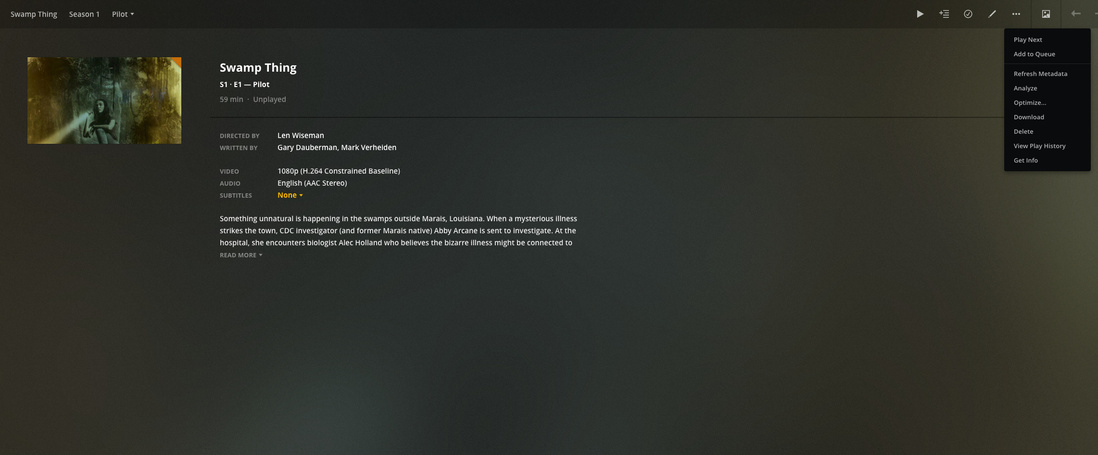
It either grabs the metadata from TVDB for either the animated series or the live-action 90s series. Fix match isn’t available either, and the new artwork I upload won’t show up as well. It’s a bit frustrating. I’ve heard some folks were able to get it to match the 2019 version with Fix Match, but that option just isn’t available for me. I’ve renamed it multiple times and did the “Plex dance” to no avail.
Any other options?
You don’t have that there? it might just say “match” if it was not actually matched with anything yet
Yeah Fix/Match nor fix OR match is showing up for me 
I had to manually add the details myself.
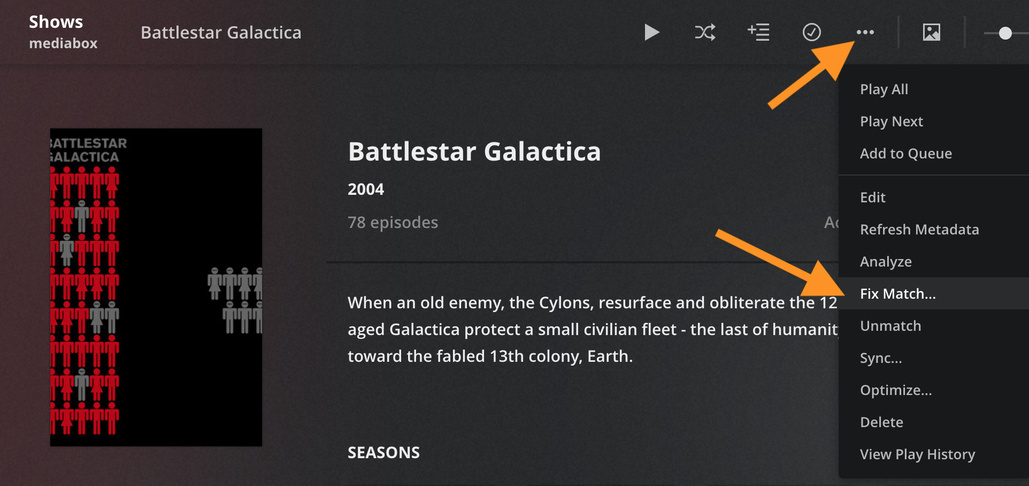
that is the individual episode screen. Go to the main show screen. You can click on the show title “Swamp Thing” on that page to get to the main show screen or the title on the upper left
UGH
Yes, that worked. Learned something new today. That will certainly come in handy.
Thank you!
I’m having a similar problem, but I can’t just Fix Match, or else it will change everything else that’s correctly matched.
The issue is that I’m trying to add Swamp Thing (2019), but I also have Swamp Thing (1990) and Swamp Thing: The Animated Series. The premiere of Swamp Thing (2019) gets matched to Swamp Thing (1990), even when the folder and episode names are labelled with the year. Ok, so I removed the 1990 folder so the episodes went away, then Fix Match’d the series (which only had the 1 new episode) to be the 2019 one. Now I had to add back the 1990 series, and guess what happens? It now matches it to The Animated Series.
So now I seem stuck. I try to remove one folder to Fix Match a series, but when I add it back, it gets incorrectly matched. I’m not sure why Plex is having so much difficulty with this, considering I have the series name and the year listed on the respected folders and episodes, which should match exactly as shown on TheTVDB. It’s really frustrating that we can’t Fix Match at the episode level.
EDIT: If anybody else is having this problem, the workaround is to just remove everything, add series individually, Fix Match them to something completely different, and then Fix Match them to the correct thing afterwords. Dumb, but it works.
I’m not sure what that means. Fix match is per individual show. it doesn’t effect others.
Yes, but when I attempt to add Swamp Thing (2019), it gets matches to Swamp Thing (1990). I can’t Fix Match the episode, because I actually have the 1990 series too, so it’ll change all the correctly matched 1990 episodes.
if they were combined into a single show you need to Split Apart first into separate listing before doing the fix match on the one that needs it
Each show has their own folder in your files right? you didn’t put all the episodes of both shows into one folder?
If they were combined there will be a Split Apart action in the same menu as Fix Match
Hey thanks! This seems to be the solution.