To help me pin/run down where this happened, do you have any idea about the last known working version of PMS ?
Looks like someone mentioned what version it worked in
I can also confirm having tested this just now using these docker images
IMAGE=plexinc/pms-docker:1.22.2.4282-a97b03fad. WORKS
IMAGE=plexinc/pms-docker:1.22.3.4523-d0ce30438 - WORKS

IMAGE=plexinc/pms-docker:1.23.1.4571-6119e8eed - BROKEN
The interesting thing is that I can potentially run the last working old version and use it as a UI only if I ever get stuck.
So basically the changes from plexinc/pms-docker:1.22.3.4523-d0ce30438 to plexinc/pms-docker:1.23.1.4571-6119e8eed is where you need to look.
Thanks for taking the time to run that down. I would have been looking forever.
1.22.3 was the last version of PMS built with the old toolchain (compilers).
1.23.0 was the first version of PMS built with the new toolchain.
If the problem is with the compiler, that will be difficult to track but at least there is a known starting point – for which I thank you very much
Ok good to hear, thanks for looking at that. I’ve had Plex for years and this is my first time using these forums. Is there way to track any official bugs raised ?
Confirming this is an issue. Do we have an ETA on tracker for the bug?
Folks,
I apologize for the delay getting to work on this. (had to work on Synology,QNAP, and desktop Linux packages)
I can’t recreate this.
Here are my test conditions.
-
Created /volume1/Optimized.dir (the real directory for “Plex Versions”)
-
Created /volume1/Optimized , symlink → , /volume1/Optimized.dir
-
Added /volume1/Optimized to the library section.
-
Ran optimization tasks.

chuck@ds418:..$ cd /volume1/Optimized
chuck@ds418:/volume1/Optimized$ ls -la
total 20
drwxrwxrwx+  4 root            root            4096 Jun  6 15:16  .
drwxr-xr-x  48 root            root            4096 Jun  6 15:29  ..
drwxrwxrwx+  3 root            root            4096 May 27 21:03  @eaDir
drwxrwxrwx+  4 PlexMediaServer PlexMediaServer 4096 Jun  6 15:33 'Plex Versions'
chuck@ds418:/volume1/Optimized$ cd Plex\ Versions/
chuck@ds418:/volume1/Optimized/Plex Versions$ ls -la
total 20
drwxrwxrwx+ 4 PlexMediaServer PlexMediaServer 4096 Jun  6 15:33  .
drwxrwxrwx+ 4 root            root            4096 Jun  6 15:16  ..
drwxrwxrwx+ 2 PlexMediaServer PlexMediaServer 4096 Jun  6 15:33 'Custom_ Universal TV 21'
drwxrwxrwx+ 2 PlexMediaServer PlexMediaServer 4096 Jun  6 15:26 'Optimized for Mobile'
chuck@ds418:/volume1/Optimized/Plex Versions$ cd Custom_\ Universal\ TV\ 21/
chuck@ds418:/volume1/Optimized/Plex Versions/Custom_ Universal TV 21$ ls -la
total 108000
drwxrwxrwx+ 2 PlexMediaServer PlexMediaServer      4096 Jun  6 15:33  .
drwxrwxrwx+ 4 PlexMediaServer PlexMediaServer      4096 Jun  6 15:33  ..
-rwxrwxrwx+ 1 PlexMediaServer PlexMediaServer 110580141 Jun  6 15:33 'Geri'\''s Game (1997).mp4'
chuck@ds418:/volume1/Optimized/Plex Versions/Custom_ Universal TV 21$ ls -la /volume1 | grep Optimi
lrwxrwxrwx+   1 root            root                     13 Jun  6 15:29 Optimized -> Optimized.dir
drwxrwxrwx+   4 root            root                   4096 Jun  6 15:16 Optimized.dir
chuck@ds418:/volume1/Optimized/Plex Versions/Custom_ Universal TV 21$
What am I missing please?
Folder Config:

Optimization Window:

https://support.plex.tv/articles/213095317-creating-optimized-versions/
This support page indicates that we should be able to select a different directory for library wide optimization, but we can’t, even when the folder has been added to the library. This breaks library wide optimization if you store your optimized files in a different location than the default directory. (Which is important for me since network storage is a factor, but could be important for other use cases as well).
Both of my test folders are “real folders” if you will, this happens with symlinks present or not.
When you try to optimize a single show, you get the correct behavior.
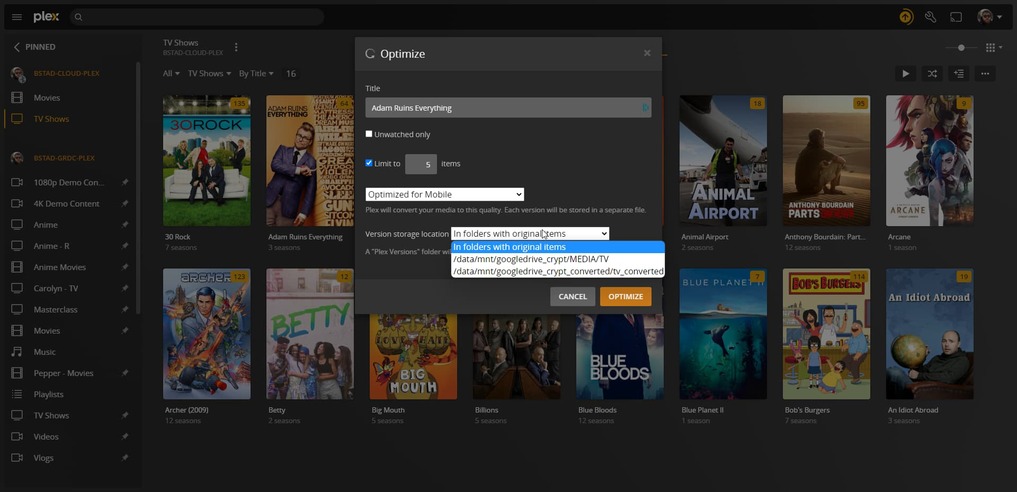
This is not the problem as stated in the title of this thread.
As I select all the movies in the library section (click first movie, scroll down, Shift-click last movie), I have all movies selected.
Now I click the ellipsis at the top to open Optimize.
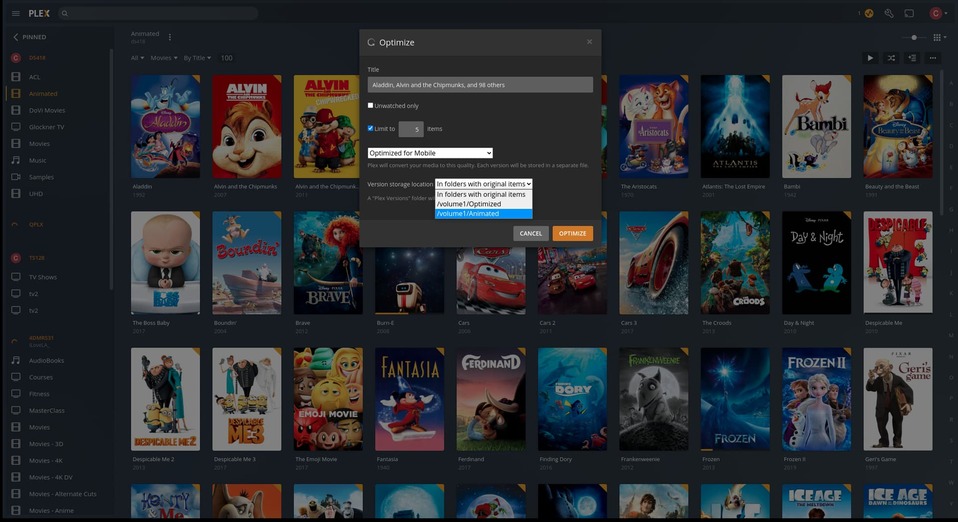
All selected titles have been queued.
I can choose whichever destination I wish
Ok, that is right, but, try selecting nothing, and hitting optimize, in other words, how we used to create library wide jobs to automate optimization.
My apologies for posting in the wrong thread, but this is currently the only active thread with relation to this issue.
Thank you for clarifying.
Let me go ask if this is a deliberate functionality change or a regression.
I found it.
It’s a Plex/web regression and the ticket was finally sorted out (not a server bug but a plex/web bug) and given to the Web team.
Cool! Hopefully we’ll see it fixed soon.
Agreed. This is a cool feature to have when you have limited upload bandwidth
Thank you. Will be happy to see it fixed.
I here to provide feedback.
This problem has been confirmed by the Plex/web team and is on the schedule.
Given how it’s tagged, I would give them 2-ish Plex/web updates (app.plex.tv) for them to complete it.
Reopened by OP request
I have no status to update with.
