Symbolic link support for 'Plex Versions' directory

Server Version#: 1.26.1.5772

I’ve just transitioned from Windows Server to TrueNAS Scale (Ubunutu) for my Plex Server.
I used to store my media on mirrored drives and the optimized versions of said media on a stripped drive array (they can easily be recreated in case of hardward failure). I used a symbolic link in Windows to link the ‘Plex Versions’ directory to another physical path and it worked GREAT.

On Linux, I can’t get it to work. I’ve verified that the symbolic link points to the right path, but it seems that when I try optimizing new media, it can’t write to the location (same permissions on both pools) because it’s probably trying to create a directory with the same name as the link.

Any suggestions on how to fix this?

Show your work?

Symbolic links work for Plex Versions on TrueNAS CORE (FreeBSD). While that’s not Linux, I think the semantics should be equivalent.

And/or share server logs.

Another - possibly better - option is to add another directory to the Library itself, and then choose that when creating the optimization task.

Fair enough, I’ll produce some logs.

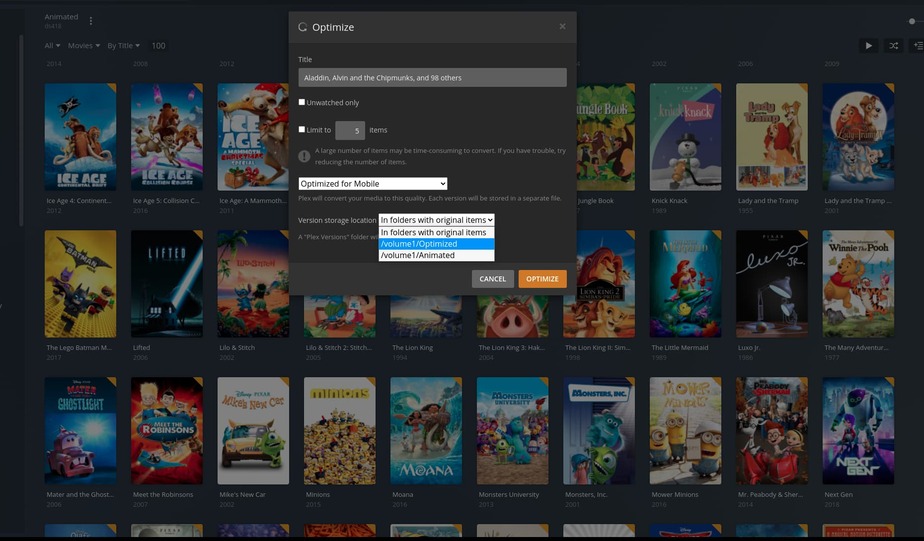
For your second alternative, I can’t currently select my other path because the UI for library optimizations are restricted: Why is selecting the Optimized “Version storage location” for an entire Library is no longer supported → Library level optimization not possible!

If I may add here?

What I’ve found works for “Plex Versions”,

  1. Add the new target directory to the library section itself.
  2. Now when you optimize, point to that directory.
  3. It’ll put the optimized versions in the other destination.

–Or is this what you’re saying is currently not working ?

1 Like

I’m hoping the “can’t select other Library locations for some Optimize jobs” thing (bug?) gets fixed. :-/

That works on a single item.

There’s a bug (?) where if you Optimize the entire Library, you can’t choose a different target directory. I guess bug because it used to work.

1 Like

So, here’'s the directory and the full 777 permissions:

root@station[/mnt/default/media/videos/movies/english]# ls -l Plex\ Versions
lrwxrwxrwx 1 root root 30 May  9 19:11 'Plex Versions' -> /mnt/temp/video/movies/english
root@station[/mnt/default/media/videos/movies/english]# ls -lLR Plex\ Versions
'Plex Versions':
total 25
drwxrwxrwx 3 root root 4 May  9 19:31 'Optimized for TV'

'Plex Versions/Optimized for TV':
total 1
-rw-r--r-- 1 root root 0 May  9 19:31 test
root@station[/mnt/default/media/videos/movies/english]#

I created the test file to make sure I could indeed write (at least as root).

Logs:

May 09, 2022 19:32:42.755 [0x7f2f09218b38] Debug — Versions: version file path is "/data/videos/movies/english/Plex Versions/Optimized for TV/10 Cloverfield Lane (2016).mp4"
May 09, 2022 19:32:42.756 [0x7f2f09218b38] Error — Error creating directory "/data/videos/movies/english/Plex Versions/Optimized for TV": File exists
May 09, 2022 19:32:42.756 [0x7f2f09218b38] Error — TranscodeJobManager: [Running] directory is not writable: "/data/videos/movies/english/Plex Versions/Optimized for TV"

Here’s a thought .

Instead of using a symlink for “Plex Versions”,

use a bind mount.

sudo mount --bind  "/path/to/Plex Versions"  /new/path/for/Plex_versions

Now it will exist as a directory and not show as a symlink.
Bind mounts are transparent compared to symlinks.

Consult: man mount for details.

[chuck@lizum lib.2012]$ mkdir /tmp/a
[chuck@lizum lib.2013]$ sudo mount --bind /var/lib/plexmediaserver  /tmp/a
[chuck@lizum lib.2014]$ ls -la /tmp/a
total 8
drwxr-xr-x  3 plex plex   42 Mar  2 10:37 ./
drwxrwxrwt 35 root root 4096 May  9 22:59 ../
-rw-------  1 plex plex 1420 Mar  4 20:11 .bash_history
drwxr-xr-x  3 plex plex   33 Dec 14 12:08 Library/
[chuck@lizum lib.2015]$ 
2 Likes

That’s clever!

If this is TrueNAS SCALE and a k8s/Docker app, using an additional Host Path Volume might work well.

Yeah, mount option is good. I think this is less of a Plex problem and more of a container problem. :frowning:

I got further though, if I created a symbolic link with the container relative paths it stopped complaining that it couldn’t write to the directory. Now it just fail on some random stream not found.

Investigating further…

1 Like

Remember how the container directory mapping works… It’s a ‘bind’ mount from the internal namespace to the external namespace :slight_smile:

2 Likes

Ahhh! I was just typing something similar - sounds like you had the same thought.

Correct, Optimization only works for single item selection. Does not work for Library. It is a bug, as this used to work…

I’m not understanding.

  1. There is no “Optimize Entire Library” function.
  2. When I go into the library and select a series, the entire series is queued and converted.

What am I missing please ?

There is a way to start optimization from the “Library”, right side, “…”->Optimize, that’s where the bug is for not being able to select the storage location… only occurs here.

This is what happens at Library Level

Notice the lack of a drop-down options for storage location
Screen Shot 2022-05-10 at 5.15.28 PM

This is in the same Library when I select one item to optimize, the storage location is available…
Screen Shot 2022-05-10 at 5.16.29 PM

COOL.

Did not know that! (that’s what I get for being on the server/os side… DOOH).

I will dig further.

I do see where you’re storing in the folder with the media.

Have you considered making a shared folder which will contain ALL your optimized media (so the two are not comingled) ?

That looks like a Plex/web error.

Can you open the library section, Multi-select all items in the library, then queue it?

Yes, that works for existing items.

The advantage of Optimize ... at the Library level is that it will automatically optimize all future items as they are added to the Library, too.

So you want to set a “Smart Optimize” job to automatically optimize any new additions?

This ability existed already before it stopped working.

That is what I use the Library level Optimize job for. Any new additions are automatically converted, it does not require any intervention nor the selection or exclusion of any content.

Set it up once and forget it.

At the time being I still have previously defined optimization jobs that are Library level and still working… but after Plex upgrades I cannot create new Libraries with a similar setup, and that is how I discovered the feature is broken. Then I tried a hardware upgrade and duplicate the setup when I hit this issue again and confirmed the problem was not limited to an older/upgraded instance.

I serve all contents from a NAS at home, and I like to keep an optimized mobile version that auto synchronizes to a smaller NAS in a mobile/travel setup ( think travel trailer/RV ). I do this to avoid needing to serve the contents from a central location and always requiring internet access… same content no matter if home or not. It all works nicely without needing any manual interventions.

Without that feature of Library level optimization working, my magic setup is broken.