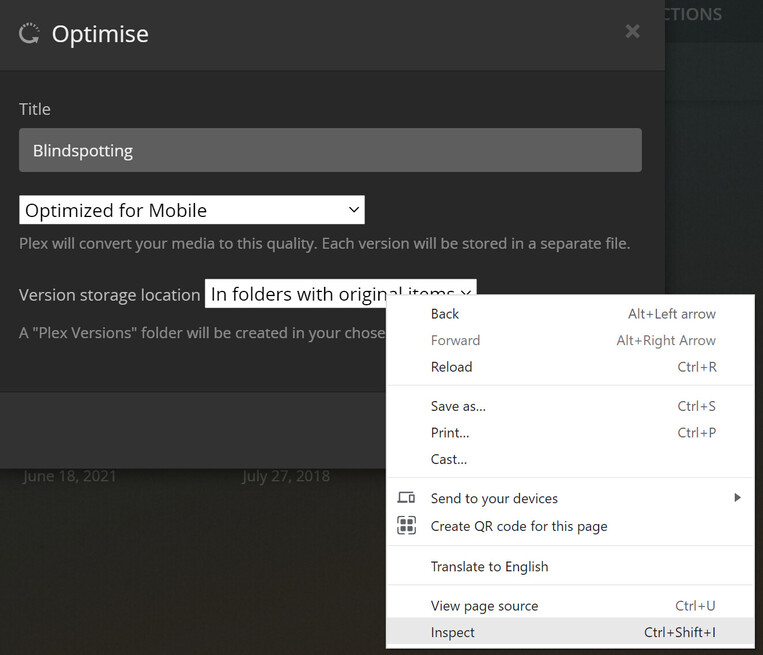
Hi, I’m moving my optimized versions to be stored remotely. I’ve done the file transfer and am at the stage of recreating the optimized version settings (i.e. listing all 4k videos in Library, clicking on the menu and then Optimize…). When I do so for a single video I can choose where the optimized versions are stored (i.e. “In folders with original items”, or in each library folder). But when I try to do it for a selection of videos in the Library, e.g. if I select all 4k resolution videos, the only folder location I’m presented with is “In folders with original items”.
I really need to have the optimised versions stored in a single folder, so need the ability to choose one of the Library folders.
I’m running PMS 33 on Fedora. Everything is writeable by the Plex user.
Would appreciate some help! Shout if logs would be helpful.
Edit: I’ve tried restarting PMS/the PC, removing and re-adding the Library, still no luck.
I’m a little confused about what exactly you’re trying to achieve.
You have your media stored locally / in your home network and want to create optimized versions using Plex’ optimizer to be stored in some remote location – is that correct?
What files did you transfer??
If you connect remote storage you should be able to add that as a source folder to your respective library (⋮ > Manage Library > Edit... → Add Folder). That folder will then be available as a potential target for an optimized version. That’s working ok for me for both individual and multi-item optimizations.
If you select items that are already stored in different directories, Plex will only offer an option to store the optimized versions alongside their source/original folders.
TL;DR: if your library is stored across different folders, you cannot (currently?) do this in a single optimize step; instead you’ll need to trigger individual optimizations based on the source location/folder… I can e.g. select all tv-shows stored on my NAS’ main folder and optimize them in one go, choosing a separate folder linked to my library as its target, then do the same for the tv-shows stored on an external HDD directly connected to the server etc.
PS: what version of Plex Media Server are you running exactly? PMS 33 is not really a thing – the latest public version is 1.23.2)
Thanks for the help! Sorry, meant Fedora 33. I’m running PMS 1.23.3.4706. I think the remote storage/moving my optimized versions things are red herrings (that I can hopefully handle once this is solved!). The core problem is as follows:
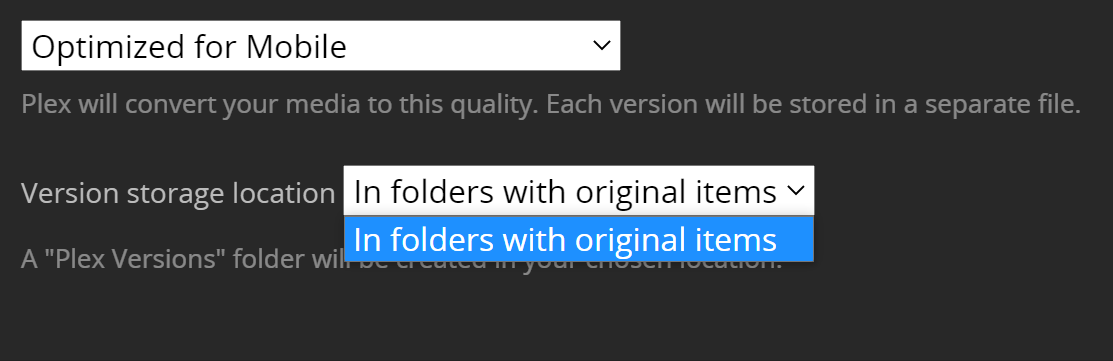
When I try to optimize my entire library, or a group of videos within it (e.g. after filtering resolution to 4k), the only “Version storage location” option I’m offered is “In folders with original items”:
But when I try to optimize a single video I have the additional locations you’d expect (i.e. the Library folders):
This is what I need, but I really don’t want to have to manually optimize each video in order to store all the optimizations in a single folder.
These videos are all in the same folder, i.e. /netstorage/Movies. The /netstorage/Movies-optimized folder is empty - I only added it to store the optimizations.
hmm… on what platform are you running your Plex Media Server / what version exactly is this?
I’ve just created a dummy library on my Mac running the latest beta 1.23.3.4706 with the hosted Plex Web (https://app.plex.tv/desktop).
The library used to have all shows organized in the same folder.
I added a new “optimization target” folder
If I select all items and click Optimize on the action bar, it’ll offer me to pick the original and the newly added “optimization target” folder.
I’m having the same experience on my productive server (running on Ubuntu) as long as I take care only to select shows that are in the same source folder – given my library is linked to 3 source folders, I could complete that in 3 optimization jobs.
Ah… but now I see your point – I can do that from the multi-selection action bar but not from the library context menu.
I suppose I stand corrected by my own attempt to prove that it’s working for me
Edit:
Though this should give you a workaround for what you’re trying to achieve.
You should be able to trigger this optimize from your single-source-folder library by selecting all shows and then trigger the optimization from the action bar
Good to see I’m not going mad I’d ideally like to be able to do this for a filter query so future additions to the library that meet that filter also get optimised. (This is how I had it set up before I started this whole migration exercise). So, sounds like this is a legitimate bug - should I file it somewhere?
I have the same issue, but unfortunately this is an unacceptable work around, I used to rely on this to make versions of my very high bit rate game captures to make then usable over my 10mbs upload. I need it to automatically optimize things as there added to the library.
I am experiencing the same issue in 1.24.0.4930. It worked for me before, but after formatting the HDD for the optimized versions I cannot longer optimize a whole library, only individual items.
Seems to be an issue with the web client. I was able to make it work by altering the website through chrome’s dev tools. I just copied the missing options into the drop down’s html and it worked just fine on the server side.
My use case is pretty much the same. I want to create 1080p versions of all unplayed 4k movies on the media server’s local storage, automatically. Originals are stored on a nfs mount.
As mentioned above, when selecting a single item, the drop down is populated. Only when trying to optimize multiple items at once, it is not. Take a look at the screen shots no1knows posted.
Hi thanks for posting the suggestion of editting the dropdown options, but although it is possible to see and select the new options, it doesn’t actually save
Hi long time Plex user and lurker in these forums but finally can post something useful (hopefully).
I too had this issue with the latest version of Plex and have managed to get around it…
I have created a symbolic link to the “Plex Versions” folder in my 4K folder to the 1080P folder, so when Plex optimises a video outputs to the “Plex Versions” folder which is actually my 1080P folder.
For windows Plex Media Servers use the “mklink” command
For Linux use the “symlink” command
For Synology it can be achieved by using the “mount —bind” command
 – the latest public version is 1.23.2)


 I’d ideally like to be able to do this for a filter query so future additions to the library that meet that filter also get optimised. (This is how I had it set up before I started this whole migration exercise). So, sounds like this is a legitimate bug - should I file it somewhere?