Server Version#: 1.30.0.6486
Player Version#: iOS 8.13
I am seeing an issue with using NVIDIA hardware transcoding and sync/download vidoes. When I restart plex the first video works and is transcoded correctly and download. the 2nd video fails to start.
Every 2.0s: nvidia-smi -i 0 -q -d UTILIZATION hal: Tue Dec 20 12:39:21 2022
This is the first video, if stop the download (cancel from device) and re request a sync
==============NVSMI LOG==============

Timestamp                                 : Tue Dec 20 12:39:21 2022
Driver Version                            : 525.60.11
CUDA Version                              : 12.0

Attached GPUs                             : 2
GPU 00000000:0F:00.0
    Utilization
        Gpu                               : 11 %
        Memory                            : 13 %
        Encoder                           : 7 %
        Decoder                           : 34 %
    GPU Utilization Samples
        Duration                          : 11.71 sec
        Number of Samples                 : 71
        Max                               : 18 %
        Min                               : 10 %
        Avg                               : 14 %
    Memory Utilization Samples
        Duration                          : 11.71 sec
        Number of Samples                 : 71
        Max                               : 22 %
        Min                               : 13 %
        Avg                               : 18 %
    ENC Utilization Samples
        Duration                          : 11.71 sec
        Number of Samples                 : 71
        Max                               : 12 %
        Min                               : 6 %
        Avg                               : 9 %
    DEC Utilization Samples
        Duration                          : 11.71 sec
        Number of Samples                 : 71
        Max                               : 59 %
        Min                               : 33 %
        Avg                               : 48 %
this is what happens.
==============NVSMI LOG==============

Timestamp                                 : Tue Dec 20 12:41:00 2022
Driver Version                            : 525.60.11
CUDA Version                              : 12.0

Attached GPUs                             : 2
GPU 00000000:0F:00.0
    Utilization
        Gpu                               : 0 %
        Memory                            : 0 %
        Encoder                           : 0 %
        Decoder                           : 1 %
    GPU Utilization Samples
        Duration                          : 11.71 sec
        Number of Samples                 : 71
        Max                               : 1 %
        Min                               : 0 %
        Avg                               : 0 %
    Memory Utilization Samples
        Duration                          : 11.71 sec
        Number of Samples                 : 71
        Max                               : 1 %
        Min                               : 0 %
        Avg                               : 0 %
    ENC Utilization Samples
        Duration                          : 11.71 sec
        Number of Samples                 : 71
        Max                               : 0 %
        Min                               : 0 %
        Avg                               : 0 %
    DEC Utilization Samples
        Duration                          : 11.71 sec
        Number of Samples                 : 71
        Max                               : 3 %
        Min                               : 0 %
        Avg                               : 0 %
I see there is an existing guid
Dec 20, 2022 12:40:37.203 [0x7fca88dc4b38] DEBUG - [Req#ec7/Transcode] Found session GUID of 3f501e3a6d1a7fda3f449c5896fe987714d94dfa in session start.
Dec 20, 2022 12:40:37.203 [0x7fca88dc4b38] DEBUG - [Req#ec7/Transcode] Using existing transcode session.
Dec 20, 2022 12:40:37.203 [0x7fca88dc4b38] DEBUG - [Req#ec7/Transcode] Activity: registered new activity a3252e0d-fed6-4ffc-a67b-f9e8726e3df0 - ""
Dec 20, 2022 12:40:37.203 [0x7fca88dc4b38] DEBUG - [Req#ec7/Transcode] Activity: updated activity a3252e0d-fed6-4ffc-a67b-f9e8726e3df0 - completed -1.0% - Media download by manojav
Dec 20, 2022 12:40:37.204 [0x7fca88dc4b38] DEBUG - Content-Length is -1 (of total: -1).
Dec 20, 2022 12:40:37.205 [0x7fca86481b38] DEBUG - [TranscodeOutputStream] Input processing thread started at offset 0 for -1 bytes.
Dec 20, 2022 12:40:37.437 [0x7fca893cdb38] DEBUG - [Req#ee9/Transcode/3f501e3a6d1a7fda3f449c5896fe987714d94dfa/6842f575-ed69-44c6-bd71-081495944081] Session 3f501e3a6d1a7fda3f449c5896fe987714d94dfa (0) is throttling
Dec 20, 2022 12:40:37.437 [0x7fca8798db38] DEBUG - [Req#f29/Transcode/3f501e3a6d1a7fda3f449c5896fe987714d94dfa/6842f575-ed69-44c6-bd71-081495944081] Throttle - Going into sloth mode.
However when first transcoded sycn finishes or is cancelled there is no sessions left in the transcode folder.
If if restart plex everything works for the very first transcode.
However when I watch movies that are transcoded things work fine, as stop and start movies. This is only an issue on sync.
I should add the sync with transcode doesn’t work even when hardware encode turned off until plex server is restarted. then again it works for the first video synced and then stops
It almost feels that once the first encode / transcode is complete the counter isn’t reset, as result the 2nd one cannot start it still thinks there is one in progress and its running in Sloth mode.
There are no issues with hardware based stream transcoding for viewing on web etc. They work great. its just during sync/download that setting it to 1/2 stream max (which is close to what my card do) is causing the sessions not to get reset.
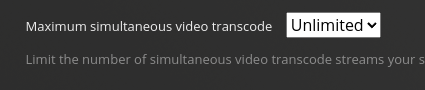
At the moment I have it working and I am downloading/sync-ing some movies. so once I set the streams back to 1 or 2. I can reproduce it and I will send you the zipped up log. The current work around is set the limit to unlimited.
See the initial post and nvidia-smi output showing that its hardly doing anything. I have some other cameras being decoded on that card which take up about ~500 megs of VRAM on the card.
The OS underneath is Ubuntu 22.04 and yes I did do the initramfs and reboot after the downgrade to 515
Also why does it go into sloth mode while doing a sync/download? should it not process everything as fast as it can write to disk? I am using /dev/shm as the transcode location to get rid of any i/o related slowness as well. I have 12G free to start, and an avg. movie (720p) about 2.3G. So no issues with running out of room there.
It is what it is like you said we can argue both sides.
But the crux of the issue is this
set my simultaneous streams to 1.
restart pms.
sync two moves on my ios device. first movie starts to sync using nvenc and finished as fast as it can I guess.
sync finishes on the 1st movie, starts on the 2nd movie, but now in sloth mode and takes forever, nvidia-smi shows no load on the GPU
any other movies I queue up after that will also not load up the GPU and proceed in sloth mode.
work around is set the limit to unlimted, then two moves start together are process and all further movies and synced using GPU and evidenced by nvidia-smi showing work being done.
Yes. I can re-create this at will. I will pick a smaller TV episode but regardless of the source type the behavior is the same.
all future transcodes after the firsdt start with nvenc/nvdec like you say but they all print out sloth mode. almost like the first one isn’t marked as finished.