Were you not assigning permissions as I show here?

This is Full Control.
which is verified here:
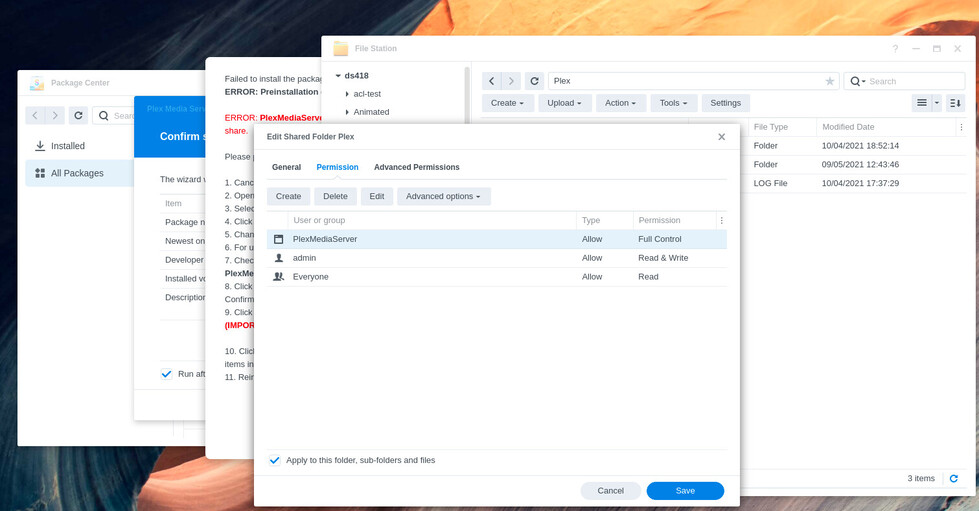
Were you not assigning permissions as I show here?
This is Full Control.
which is verified here:
It is clear to me that I need better detection of the permission-prohibited condition.
I have an idea how to be more surgical and will start working on that .
The goal being that it throws up the “ACL permission” error popup sooner (as it should have)
I was setting Admin rights only on PlexMediaServer. The Plex folder did not have the option. What I’m reading now is that the Plex folder needs to be converted for ACL permissions before that can happen. Trying that now.
Yes.
IGNORE / DELETE the PlexMediaServer shared folder please.
Its presence will cause you grief PRIOR to migration.
( ( Normal installation does not show the PlexMediaServer shared folder until after the package is installed ) )
Your only concern is the Plex share. I handle the rest.
Took a couple of minutes to run the ACL conversion wizard on the Plex folder. Now able to set the Plex folder for full access. Installing again and appears to be taking some time this time. Will let it run overnight and post results tomorrow. Thanks again for your help.
ACL setup is the required magic.
In the documentation, I explain what happened to the package under DSM 7.
The TL;DR is:
No more “root” access. PlexMediaServer is an unprivileged user trying to gain access to another unprivileged user’s files (Plex). That’s the step you, as admin, provide.
Plex doesn’t install itself anymore. DSM handles everything.
DSM manages the permissions of the “PlexMediaServer” shared folder as well as where it’s created.
The environment, in general, is extremely ‘clamped down’. I, as developer, can only access that which they grant through a non-privileged API (the installer) and the ACL changes which you, as admin, grant.
Sucks, huh?
DSM might force you to log in again. No worries. Install is still running (DSM is doing it )
Don’t shut down the box until it’s done.
You can tell it’s done when the file Plex / Migration.log shows you Completed: Clean /volume1/Plex as the last line.
Success!
After 3 hours, the pop-up said the install failed and I should log into DSM again. I checked the log file you mentioned and it showed as completed. After closing and reconnecting to the NAS, all my metadata is now under the PlexMediaServer folder instead of the Plex folder. Opened Plex and all my media was there. Just had to remove several “unavailable” servers.
I can’t thank you enough for your help. I really thought I was going to have to start from scratch.
Thanks!
I did my install of DSM 7 today.
Same as the first post…followed all instructions and got a very quick success message, no error message, and no history or metadata or DVR settings, etc
Fix was to do a full ‘erase’ uninstall of the PMS package, delete all files in the PlexMediaServer shared folder, and then reinstall PMS package.
DSM is 7.0.1-42218 Update 2
PMS is 1.25.3.5409
Batts
This almost always happens when PMS is still installed when upgrading to DSM 7 and the “Repair” button is clicked or PMS 1.21.0.3744 is used.
Either of those options end result in 1.21.0.3744 being installed and creating a rogue server install without migrating the data.
Therefore, when upgrading PMS, it takes the rogue installation and moves it to PlexMediaServer.
In all these cases, Uninstall + ERASE option removes the rogue server installation.
Caution is given – CONFIRM Plex/Library/Application Support/Plex Media Server exists prior to any ERASE option complete restart is desired.
This topic was automatically closed 90 days after the last reply. New replies are no longer allowed.
