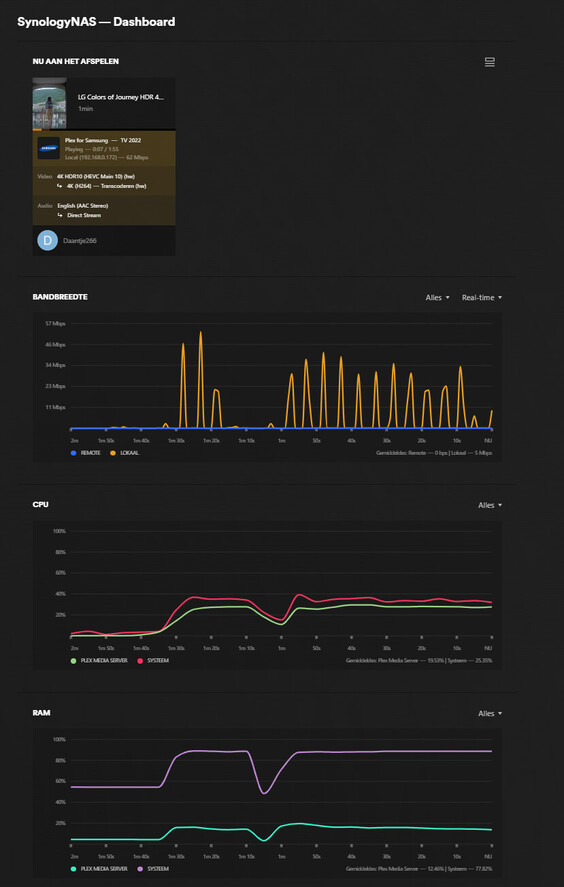
This is my DS920+ transcoding.
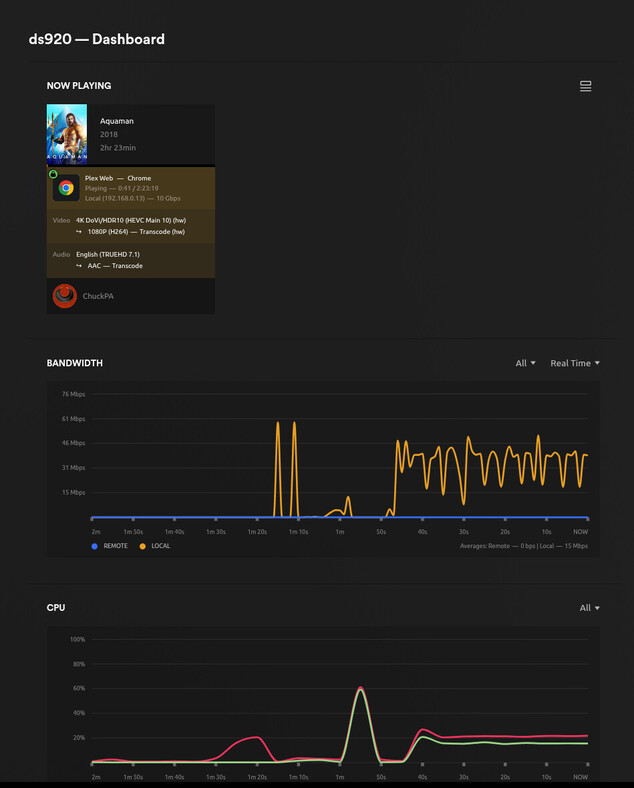
Notice the CPU load as it converts HEVC HDR to 1080p
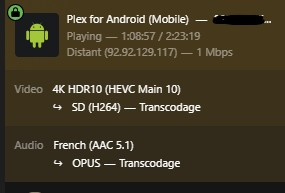
Hello, this is my first post on this forum.Sorry, my english is not perfect (I’m french). I’m using a brand new DS425+ (with Synology hard drives …) with a plex pass. It’s seems that Plex is not using the hardware to transcode (see photo). I thought it would, since the DS425+ has the same cpu that is used on the DS920+ (Intel J4125). I think the reason is that the DS425+ is not on the compatibility list provided by Plex. I hope that it will be quickly supported. Is there any other way to say to plex to allow hardware transcoding ?
On the photo, there is no (HW) after the word “transcoding” (“transcodage” in french) :
The film that had the high peak was focus. But the other film had high peaks during reading and writing.
After that, I converted the film to MP4, and that was my final screenshot, which showed that the NAS was barely loaded and didn’t need to work.
But if the DS425+ isn’t as handy with a Western Digital HDD, I might as well buy the DS423+ soon so I don’t have the last one. If the DS423+ breaks down in the future, I’ll have to switch to another brand. Or can anyone tell me which other brands are better than the DS423+?
No matter what I do, I can’t get hardware transcoding on my DS425+. I previously owned a DS920+ and a DS1520+ and had no issues. And recently, I installed Plex on a friend’s DS423+, no issues either. Are you sure that the DS425+ is really supported under Plex for hardware transcoding, even though it has the same processor as the other 3 NAS I’m talking about? You added it to the compatibility list yesterday, but isn’t there a settings file in plex that says which NAS is supported?
Please do the following for me.
This will tell us definitively what is happening
To answer your question:
Here are the server logs : Plex Media Server Logs_2025-07-11_00-04-19.zip (502.7 KB)
Thank you for your help.
Thank you for the logs.
Jul 10, 2025 23:59:52.127 [140342331755320] DEBUG - [GPU] Got device: Intel GeminiLake [UHD Graphics 600], intel@builtin, default true, best true, ID 8086:3185@0000:00:02.0, DevID [8086:3185], flags 0x34e7
Jul 10, 2025 23:59:52.127 [140342331755320] DEBUG - [GPU] Cuda library was not found on the system
Jul 10, 2025 23:59:52.127 [140342331755320] INFO - Preemptively preparing driver ivd for GPU Intel GeminiLake [UHD Graphics 600]
Jul 10, 2025 23:59:52.127 [140342331755320] DEBUG - [DriverDL/ivd] Skipping download; already exists
Jul 10, 2025 23:59:52.127 [140342331755320] INFO - Preemptively preparing driver icr for GPU Intel GeminiLake [UHD Graphics 600]
Jul 10, 2025 23:59:52.127 [140342331755320] DEBUG - [DriverDL/icr] Skipping download; already exists
Jul 11, 2025 00:03:04.993 [140342281636664] DEBUG - [Req#83/Transcode] [FFMPEG] - nal_unit_type: 32(VPS), nuh_layer_id: 0, temporal_id: 0
Jul 11, 2025 00:03:04.993 [140342281636664] DEBUG - [Req#83/Transcode] [FFMPEG] - nal_unit_type: 33(SPS), nuh_layer_id: 0, temporal_id: 0
Jul 11, 2025 00:03:04.993 [140342281636664] DEBUG - [Req#83/Transcode] [FFMPEG] - nal_unit_type: 34(PPS), nuh_layer_id: 0, temporal_id: 0
Jul 11, 2025 00:03:04.993 [140342281636664] DEBUG - [Req#83/Transcode] [FFMPEG] - nal_unit_type: 20(IDR_N_LP), nuh_layer_id: 0, temporal_id: 0
Jul 11, 2025 00:03:04.993 [140342281636664] DEBUG - [Req#83/Transcode] [FFMPEG] - Decoding VPS
Jul 11, 2025 00:03:04.993 [140342281636664] DEBUG - [Req#83/Transcode] [FFMPEG] - Main 10 profile bitstream
Jul 11, 2025 00:03:04.993 [140342281636664] DEBUG - [Req#83/Transcode] [FFMPEG] - Decoding SPS
Jul 11, 2025 00:03:04.993 [140342281636664] DEBUG - [Req#83/Transcode] [FFMPEG] - Main 10 profile bitstream
Jul 11, 2025 00:03:04.993 [140342281636664] DEBUG - [Req#83/Transcode] [FFMPEG] - Decoding VUI
Jul 11, 2025 00:03:04.993 [140342281636664] DEBUG - [Req#83/Transcode] [FFMPEG] - Decoding PPS
Jul 11, 2025 00:03:04.993 [140342281636664] DEBUG - [Req#83/Transcode] [FFMPEG] - Format vaapi chosen by get_format().
Jul 11, 2025 00:03:04.993 [140342281636664] DEBUG - [Req#83/Transcode] [FFMPEG] - Format vaapi requires hwaccel initialisation.
Jul 11, 2025 00:03:04.993 [140342281636664] ERROR - [Req#83/Transcode] [FFMPEG] - No support for codec hevc profile 2.
Jul 11, 2025 00:03:04.993 [140342281636664] ERROR - [Req#83/Transcode] [FFMPEG] - Failed setup for format vaapi: hwaccel initialisation returned error.
Jul 11, 2025 00:03:04.993 [140342281636664] DEBUG - [Req#83/Transcode] [FFMPEG] - Format vaapi not usable, retrying get_format() without it.
Jul 11, 2025 00:03:04.993 [140342281636664] DEBUG - [Req#83/Transcode] [FFMPEG] - Format yuv420p10le chosen by get_format().
Jul 11, 2025 00:03:04.994 [140342281636664] DEBUG - [Req#83/Transcode] [FFMPEG] - Decoded frame with POC 0.
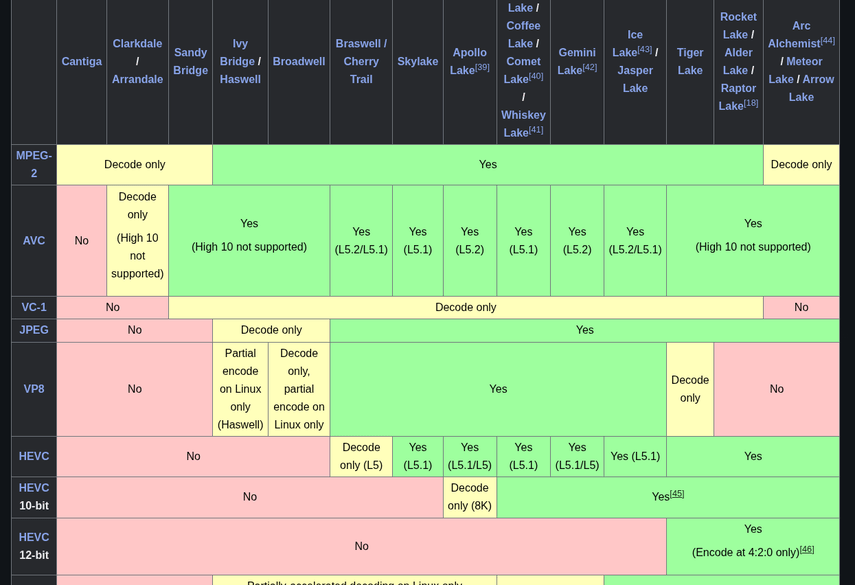
Please look at this chart
Here is a test file which I know the GeminiLake (J4xxx) CPUs can transcode.
Please retest with it.
BEFORE you retest, Please do the following
.device_id file. (your license)@ChuckPa Were you able to find anything in my logs?
Yes. Please see my comments above (1 & 3).
It sees the GPU (#1)
The GeminiLake cannot HW process HEVC 12-bit (4:4:4) – aka Profile 2 video.
(It’s too old for 4:4:4)
That’s why I linked the test file. The test file will confirm you have HW support on HEVC 4:2:0 video (HDR 10).
I’ve deleted everything from the card you’re referring to. I’ve reinvented the NAS.
Playing the movie, it first went black, then a spinning circle for about 20 seconds. Then it started playing for about 10 seconds, then stopped again and started loading again, also for about 20 seconds, and then played for only about 10 seconds again. It’s not really working, so to speak.
Auf meiner QNAP TS-464 läuft es mit Hardware Transkodierung einwandfrei ohne zu stocken. Ich transkodiere zu HEVC (h2.65).
How do you see where it’s transcoding to? Perhaps you have a better TV that can play more file types? I feel like my TV can play very little.
My first test was transcode to my android handy. The second was to my Desktop-PC.
This screenshot of it playing the demo file I gave you shows HW transcoding.
– HW decode HEVC, HW encode H264
The easiest & best player to test with is the browser. (Plex/web app)
The browser has no special capabilities, PMS (the server) must do everything
The Plex/web app writes clear entriies to the server logs.
I don’t understand you? I don’t need to test anything with the Plex Web. It’s supposed to work on my TV, and it doesn’t. It also does hardware transcoding (hw), but the CPU is going very high and my volumes are reading and writing very loudly. In short, my NAS has to work incredibly hard.
I think I should abandon hardware transcoding and just compress everything to MP4.
I’m debating whether to get a QNAP NAS. I’m used to Synology, but it’s not working for me. They no longer support Western Digital, and the slightly older version of the NAS wasn’t suitable for the WD Red Pro 22TB. But what’s the difference with QNAP? Synology had good security, including SFTP and automatic blocking of IP addresses. Can I also go to this forum for this or should I ask this somewhere else?
@ChuckPa
Das Video wird für den Samsung TV transcodiert, weil die Framerate variabel zwischen 57,7 und 62,5 FPS liegt. Der TV meckert, dass die Framerate mit über 60 FPS überschritten wurde. Das tritt auch an meinem TV auf (Samsung QN90C). Mein QNAP TS-464 puffert dann auch in den letzten 20 Sekunden. Übrigens: “Force direkt play” spielt das Video ohne Probleme!
I wouldn’t use either to host Plex, I used host it on a Synology DS220j but got frustrated with how little power it had for that. I eventually moved it to a Linux server made out of spare computer parts and then mounting the Synology share folders.
For the transcoding, you have another option in that you can use a program like Handbrake to transcode the video to a target output and bitrate while leveraging your computer’s hardware. You will just have to add the version info in the file name so it categorizes correctly.
Plex Server only transcodes if you don’t already have a suitable file.
I don’t have enough knowledge to build my own NAS. I currently have the DS220+ and it works fine. However, my TV can’t handle many file formats.
I just think it’s really bad that Synology doesn’t recognize Western Digital HDDs. I want 22TB per hdd