Yeah, that can be a bit of a hurdle. I also think Synology shot themselves in the foot with the new lineup requiring “first party” drives. I can see that making sense for the rack mount series (since usually enterprise buys those), but for the desktop NAS systems it is really dumb.
Hello, thank you for your help. First, the movie I’ve tried to play 4 days ago is a “4K HDR10 (HEVC Main 10)” movie. I’m sure this movie ran smoothly on my DS920+. I followed your advice (emptying the “codecs” directory etc.) and I have the same problem with the test video you provided me: no hardware transcoding ! The CPU activity is close to 100%, there are pauses due to “buffering” … I’m attaching the logs and a screenshot. My plex pass is ok : I’ve installed Plex Media Server on my PC and hardware transcoding (with my Geforce 4070ti) is working.
So, to summarize: I have a working plex pass, my DS425+, which has the same CPU as the DS920+ and DS1520+, cannot do a hardware transcode of the file you provided me. A friend who has a DS1520+ tested with the same version of PMS (1.41.8.9834-72009834) and he has no problems. What’s going on with the DS425+?!
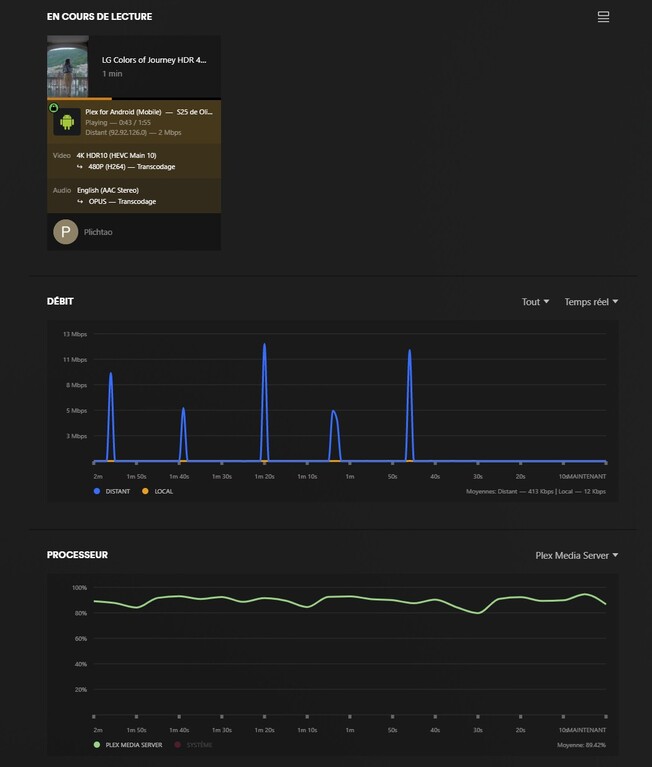
The DS425+ was added to the Compatibility List because previous models with that same CPU and HW configuration had been vetted.
Without hands-on to another, or your, DS425+, there is absolutely no way of knowing what’s not working for you.
Given others have with the same CPU have no difficulty, there are two possible outcomes:
- The DS425+ is somehow altered but not reported in the specs
- There is something wrong with your DS425+ or it’s configuration
Yes, that’s right. Many people don’t want the expensive Synology HDD and don’t want to be forced. I’m really considering switching to QNAP, but I’ve read reports that the security isn’t as good. I also read reports that people prefer the system to the Synology, so I find it difficult because security is very important.
The security of your NAS depends on the firewall you use. I have a Fritzbox with dual stack (IPv4 & IPv6).
For IPv4, I only forwarded port 32400 to my TS-464 NAS for Plex. This is enough to run PLEX securely. I run other services (SFTP, for example) ONLY over IPv6. I mapped the ports so that the well-known ports aren’t used.
I also installed Qfirewall on the NAS and restrict access based on country.
This has been running for two years now without a hacker attack.
Okay, yes, with Synogoly, you don’t need a software firewall or hardware firewall, and it handles everything from its own system. It’s already blocked thousands of IP addresses from all over the world, and so on. I do need to open a few ports and have an SFTP connection. But I read everywhere that the security is poor, even with the QNAP software firewall.
Are there any drivers that need to be installed for the Celeron J4125’s IGP, to handle hardware decoding and encoding ? If so, does Synology install them during DSM installation and updates, or does the Plex installation handle them? One thing is certain : even though they’re based on the same architecture, the DS920+ and DS425+ don’t have the same DSM components. Consider the size of the DSM for each of these NAS ! (see picture)
Would you be willing to test my DS425+ with remote access to try to resolve my issue and possibly allow future DS425+ users to benefit from it ? I spent all afternoon trying to resolve my issue, and I even started from a completely new DSM installation, with only the Plex package installed but the problem remains the same. I’ve been using Plex for 6 years and have installed it on many Synology NAS, this is the first time I’ve encountered this problem !

The drivers for the iGPU are built into the kernel.
To confirm it’s in the kernel,
- SSH into the unit,
- type:
ls -la /dev/dri - You will see something like this:
admin@Syno-DS716plus:~$ ls -la /dev/dri
total 0
drwxr-xr-x  2 root root             100 Jan 14  2015 .
drwxr-xr-x 13 root root           14020 Jul  9 10:49 ..
crw-------  1 root root        226,   0 Jan 14  2015 card0
crw-------  1 root root        226,  64 Jan 14  2015 controlD64
crw-rw----  1 root videodriver 226, 128 Jan 14  2015 renderD128
admin@Syno-DS716plus:~$
The important names here are: card0 and renderD128.
- renderD128 is how to access the transcoding
- card0 is how to access the tone mapping.
Notice the renderD128 device is a member of the videodriver group.
This is expected and how Plex accesses it (has sufficient privilege)
Misschien kunnen jullie beter in een prive chat of eigen topic verder gaan. Want dit is mijn topic en Plichtao word meer geholpen als mij. Maar ik heb het wel gezien, hardware transcodering werkt deels maar niet helemaal en je nas word op volle toeren gejaagd. Dus gewoon een goeie player kopen
Gewoon met vlc player converteren naar mp4, subs inbranden. Geen gezijk meer met transcoderen
It seems ok for the drivers :

I keep looking for what’s wrong but I’m starting to run out of ideas.
Daar heb ik verder geen verstand van. Ben er wel achter gekomen dat de nas heel veel leest en schrijft en afhankelijk van je schijf zit daar ook slijtage aan vast wd plus is 180tb per jaar en wd pro 550tb per jaar
Hello ChuckPa, I’ve just created a new topic about my DS425+ hardware transcoding issue. I’ve noticed something that could help us to solve the problem …
I have just purchased a DS425+ because earlier this week it said it supported hardware transcoding, today I checked and its gone (crossed out) are there issues, is it a temp bug or have I just blown my load on the wrong NAS?
There are issues with the DSx25+ models which prevent HW transcoding.
Beestation is reported working but the same CPU in the DSx25+ does not.
A DSx25+ owner must open a ticket.
Until such time as this is resolved, I must disqualify HW transcoding for the unit.
