Can you assist here ? I believe managed users is more your area.
I have not many ideas about this.
Please switch to your Plex admin account, then go to
https://app.plex.tv/desktop#!/settings/users-sharing
Click on one of the affected users
On the tab ‘Shared Libraries’ ‘Edit’ and verify that the user has been allowed to access the right libraries on the right server (in case you have several. This can actually be an old and a new server installation on the same machine.)
Then change to the ‘Restrictions’ tab, make a screenshot and paste it into here.
I will try this tonight.
Thanks,
Rick
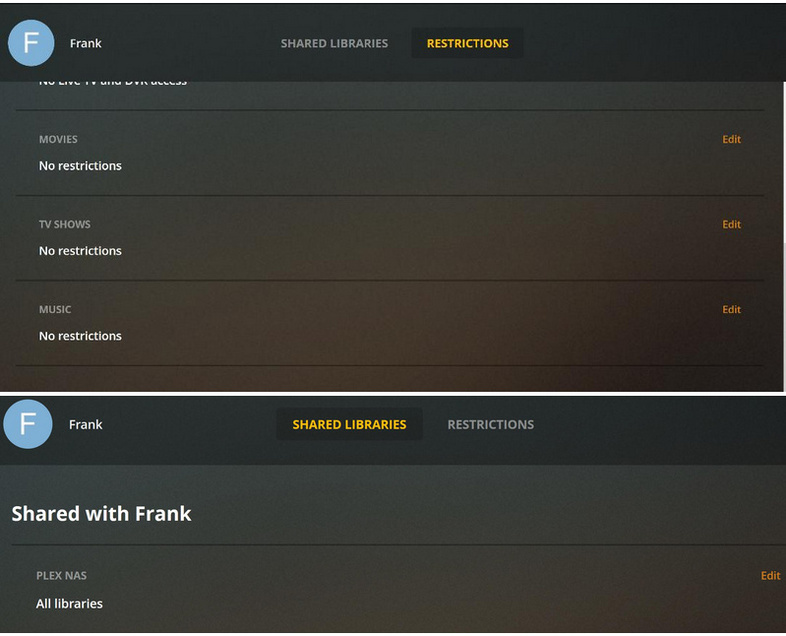
Could you send me your real Plex username per PM, please?
Does it make any difference if you edit the ‘All Libraries’ link and revoke the access to one library,
then save
then grant the access back?
I just tried only leaving one library available. The user couldn’t see that. Then I went back in and gave full rights. They still couldn’t see anything on my NAS - “no soup for you” message.
I finally have this fixed. I don’t know if it will help anyone else, but I deleted the PLEX Server app off my Synology NAS and added it back in. Once I did that. All users could see the server and libraries again, and I was able to delete Managed Users which had also stopped functioning.
Doing this brought my PLEX Server back to version 1.16.5.1552, which was the last working version I had before updating to version 1.18.x
I am see no reason for me to upgrade so I will leave it alone until I am forced to upgrade.
Thank you all for your efforts in trying to help me get his going again.
1 Like
Ok, so I was able to piece together what @p924s87 and @trumpy81 did to get shares working again in Plex 1.18+ on Synology’s DSM. Posting here for any other googlers:
- On your local plex server (hitting the server locally, not via app.plex.tv), as an administrator, go to the Plex Web UI
- Click on Settings, then Authorized Devices
- In the Dropdown, filter by Server
- Remove your Synology Server. You’ll get some scary warnings, but don’t worry, there’s no data-loss
- Once done, refresh the web browser and go back to Settings
- You’ll see a message about this Plex instance being unclaimed (remember, you’re hitting plex via either localhost or your local IP and port).
- Go ahead and re-claim your server
- Once re-claimed, go back to Users & Sharing
- You’ll see all your users there, but no libraries being shared
- Go ahead and re-share your libraries with your users
- Done!
Couple of hiccups:
- You’ll only be able to re-enable shares with up to 5 users at first. Seems like there’s some sort of API rate-limiting, and you’ll get an error saying “Failed to update server shares.” after five. Just wait 10 mins and try again, and it’ll work
- Your users might have to sign out and back in on their client to get it to pick the share back up. This varies by client. On the AppleTV I simply had to force quit the app, but others had to sign out and back in.
Hope this helps!
2 Likes
This topic was automatically closed 90 days after the last reply. New replies are no longer allowed.
