Synology PMS start-stop-status script prevents mounting Plex directory

Server Version#: 1.19.3.2852
Synology DS918+
DSM: 6.2.3-25426

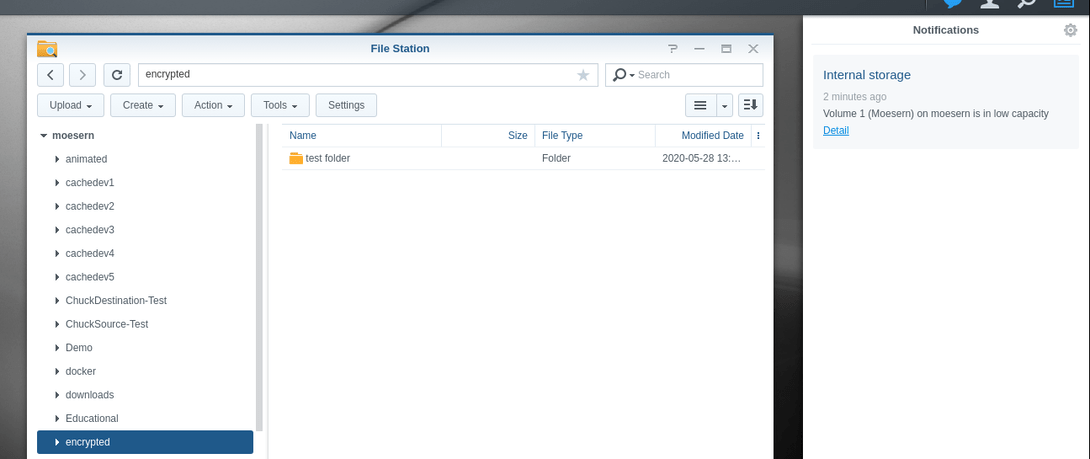
I encrypt my Synology Shared Folders using the native encryption functionality. Therefore, /volume1/Plex is a separate ecryptfs mount point.

The PMS ‘/var/packages/Plex Media Server/scripts/start-stop-status’ script includes a few lines that checks if the tmp_transcoding dir exists, and creates it if not. However, it appears that upstart is invoking this script (presumably for status) every ~5s. Therefore, there is a race condition, and if the script succeeds in creating the tmp_transcoding dir before the encrypted filesystem is mounted, the mount fails because the mount point directory is not empty.

I’m guessing the check-and-create-folder logic was added as a result of this: Synology Plex Stopped - Can't Restart.

Is there a better way of handling this? Currently, I have to edit the script and comment out those lines every time I update the PMS package. Perhaps better to move this check/logic to PMS itself rather than the startup script? Presumably PMS needs to locate Preferences.xml on startup, so if it can locate that, but tmp_transcoding doesn’t exist, then create it?

It sounds like there’s a few things going on here.

  1. DSM queries each “Started” app every 5 seconds. This is the start-stop-status routine you see in the /var/packages/Plex Media Server/scripts/start-stop-status. If I don’t respond to their query, the package is marked “dead” until next reboot.

  2. I am surprised they startup applications, which almost all expect their files available at startup, before actually unlocking the share(s). IMHO, this is a Synology bug --unless-- you’re using something other than Synology apps to accomplish this?
    2a. Can you elaborate more please?

  3. Regarding the handling of the Plex share, this situation is extremely atypical for the reasons stated above. While I could tighten the app’s behavior, it would be a rather ugly message because if the Plex share didn’t exist (was deleted without reinstalling), my only recourse when attempting to start would be similar to as already in place:

PLEX_PATH="$(/usr/syno/sbin/synoshare --get Plex | grep Path | awk -F[ '{print $2}' | awk -F] '{print $1}')"
if [ "$PLEX_PATH" = "" ]; then

  # Issue error to users (Not Found - rerun installation)
  echo "The Plex share could not be found.  Please check your configuration, reinstall Plex, or ask in our Support Forums." > $SYNOPKG_TEMP_LOGFILE
  exit 150
fi

Thank you for the quick response! I apologize that I did not do a better job of fully communicating the issue in my original post.

  1. Understood on DSM querying every 5s; this makes sense given the behavior I am observing.

  2. I am not using anything outside of normal Synology tooling to start/stop services. To this point, I’ve been only using the webUI and Package Manager for starting/stopping PMS.

2a and 3) I think the crux of my issue is that the start-stop-status script includes these lines outside of any function, meaning they get run every time the script is invoked, regardless of which script option (start, stop, status, log) is requested:

# Verify tmp_transcoding directory exists.  Silently recreate if possible.
if [ ! -d "${PLEX_PATH}/tmp_transcoding" ]; then

  # There is nothing there or not a directory,  Silently recreate if possible
  rm -rf "${PLEX_PATH}/tmp_transcoding"
  mkdir -p "${PLEX_PATH}/tmp_transcoding"
  if [ $? -ne 0 ]; then

    echo "The Plex 'tmp_transcoding' directory was missing.  Attempts to recreate it failed.  Please repair manually or ask in our Support Forums." > $SYNOPKG_TEMP_LOGFILE
    exit 150
  fi

  # Grant permissions
  chown plex:users ${PLEX_PATH}/tmp_transcoding
fi

I think a big portion of my issue would be mitigated by moving those lines into start_plex(), which seems like the only time it would be relevant to verify that directory exists? It’s not clear to me why it would be necessary to check for and create the directory on every script invocation (for status, stop, or log). As it exists now, if (for whatever reason) I need to stop PMS and unmount the Plex share, I am unable to re-mount the Plex share because I’m in a 5s race against the script. It appears that even with PMS stopped via Package Manager:

# initctl status 'pkgctl-Plex Media Server'
pkgctl-Plex Media Server stop/waiting

DSM still invokes the script every 5s and the Plex/tmp_transcoding directory gets recreated.

Even if those lines get moved into start_plex(), it’s possible that there may still be a race condition upon a full reboot. I am unable to test that right now as I have a multi-hour data transfer in process. As soon as I’m able to test, I will follow up.

Oh My!

What a great catch! I thank you!

I guess I look at the code too much and don’t see my own mistakes!

start_plex ()
{

  # Verify tmp_transcoding directory exists.  Silently recreate if possible.
  if [ ! -d "${PLEX_PATH}/tmp_transcoding" ]; then

    # There is nothing there or not a directory,  Silently recreate if possible
    rm -rf "${PLEX_PATH}/tmp_transcoding"
    mkdir -p "${PLEX_PATH}/tmp_transcoding"
    if [ $? -ne 0 ]; then

      echo "The Plex 'tmp_transcoding' directory was missing.  Attempts to recreate it failed.  Please repair manually or ask in our Support Forums." > $SYNOPKG_TEMP_LOGFILE
      exit 150
    fi

    # Grant permissions
    chown plex:users ${PLEX_PATH}/tmp_transcoding
  fi

  # Verify device permissions are intact
  Changed=0

  # Ensure the TV Butler udev rule exists
  if [ ! -f /lib/udev/rules.d/60-tv-butler-fix.rules ]; then
    echo 'SUBSYSTEM=="usb", ATTRS{idVendor}=="1d19", ATTRS{idProduct}=="0100", GROUP="video", MODE="0660"' > /lib/udev/rules.d/60-tv-butler-fix.rules
    Changed=1
  fi
..
..
..

Move to be within the confines of start_plex absolutely

Do you concur ? (looks like you do from the above)

So just moving that set of lines into plex_start() sort of solves part of the larger issue. It prevents the system from checking/creating the directory every 5s whether the Plex service is running or not. Which allows me to manually ensure the Plex share is mounted/available and manually start the Plex service.

This failed a reboot test, though. It seems that the Plex service gets triggered to start before DSM has finished mounting all of the shares.

So my solution is to add some logic to plex_start() to check if the Plex share is mounted/online/available before starting PMS. I tested as many different shares (encrypted and plaintext), it as many different modes as I could think to try, and it seems that the Status value as reported by synoshare --get <sharename> uses the least significant bit to determine if the share is fully ready for use or not. If the LSB is 0, it is usable; if 1 then not.

So here is what I did to the Plex start-stop-status script locally, which seems to work for all of my use cases, albeit with a grossly-hard-coded 30s countdown (this is all within plex_start(); I included a few lines before and after to show context/position within the existing script):

...

    # Retrigger udevadm if needed
    if [ $Changed -eq 1 ]; then
      sync
      udevadm trigger
      sleep 3
    fi

    # Wait up to 30 seconds for the Plex share to become available.
    counter=30
    mounted=0
    while [ $counter -gt 0 ]; do
      # This checks if the least significant bit in the Status field is a 0
      # (i.e. - the Status value is an even number). This appears to indicate
      # that the share is mounted/ready for use.
      status=$(/usr/syno/sbin/synoshare --get Plex | grep Status | awk -F[ '{print $2}' | awk -F] '{print $1}')
      if [ $(($status & 0x1)) -eq 0 ]; then
        mounted=1
        break
      fi
      let counter=counter-1
      sleep 1
    done
    [ $mounted -eq 0 ] && return 1

    # Verify tmp_transcoding directory exists.  Silently recreate if possible.
    if [ ! -d "${PLEX_PATH}/tmp_transcoding" ]; then

      # There is nothing there or not a directory,  Silently recreate if possible
      rm -rf "${PLEX_PATH}/tmp_transcoding"
      mkdir -p "${PLEX_PATH}/tmp_transcoding"
      if [ $? -ne 0 ]; then

        echo "The Plex 'tmp_transcoding' directory was missing.  Attempts to recreate it failed.  Please repair manually or ask in our Support Forums." > $SYNOPKG_TEMP_LOGFILE
        exit 150
      fi

      # Grant permissions
      chown plex:users ${PLEX_PATH}/tmp_transcoding
    fi

    # Continue with normal PMS start
    PLEX_PATH=$(/usr/syno/sbin/synoshare --get Plex | grep Path | awk -F[ '{print $2}' | awk -F] '{print $1}')
    su plex -s /bin/sh -c \

...

Please feel free to use this if you like, or come up with a better way of writing this instead of my quick&dirty solution.

Thanks again for your responsiveness and attention to this!

1 Like

I’ve implemented that change. It was tested by two of us for basic functionality before giving to you.

My only check for the Plex share is thesynoshare command. That is how their API wants me to do it.

Might this be something to take up with Synology ?

DSM 6.2.2 or new 6.2.3 ?

I’m on DSM 6.2.3.

I do not fully understand your most recent reply. You’ve implemented which change?

Also, please clarify your point about the synoshare command? I see that you use it to obtain the disk path to the PLEX_SHARE. I used the same command for a different purpose: to obtain the status of the share.

I am on DSM 6.2.2. I’ve not updated

The Synology SDK instructs me to query their share tool. When the Path is available, the share is there.

PLEX_PATH=“$(/usr/syno/sbin/synoshare --get Plex | grep Path | awk -F[ ‘{print $2}’ | awk -F] ‘{print $1}’)”

This returns the absolute path (e.g /volumeX/Plex )

I then use that path for all further operations in the script

When the Path is available, the share is there.

That is provably incorrect. Starting with the Plex share mounted and its contents available:

root@NAS:~# mount | grep Plex
/volume1/@Plex@ on /volume1/Plex type ecryptfs (rw,relatime,ecryptfs_fnek_sig=...
root@NAS:~# ll /volume1/Plex
total 48
d---------+ 1 root root  2176 May 21 10:21 .
drwxr-xr-x  1 root root   446 May 28 07:07 ..
-rwx------+ 1 plex users    0 May 25 12:53 Bitte legen Sie hier keine Mediendateien ab.
drwxrwxrwx+ 1 root root   336 May 28 07:07 @eaDir
drwx------+ 1 plex users  208 May 16 11:34 Library
-rwx------+ 1 plex users    0 May 25 12:53 Please do not place any media files here.
-rwx------+ 1 plex users    0 May 25 12:53 Por favor, no coloque ningún archivo multimedia aquí.
drwx------+ 1 plex users    0 May 28 07:05 tmp_transcoding
-rwx------+ 1 plex users    0 May 25 12:53 Veuillez ne placer aucun fichier multimédia ici.
-rwx------+ 1 plex users    0 May 25 12:53 ここにメディアファイルを置かないでください。
-rwx------+ 1 plex users    0 May 25 12:53 请不要在此处放置任何媒体文件。
root@NAS:~# synoshare --get Plex
SYNOSHARE data dump:
	 Name .......[Plex]
	 Comment ....[Plex metadata storage]
	 Path .......[/volume1/Plex]
	 Deny list ..[]
	 RW list ....[]
	 RO list ....[]
	 fType ......[2]
	 fBrowseable [yes]
	 FTPPrivilege[7]
	 Status .....[0x1882]
	 WinShare .....[yes]
	 ACL ..........[yes]
	 Skip smb perm.[yes]
	 Permit .......[yes]
	 RecycleBin....[no]
	 RecycleBinAdminOnly....[no]
	 HideUnreadable ........[no]
	 Snapshot browsing .....[no]
	 On Cold Storage Volume.....[no]
root@NAS:~#

So now I’ll unmount the encrypted Plex share:

root@NAS:~# synoshare --enc_unmount Plex
root@NAS:~# ll /volume1/Plex
ls: cannot access /volume1/Plex: No such file or directory
root@NAS:~# synoshare --get Plex
SYNOSHARE data dump:
	 Name .......[Plex]
	 Comment ....[Plex metadata storage]
	 Path .......[/volume1/Plex]
	 Deny list ..[]
	 RW list ....[]
	 RO list ....[]
	 fType ......[2]
	 fBrowseable [yes]
	 FTPPrivilege[7]
	 Status .....[0x1883]
	 WinShare .....[yes]
	 ACL ..........[yes]
	 Skip smb perm.[yes]
	 Permit .......[yes]
	 RecycleBin....[no]
	 RecycleBinAdminOnly....[no]
	 HideUnreadable ........[no]
	 Snapshot browsing .....[no]
	 On Cold Storage Volume.....[no]
root@NAS:~#

Note that when the Plex share is unmounted, and in fact the /volume1/Plex directory does not even exist, synoshare --get Plex still shows the full Path. So the presence of the Path in the output of synoshare --get Plex has nothing to do with whether the share is available for use or not.

This is why my suggested script modification uses the Status value from synoshare --get Plex. Note the difference in the Status value between the mounted case and the unmounted case:

root@NAS:~# mount | grep -i plex
root@NAS:~# synoshare --get Plex | grep Status
	 Status .....[0x1883]
root@NAS:~# synoshare --enc_mount Plex 'password_redacted'
root@NAS:~# mount | grep -i plex
/volume1/@Plex@ on /volume1/Plex type ecryptfs (rw,relatime,ecryptfs_fnek_sig=...
root@NAS:~# synoshare --get Plex | grep Status
	 Status .....[0x1882]
root@NAS:~#

When unmounted, the Status is 0x1883 (an odd number, so the LSB is set). When mounted, the Status is 0x1882 (an even number, so the LSB is not set). That same pattern holds for all other shares, encrypted and not, on my NAS.
let me get this clear so I can change my work before it goes to QA?

if I perform the synoshare command, AND the share is unmounted,

THEN

What should I do?

I do not control how DSM starts PMS.

Is it being asserted I check the status and ignore starting until mounted?

What impact will that have on service status?
How am I expected to track a pending start request but be certain to not carry it through a reboot (which would be poor behavior)?

So, I do not feel it is my place to tell you exactly what to do. In an earlier post, I shared the “solution” that I came up with, which was to check the status of the Plex share every second for up to a maximum of 30 seconds. If the share becomes available, proceed with starting PMS. If the share never becomes available, or 30 seconds elapses, return non-zero from plex_start() indicating a failed startup. This 30 second counter is kind of a gross hack that allows time for the race between DSM attempting to start PMS and DSM finishing mounting the encrypted shares.

There may be edge cases I’m not thinking of, and there may be ways that this does not provide the best user experience that Plex may want for the product. My intention with this entire thread was to highlight the problem I encountered, and suggest one possible “solution”/workaround. You are free to use my suggestion as-is, create a modified version of it, do something else entirely, or ignore this altogether.

I have a finite time before DSM is going to mark the app as dead.

If I restructure the start, allowing a finite number of Check-for-share-ready before failing, the rest of the logic will handle PMS itself starting as before once unlocked.

In all the time PMS has been on Synology, I don’t understand why this is only becoming an issue now but am trying to resolve it as quickly as possible and get it right the first time.

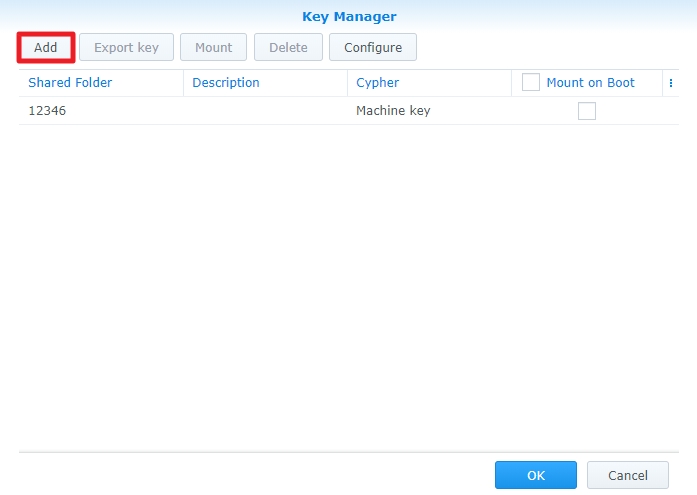
I spoke with Synology and they provided the answer

4.2 Add keys to be managed in Key Manager

  1. Check to box to “Mount at boot”
  2. DSM will unlock/mount/make available before starting apps (Plex).

Confirmed: Automatically mounted on reboot.

No modifications to the startup scripts are required for this to work properly.

I have corrected the inappropriate testing for the directories on every invocation of start-stop-status.

I already have the Plex share configured to mount at boot. That isn’t the issue. The issue is that there is an apparent race condition between DSM starting PMS and DSM mounting the shares at boot. DSM does not appear to wait until all shares are mounted before launching various services, PMS included. So on a reboot, PMS gets launched before the Plex share is available, the portion of the start-stop-status script that checks for and creates the tmp_transcoding directory runs, which means that the mount point for the Plex share is not empty, and when DSM then tries to mount the Plex share, it fails.

I still do not understand why the start-stop-status script needs to specifically handle the creation of tmp_transcoding every time PMS is started. It seems like the PMS application and/or plug-in(s) could verify that directory is available whenever they need to use it, and create it if necessary. However, since that is the way things are currently, I was just trying to find a workaround that makes all of this work.

I believe the correct fix would be for Synology to provide a way for Plex to specify, in the package metadata/INFO, that PMS depends on the Plex share being available. However, my own reading of the DSM Developer/SDK docs suggests there is currently no such (at least documented) method of doing so.

If Plex feels that this is not their/your problem to solve, so be it. I can automate the patching of the PMS script whenever I update the PMS package. My hope was to get some kind of workaround or fix into the product itself so that other users could avoid this as well.

Regarding the race condition, Please take that up with Synology.
I just spoke to them about it and it should handle all applications.

I’ve even tried starting PMS in an encrypted Plex share and cannot recreate this problem on two different NAS systems (DS1815+ and DS418j).

The reason I check for those directories is because there are times when some restores a backup or moves the Plex share.

They are normally created at installation time but it’s easier for all concerned to create them if needed when the Plex share already exists. (this is a soft-recovery situation).

I think it’s in the best interest to get the problem solved. Working around something gains nothing.

If you are told otherwise by Synology, please get back with me ASAP.
We have another channel we can use to escalate the problem.

If additional information is needed, here is from my DS418j

The DS918+ has AES-NI hardware acceleration so that shouldn’t be a problem.

I’ve spent additional time on this today.
I wanted to discover the root cause of the startup race condition.

It appears, althought not 500% certain, Synology calls the plex start-stop-status routine even when PMS isn’t started.

Why it does this is a mystery.

My steps to recreate

  1. Stop Plex
  2. Rename the share in Control panel - Shared Folders
  3. Create a new “Plex” share with the standard permissions.
  4. Without doing anything else, inspect the Plex share.

This creates an unrecoverable situation until I use the new start-stop-status routine.
If DSM creating @eaDir is the true root-cause then we need to get Synology involved as quickly as possible.

As interrim solution, I’m posting here to get feedback & confirmation that it will work.

please mind the lead-in and trailing shell lines.

[chuck@lizum scripts.507]$ cat start-stop-status 
#!/bin/sh

# DSM version variables
DSM_VERSION="$(get_key_value /etc.defaults/VERSION productversion)"
DSM_BUILD="$(get_key_value /etc.defaults/VERSION buildnumber)"
DSM_UPDATE="$(get_key_value /etc.defaults/VERSION smallfixnumber)"

# Set identification variables
PMS_INFO_VENDOR=Synology
PMS_INFO_DEVICE="$(get_key_value /etc.defaults/synoinfo.conf unique|cut -d'_' -f3|sed 's/^ds/DS/;s/^fs/FS/;s/^rs/RS/'|sed 's/^\([0-9]\)/DS\1/')"
PMS_INFO_MODEL="$(uname -m)"
PMS_INFO_PLATFORM_VERSION="DSM $DSM_VERSION.$DSM_BUILD-$DSM_UPDATE"

# Base Plex installation directory
PLEX_DIR="/var/packages/Plex Media Server/target"

# Find the Plex share
PLEX_PATH="$(/usr/syno/sbin/synoshare --get Plex | grep Path | awk -F[ '{print $2}' | awk -F] '{print $1}')"
if [ "$PLEX_PATH" = "" ]; then

  # Issue error to users (Not Found - rerun installation)
  echo "The Plex share could not be found.  Please check your configuration, reinstall Plex, or ask in our Support Forums." > $SYNOPKG_TEMP_LOGFILE
  exit 150
fi

# Set final variables
PLEX_LIBRARY_PATH="$PLEX_PATH/Library/Application Support"
PID_FILE="$PLEX_LIBRARY_PATH/Plex Media Server/plexmediaserver.pid"


# Plex status must now be defined before parsing below
plex_status()
{
    if [ ! -f "$PID_FILE" ]
    then
        return 1
    fi
    if [ -d /proc/`cat "$PID_FILE"` ]
    then
        return 0
    else
        return 1
    fi
}

start_plex ()
{

  # Verify tmp_transcoding directory exists.  Silently recreate if possible.
  if [ ! -d "${PLEX_PATH}/tmp_transcoding" ]; then

    # There is nothing there or not a directory,  Silently recreate if possible
    rm -rf "${PLEX_PATH}/tmp_transcoding"
    mkdir -p "${PLEX_PATH}/tmp_transcoding"
    if [ $? -ne 0 ]; then

      echo "The Plex 'tmp_transcoding' directory was missing.  Attempts to recreate it failed.  Please repair manually or ask in our Support Forums." > $SYNOPKG_TEMP_LOGFILE
      exit 150
    fi

    # Grant permissions
    chown plex:users ${PLEX_PATH}/tmp_transcoding
  fi

  # Verify device permissions are intact
  Changed=0

  # Ensure the TV Butler udev rule exists
  if [ ! -f /lib/udev/rules.d/60-tv-butler-fix.rules ]; then
    echo 'SUBSYSTEM=="usb", ATTRS{idVendor}=="1d19", ATTRS{idProduct}=="0100", GROUP="video", MODE="0660"' > /lib/udev/rules.d/60-tv-butler-fix.rules
    Changed=1
  fi

  # Check if this model supports HW transcoding
  if [ -d /dev/dri ]; then

    # Ensure the HW Transcoding udev rule exists
    if [ ! -f /lib/udev/rules.d/60-fix-plex-hw-transcoding.rules ]; then
      echo 'SUBSYSTEM=="drm", GROUP="video"' > /lib/udev/rules.d/60-fix-plex-hw-transcoding.rules
      Changed=1

    # If the HW Transcoding udev rule exists, ensure it is correct
    elif [ "$(grep -c drm /lib/udev/rules.d/60-fix-plex-hw-transcoding.rules)" -eq 0 ]; then
      echo 'SUBSYSTEM=="drm", GROUP="video"' > /lib/udev/rules.d/60-fix-plex-hw-transcoding.rules
      Changed=1
    fi

    # Check if permissions correct
    if [ "$(ls -la /dev/dri/renderD128 | awk -F' ' '{print $4}')" != "video" ]; then
      Changed=1
    fi
  fi

  # Retrigger udevadm if needed
  if [ $Changed -eq 1 ]; then
    sync
    udevadm trigger
    sleep 3
  fi

  # Continue with normal PMS start
  PLEX_PATH=$(/usr/syno/sbin/synoshare --get Plex | grep Path | awk -F[ '{print $2}' | awk -F] '{print $1}')
  su plex -s /bin/sh -c \
  "export LC_ALL=en_US.utf8; \
   export LANG=en_US.utf8; \
   export LD_LIBRARY_PATH='$PLEX_DIR/lib'; \
   export PLEX_MEDIA_SERVER_MAX_PLUGIN_PROCS=6; \
   export PLEX_MEDIA_SERVER_APPLICATION_SUPPORT_DIR='$PLEX_LIBRARY_PATH'; \
   export TMPDIR=$PLEX_PATH/tmp_transcoding; \
   export PLEX_MEDIA_SERVER_DEFAULT_PREFERENCES='HardwareAcceleratedCodecs=true&TranscoderCanOnlyRemuxVideo=false'; \
   export PLEX_MEDIA_SERVER_INFO_VENDOR='$PMS_INFO_VENDOR'; \
   export PLEX_MEDIA_SERVER_INFO_DEVICE='$PMS_INFO_DEVICE'; \
   export PLEX_MEDIA_SERVER_INFO_MODEL='$PMS_INFO_MODEL'; \
   export PLEX_MEDIA_SERVER_INFO_PLATFORM_VERSION='$PMS_INFO_PLATFORM_VERSION'; \
   export PLEX_BROWSER_NO_HOME_DIR=1; \
   ulimit -s 3000; \
   sleep 2; \
   /var/packages/Plex\ Media\ Server/target/Plex\ Media\ Server >/dev/null 2>&1 &"

  counter=20
  while [ $counter -gt 0 ]
  do
    plex_status && break
    counter=$((counter - 1))
    sleep 1
  done

  # Give 3 seconds to get started
  sleep 3

  # create DSM shortcut
  if [ ! -f "/usr/syno/synoman/webman/3rdparty/plex" ]; then
    ln -s "$PLEX_DIR/dsm_config/plex" /usr/syno/synoman/webman/3rdparty
  fi
  plex_status

}

stop_plex ()
{

    # Make first requests nicely
    Count=11

    # Ask nicely for 1 minute
    while [ "$(ps -ef | grep -i ^plex | grep "Plex Media Server"| wc -l)" -ne 0 ] &&  [ $Count -gt 0 ]
    do

      if [ -f "$PID_FILE" ]; then

        kill -15 $(cat "$PID_FILE")
        sleep 5
      fi

      Count=$(($Count - 1))

    done

    # PMS has been asked nicely to shut down for 1 minute but has not.
    # Now we take down any processes owned by user 'plex'
    Pids="$(ps -ef | grep -i ^plex | awk '{print $2}')"

    Count=10
    Sig=-9

    while [ "$Pids" != "" ] && [ $Count -gt 0 ]
    do
        # Kill what's still running
        kill $Sig $Pids
        sleep 5

        # Look again
        Pids="$(ps -ef | grep -i ^plex | awk '{print $2}')"
        Count=$(($Count -1))

        # Force them down if our last iteration
        if [ $Count -eq 1 ]; then
          Sig=-11
        fi
    done

    # Remove the Package Manager linkage
    rm -rf /usr/syno/synoman/webman/3rdparty/plex
}

case $1 in
    start)
        echo Starting Plex ...
        start_plex
        exit $?
        ;;
    stop)
        echo Stopping Plex ...
        stop_plex
        exit $?
        ;;
    status)
        if plex_status
        then
            echo Plex is running
            exit 0
        else
            echo Plex is not running
            exit 1
        fi
        ;;
    log)
        echo "$PLEX_LIBRARY_PATH/Plex Media Server/Logs/Plex Media Server.log"
        exit 0
        ;;
    *)
        exit 1
        ;;
esac
[chuck@lizum scripts.508]$ 
  1. (minor) You’re setting PLEX_PATH twice and this isn’t necessary.
  2. I don’t see how this addresses the race condition in any way?

For what it’s worth, my issue wasn’t that @eaDir was getting created; in fact I never saw that. The only thing getting created was /volume1/Plex/tmp_transcoding.

Where are the unlocking credentials (key) stored?
Are they external or on the internal system volume?