Server Version#:1.32.4.7195-7000
Player Version#:
<If providing server logs please do NOT turn on verbose logging, only debug logging should be enabled>
I have my PMS on a Synology 218+ server with two 12TB drives and have had very few problems.
Recently, we lost power. When things came back online, there were some issues with other AV components and I didn’t focus on the Synology/Plex server. It seemed to be working. But soon I noticed that my free space was disappearing (I had roughly 3TB remaining and then noticed it was under 2TB). I noted it, but wasn’t overly concerned. Now, however it has dropped to 0% remaining.
I have been in touch with Synology and they have pointed to a few things that freed up a little space (that then got eaten quickly). I rebooted the system and that seems to have quieted things down. Now whe I free up a little space (30GB) it stays free.
I’m thinking the problem may be in Plex. I don’t have much on the server (obviously a bunch of media files, but they are very neatly organized. A couple other folders with photos and some other media backups. Otherwise the only things on the server are the Synology Packages and Plex.
When I’ve opened some of the subfolders in Plex, there are just reams and reams of folders and subfolders with thousands of files. Not very big individually, but there are too many to count.
a) Has anyone else experienced something like this? How did you address it?
b) Should I uninstall and reinstall the PMS? I’d hate to lose all of my meta data (I do a lot of customizing of tags, etc.). My base system is an older Mac Mini.
c)Plex support docs say to search for ~/Library/Application Support/Plex Media Server/ and ~/Library/Caches/PlexMediaServer, but I cannot find these - either on my Synology server or the Mac (wouldn’t expect them on the Mac, but I looked).
I’m sure I need to provide more information, so please let me know.
Thank you in advance for your help.
Craig.
Craig,
By default, PMS sets up the following -
- Chapter thumbnail images (these can chew a LOT of space)
- You can turn them off & remove them easily if you wish.
- EDIT the library section and go to the Advanced tab.
- Turn OFF
- DELETE if you want
- Save changes when done.
is your media stored outside your plexmediaserver folder? could a corrupt database be causing you to generate more and more data.
Yes, they’re both on the Synology server, but PMS is separate from the media library (I had built the library (or much of it) before upgrading to Plex.
Given that, thoughts on how to proceed?
Thanks.
@craig_camelio_gmail_com
Please detail how you have things configured ?
Where’s Plex installed ? volume 1, 2, or ???
Where are you running out of space ?
chuck will help better than me but for your reference my plexmedia folder is this big if you want to check yours. if plex was the culprit i’d expect that folder to be getting larger.
I run my PMS on a regular Linux box (My syno is used for development/testing)
My PMS directory is 99GB … and I am testing everything except thumbnail images

[chuck@glockner ~.1997]$ du -ms /vol/plexmediaserver/
99684	/vol/plexmediaserver/
[chuck@glockner ~.1998]
Chuck,
Thank you (and djfriday13) for your help. And I apologize in advance that I’m going to be pretty clueless. I made the switch to Synology after an earlier drive melted down. It was recommended because it would be easy to set up and somewhat “plug and play”. And largely it has been. But when things go wrong (like this) I feel like I’m drowning.
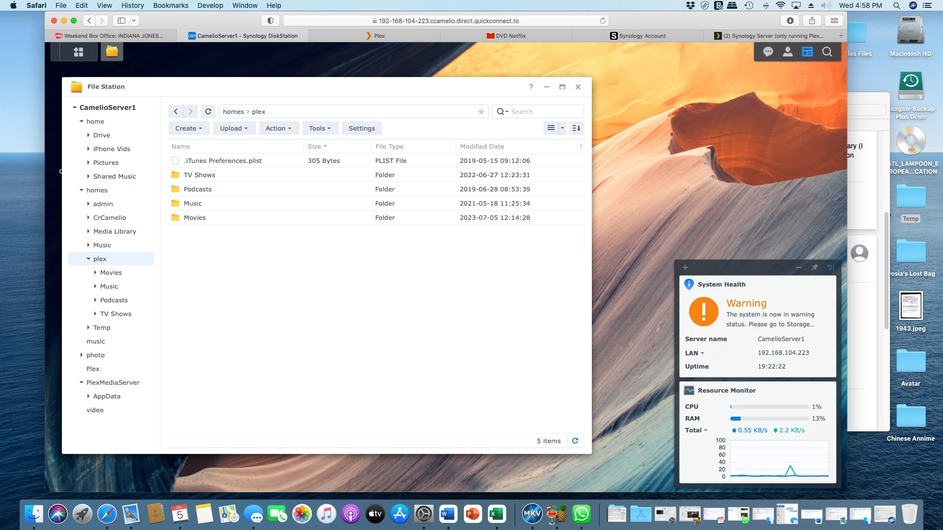
I am including some of the screenshots which I hope helps somewhat. Part of my challenge is that I don’t know where the “new” data is. It’ s not appearing in an obvious place on the drive. And I can’t see how big the PMS folder (and all the infinite sub-folders) is. I’d be willing to bet it’s bigger than 100GB.
Also, just a heads up that I will be offline soon, but I will be back in the morning.
Thank you again for your help.
Craig.
Using File Station, navigate to /PlexMediaServer/AppData.
Right click on Plex Media Server (inside AppData)
Choose Properties.
Wait. It may take a few minutes. DSM will eventually show you the folder size, number of files, etc.
@craig_camelio_gmail_com
Craig,
One thing to understand with SHR raid – That first configuration of 2x 10TB, you’re only going to get 10TB usable. This is because the other drive is providing the protection (They share the protection duties). (you can pull either of the drives out right now, while it’s running, without data loss. Yes, it will need to scrub the volume to recover but there won’t be anything lost)
When you add another drive, you’ll get most, if not all, that drive’s space
Chuck,
Fully understand. But I think we’ve (thank you) identified the problem.
I ran the check on the size of the PMS folder. I don’t have an answer for you because at some point my computer choked and rebooted. But last I saw it was up to 43MM (yeas, 43 million) files in the PMS directory.
So, assuming this is the problem, how do I fix it and remember, talk to me like I’m five (a knowledgeable 5, but still…)
Thanks.
Craig.
Ooooh, A knowledgeable 5 ? That’s way better than Terrible 3’s I normally get! 
Read slowly please. I wrote this conversationally. Ask if any questions.
The files in the “PlexMediaServer” shared folder are structured much like a library.
-
The databases ( Plex Media Server / Plug-in Support / Databases ) is the Card Catalog. It tells PMS what is what (your media) and where everything is (all the metadata)
-
The rest of the support files, in the “Plex Media Server/Media” and “Plex Media Server/Metadata” folders, are the actual metadata for all your media files.
-
There are a few other support folders (Caches) which hold the artwork in display-ready format.
When we look at the space PMS is using,
-
The SQL Databases themselves have the biggest impact on performance.
That’s what my tool addresses. It fixes the simple errors. Its biggest benefit is restructuring the database and restoring it for best performance. When you have a lot, and I do mean a LOT of media, it’s not uncommon to see SQLite databases approach 1GB in size. (You’ll see this as you add more and more media.).
-
The “size” of the PlexMediaServer shared folder itself can get really big.
I had one user whose databases were about 1.5 GB.
The size of the PlexMediaServer shared folder was over 500 GB.
This includes the SQLite databases AND all the support metadata.
To give you some sense of scope,
-
I have 123,428 media files indexed in my PMS server
-
The size of my SQLite3 database is 518 MB
-
The number of metadata files I have is 679,795
-
The amount of disk space to hold everything is 99GB.
This is pretty normal for having that much indexed into PMS (indexed == Added to library sections).
A couple recommendation for you:
-
When you make backups of your Plex server , use Synology HyperBackup.
It makes a perfect backup such that if you ever need to restore, PMS won’t be able to detect it. Do run the backup with PMS stopped. This guarantees the databases are backed up perfectly in a quiescent state
-
You probably are thinking about what to do with your DS218+.
This is the tough part.
– You didn’t understand how SHR RAID works and figured 2 drives would be OK
– Now you’ve grown out of your 12TB (10.8TB usable) storage.
– What do you do ?
-
You’re not the first to be in this situation and certainly not the last.
-
A lot of us plan ahead only to realize we didn’t plan far enough ahead.
-
Options to consider (not knowing your finances)
– Upgrade the 12TBs to 20TBs (it will buy you some time … you’ll add 8TB more usable)
– Consider purchasing a 4, 5, or even 8 bay Synology (Diskless)
AND
– Move your two existing HDDs to the new chassis (DSM will let you do this with ease and without any data loss
OUTFALL
– You’ll be able to sell or repurpose the DS218 as you deem appropriate.
What happened to me -
- I had a DS1813+ and outgrew it in a couple months
- I bought a DS1815+ and outgrew it just as quickly
- I bought a QNAP TVS-1282. I outgrew that 2 years later.
- I finally got tired of it all and built my own
(12x 12TB HDDs giving me 100TB of usable storage. notice 24 TB is dedicated to making the RAID work. I can give you the math if you wish. It’s easy)
If I fill that any time soon … Shoot me 
chuck i think you may have missed what his problem is as he doesn’t think he has outgrown his system yet. He had 3tb of space one day and then had no space left shortly there after, suggesting that something is creating data in error and leaving it there.
at this point he is thinking that his plexmediaserver folder is growing uncontrollably even though he has not added media or changed anything. I’m not sure this fact is confirmed yet although his latest post makes that conclusion based on the 43MM files.
i have seen other threads where people ahve this issue but it was because they had media in that folder. He has confirmed he doesn’t. Perhaps because of a power outage something is causing his database to continually grow?
DJ,
I think you’re on the right track. Something in the powerloss/resumption sent things awry and it just got into a “doom loop” of writing and writing and writing (until it filled over 3B of space). All of this seems to be contained in the PMS directory.
At the very least, I would want to try to uninstall/delete the PMS folder and then try to reinstall it. I’d like to do that in a way that would not cost me all of the tweaking and metadata that I’ve added/changed, but that’s the price I pay, it will take several hours, but won’t be the end of the world.
I am open to any other thoughts that would be short of a complete re-do of PMS if you think that would work. If not, I think that’s what we have to look at. Given that, is it as “simple” as uninstalling the PMS Package on the Synology drive and deleting any remnant files and then downloading and reinstalling a new one from Plex?
Again, thank you both for your help.
Craig.
@craig_camelio_gmail_com
I’m sorry if I misunderstood.
Let’s find out what’s happening this way
- Open FileStation (in the web browser opened on the Syno)
- Go to PlexMediaServer shared folder
- Right-Click “AppData” → Properties
- Now wait for it to count all the files & folders in AppData.
- When it finishes, it will also display the disk space used.
This is faster than trying to do from a computer over the network
I tried this last night. It ran for over 6 hours before something failed and my computer rebooted. At that time it was up to over 43MM files (no idea of the total size, but simple math (even if they were only a 100K average would be huge).
I can try rerunning it again, but I’d point out that my library is large, but not “too large”. I have roughly 1700 movies, Maybe 100 TV shows, and a music database that I haven’t added to in years (thanks, Spotify). I don’t think that there is any reason for the PMS files to number 10000:1 in balance with the actual media files.
Craig.
You sat in FileStation, with FileStation gathering the info, for 6+ hours and the NAS rebooted ?
( Your computer doesn’t do anything during this time except sit there in the browser )
My computer rebooted - I don’t think the NAS did. but it shut down the browser and when I went back I had to relog in and progress appeared to be lost.
I restarted it, but it will take a while…
If you want to shortcut this, we can just use a big hammer.
- Stop Plex
- Open FileStation
- Navigate → PlexMediaServer/AppData/Plex Media Server/Cache
- Delete
PhotoTranscoder and Transcode folders
- Navigate back up to PlexMediaServer/AppData
- Go into the
tmp folder
- Delete anything / everything you find.
Now look at the disk space situation.
Just a FYI. I haven’t disappeared. The first two steps (TransCode and PhotoTranscode) went relatively quickly (a few minutes each. The tmp directory is taking over 2 hours (still calculating file size).
Will let you know when it’s complete.
Craig.