I have my home videos organized like TV shows by year on Plex and thought that if I tagged the videos with various keywords I could then search for videos using those tags. After tagging a few however, I tried searching and none of them came up. Is there a way to search content using the tags, and if not, what is the point of tagging content? Is there another way to search easily for specific videos?
I suppose you’re looking for the library filters?
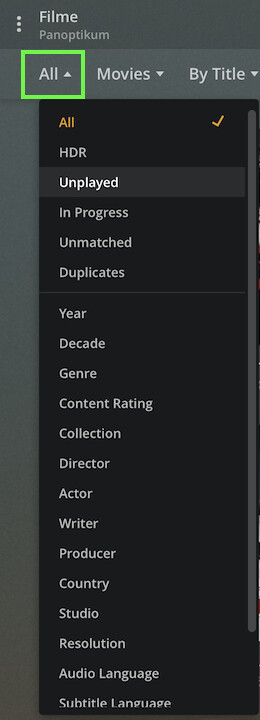
You can e.g. filter your library by year/decade, genre, content rating, collection, cast/crew (actor, director, writer, producer), country, studio or (sharing) labels.
All of those (except for the actor field) are based on the tags you can edit within Plex. If you have configured Plex to use embedded metadata, Plex will also use embedded tags (incl. actor information – I’ve been using this for some time to filter by family members in certain videos).
Filtering also supports limiting your library by certain technical aspects (e.g. resolution, audio/subtitle language [if applicable], HDR, playback status…).
Edit:
Search will mostly go for the video’s title, actor/director.
It sounds like that would do the trick for me. This may be a dumb question, but how do I set up filtering? I don’t see that setting anywhere. How do I add information like actors to the videos? The only tags I see are Writers and Directors, neither of which appear to show up in search results at the top of the screen. Thanks for your help.
If you click the filter box/selection you can pick by what parameter you want to filter your library. At the bottom of the list, there’s also an option for a custom filter that allows you to combine multiple filters or to exclude certain tags (instead of only showing those)