Ah; I assumed since nothing was visible in the GUI, there was no data. Log is here.
Ctrl+F ERROR and you’ll see what I mean. There are so many bad entries, bad characters, half messages, etc. Those are the raw messages from Plex Media Server and control everything Tautulli does. If the messages are bad, then there is no way that Tautulli can process them and function normally.
I saw that. Lots of weird character blocks in there. This started happening during my usage of PMS v1.14.0.5468, and continued after I upgraded to v1.14.0.5470.
I ran a “repair” function and rebooted, then activated the “server up” and “server down” notifications in Tautulli. The constant alerting behavior is still happening, so it looks like the repair didn’t repair the problem with PMS.
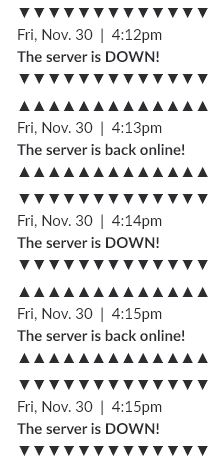
Does anyone know what my options are here? What is this a possible symptom of? I am clueless.
@SwiftPanda16- Should I post a bug tracker issue? The 24 hour temporary post of my logs has now expired.
Additionally, could @tycho1974 's issue in viewing websocket log be related?
Install older version?
I have no idea what the issue is.
Nor do I, but with logs and that error hopefully you’d be able to determine at least a good point to start troubleshooting.
tautulli.log (398.0 KB)
Log attached. 11/26 ~20:00, I could read the logs.
11/27 ~18:00 I could not.
please, support for python 3.x thanks for the amazing addon. Very useful
For a reference point…
I have Tautulli v2.1.22 running on a Windows 7 system pointing to PMS v1.14.0.5470 running on another Windows 7 system. An I login from my Laptop to Tautulli…
I have had this setup since PMS v1.13 without any issues…
Just getting into Tautulli, very cool! Is there any way to monitor/maintain playlists with this tool? I couldn’t find anything in the FAQ.
You cannot monitor anything specific to the playlist but if someone watches an item on it then it will be logged/tracked.
As for managing playlists webtools will allow you to do that.
Thanks for this.
I think that i have mad a mistake. The first time i startet Tautulli it was on the desktop.
So now i place all my logs and so on on my desktop.
Can i change that?
I have moved Tatulli to my C:program files\ directory.
Regards Daniel
how to i get it to not send notifications about me playing
Conditions
Username is not xxxxxx
didn’t think of that
c:\program files\ isn’t usually recommended.
It usually requires administrative access to write access to those folders.
I’d recommend moving your Tautulli folder to c:\Tautulli or something like c:\PlexStuff\Tautulli (I’ve got a whole slew of tools/toys/files I use with Plex, so “PlexStuff” was better for me)
Once the \tautulli\logs folder is in a folder that the user running Tuatulli has write permissions to, logs/db and other access will take care of itself when running.
I’m trying to set up a notification when I add a new TV series to the server. I have it set up with a condition for the media type eq season. But when I add something to Plex, I see: Tautulli NotificationHandler :: Custom notification conditions not satisfied, skipping notifier_id 7.
I have tried with the media type being both season and show. What do I need to change? The trigger is set to “media added”
For the first time a very long time, Tautulli has stopped working for me. I have made sure I am on the latest version and verified the server connection. The “Watch Statistics” has data, as does the Stream info, but the “Activity” and “Library Statistics” area all get the message “There was an error communicating with your Plex Server. Check the [logs] and verify your server connection in the [settings].” So here are the logs. Hopefully, it is just something dumb I have done.tautulli.log (3.9 MB)
Workaround here:
Tested and working.
