The Clearing (2023) Episode metadata incorrect

The Clearing (2023) The Clearing (TV Mini Series 2023) - IMDb
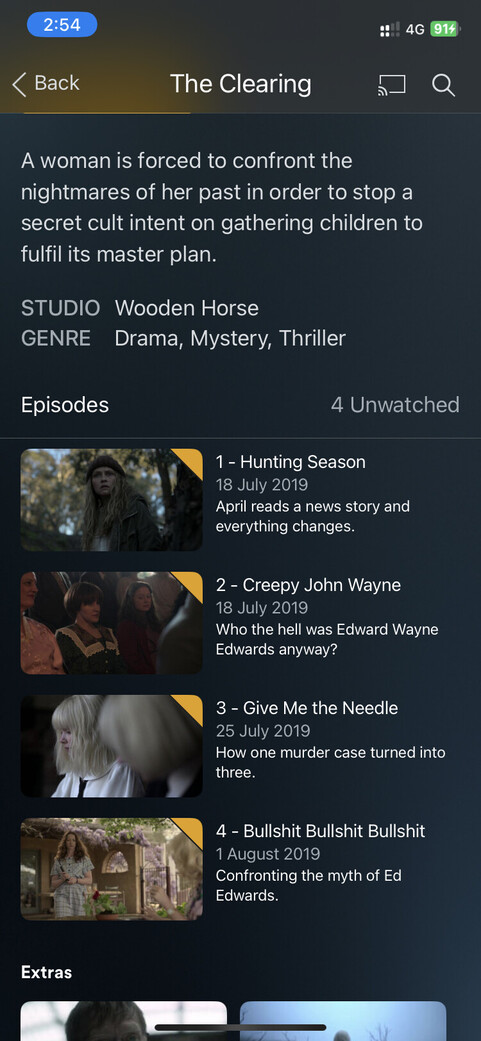
Episode metadata is showing from an old podcast instead of the new Disney plus show. I’ve unmatched/fix matched several times and there is only one option of the clearing to choose. All the other metadata of the series is correct.
The episodes show properly when searching and using plex’s streaming option.

Any ideas how to get these to show the right data?


TVDB is the problem even though it has the same order as Plex.tv and TMDB

Switch it to TMDB and it will be fixed

Plex is matching the 2019 series, not the 2023 series.

Two things to check:

  • File naming/organization
  • Episode ordering.

File Naming & Organization

Plex DocumentationYour MediaNaming & Organizing Your TV Show Files

There are multiple TV shows named “The Clearing,” including one from 2019.

Be sure to follow Plex naming requirements for TV shows. This helps Plex correctly match the show and not confuse it with a similarly named show.

It is important to include the year in the folder and file names. It also helps to use the TVDB/TMDB ID, as it tells Plex which show to match.

Example:

/TV Shows  <-- Folder added to TV show library
.../The Clearing (2023) {tvdb-429916} <-- ShowName (year).  Use curly braced for ID.
....../Season 01 <-- "Season" in English.
........./The Clearing (2023) s01e01.ext <-- sXXeYY important.  

Episode Ordering

Plex DocumentationScanners & AgentsAdvanced Settings Plex TV Series Agent

Plex uses episode ordering information from TVDB and TMDB for TV shows.

The information at TheTVDB.com matches what is at watch.plex.tv.

TVDB: The Clearing (2023) - Unknown - Season 1 - TheTVDB.com
watch.plex.tv: https://watch.plex.tv/show/the-clearing-4/season/1

Configure either the TV Show library or just the TV show to use information from TheTVDB.com.

Library Level

  1. Edit the library
  2. Choose Advanced
  3. Scroll down to Episode Ordering.
  4. Choose either TheTVDB or The Movie Database.
  5. Save Changes.
  6. Refresh metadata for the library if Plex does not do so automatically.

Show Level

  1. Edit the Show (Pencil icon, show level, not season or episode levels)
  2. Choose Advanced
  3. Scroll down to Episode Ordering
  4. Choose desired ordering
  5. Save Changes
  6. Refresh metadata for the show (or library) if Plex does not do so automatically.

This is once again a linking issue at the episode level. The show it self is matched properly as the 2023 version, but the episodes are matched with the 2019 version. This is not the case on TVDB itself.

Will probably take a while before someone fixes it. Mulligan hasn’t been fixed since it came out a month ago, so don’t hold your breath :slight_smile:

I added the show to my server and also see the problem. Plex still shows 2019 episode information even when adding 2023 TVDB ID to folder name and specifying TVDB Aired episode ordering.

Reported to Plex.

1 Like

I came here today for exactly this problem. It appears to be matching episode titles and descriptions with those of a podcast with the same title.
Edit:
The Scanner and Agent for this library are both set to Plex TV Series

Edit the show and choose TMDB ordering. Plex will then pull down episode names, descriptions, etc.

Not sure why, but TVDB Aired shows “Episode 1,” “Episode 2,” etc.

File naming: /tv shows/Mulligan (2023) {tvdb-433595}/Season 01/Mulligan (2023) s01e01.mkv

Also reported to Plex.

Mulligan - TMDB Episode Ordering


Mulligan - TVDB Aired Episode Ordering (using test files in lieu of actual episodes)

1 Like

Changed on the show level as described to The Movie Database and this corrected the issue. I seem to remember that you could change the Agent during a Fix Match search. The drop down is there but there are no options. Thanks for this.

Yeah, I know I could switch, and I’ve done that in the past for some really stubborn shows, but these days I keep track of what’s not linked properly and usually report it here.

Not when the library is using the Plex Movie or Plex TV Series agents/scanners.

IIRC, that was an option with the legacy agents/scanners, but I haven’t used those in quite some time.

With Fix Match, you can also enter the IMDB ID for a movie or show (leave the year blank). That will sometimes help when matching a troublesome show.

Plex updated their systems.

The Clearing (2023) now has correct episode information with either TMDB or TVDB (Aired) episode ordering. Refresh the metadata for the show to update your server.

Mulligan and Gremlins: Secrets of the Mogwai (mentioned in another thread) should update soon.

1 Like

Can confirm. Both The Clearing (2023) and Mulligan have been fixed. Thanks!

This topic was automatically closed 90 days after the last reply. New replies are no longer allowed.