When a torrent is active, it will trigger PMS to rescan and analyze. It can also cause it to generate new thumbnail images. This will continue to happen each time the file is modified
Recommended practice –
have torrents download (intermediate area)
When they are complete, move the finished file(s) to your Plex media directories.
I know there are several clients which will do this.
Hi, I checked the directories plex media monitoring, there are no .torrent files in it.
but I use the same directories as EMBY server data libraries and set them to save EMBY files in the libraries. Will these were the reasons that cause PLEX to rescan and analyze all day?
I don’t think @ChuckPa was talking about the .torrent files. He was talking about downloading those torrents directly to the directories that Plex monitors for content. Because of the way torrents download, they will cause the scanner in Plex to go nuts as it sees chunks of the files being deposited over and over again in the directories. This causes the scanner to run every single time it sees one of those chunks drop into the directory, subsequently causing your servers CPU to load up to 100%. You have two options to fix this. Download the files to a staging directory, I use a /MoveToServer folder and then move them myself, or turn off all the auto detection and scanning, making sure to manually scan the libraries after each addition you make to the library instead of letting Plex autodetect changes to the directory and triggering a scan.
Thank you very much, I will look into it.
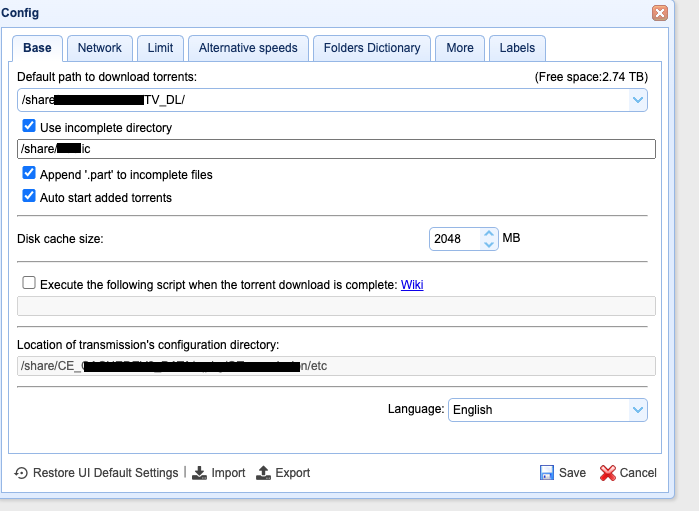
The “transmission” App I use has a function that seems it could download files in a temporary folder when the download is finished it will move the files into a target folder. I holp that will be helpful.
But Emby will create some pictures or subtitles in the directories, I choose that option because I want Plex to use the same pictures or other movie information with Emby and it will save time. I will upload some pictures of them later~
Depending on the client it will download pieces to that incomplete directory and move the pieces once they are complete to the other directory causing exactly the issue you are seeing. (this is how my torrent client handles that) Torrented files are downloaded in chunks and merged together as the chunks complete from what I understand. As soon as a chunk is complete it moves it from the incomplete directory into the staging directory to join with the whole file. As for the files being created by Emby, it looks like it is just local asset type things in the movie folders themselves which shouldn’t be a problem as long as Plex is only tasked with monitoring the actual content directories and Emby isn’t constantly editing those files. If Plex is monitoring anything in the Emby installation or if Emby is constantly messing with those files, that could cause all sorts of issues.