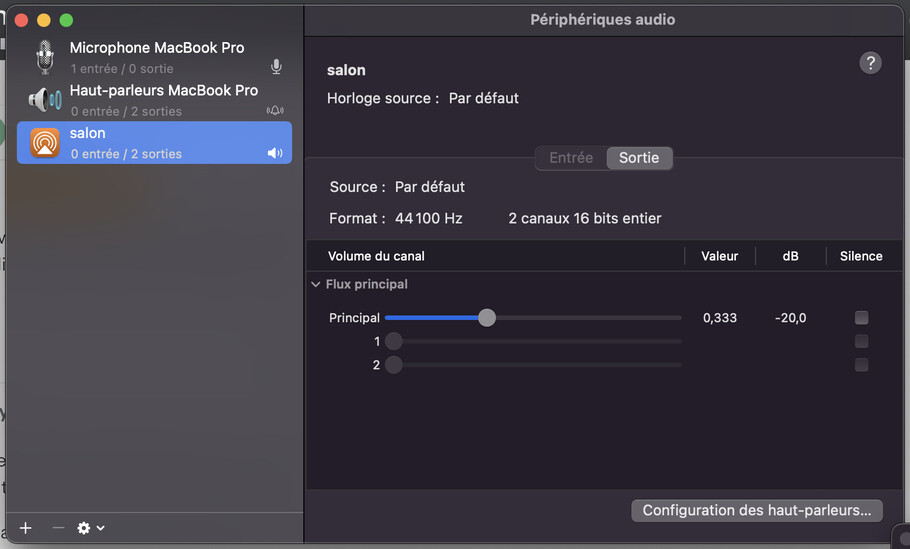
For exemple, my bluetooth peripherals named “salon” were duplicated and the second one were delayed by a few seconds to compensate for the bluetooth delay.
The latest version to offer this possibility is the Plex player mac version 1.106.0.276
Doubling up the sound output devices (with a 2 second delay for some reason) is not an intentionally created feature of the app, if that is what you mean. I use it on a mac as well and i’ve never had that.
The player portion is based on MPV and we get the audio device list from MPV because it’s the only way to be sure that the audio device we select can be understood by MPV. If the config for that was edited somehow maybe, but I don’t know what the specific setting would be.
Can you explain to me then why, if I go from version 1.106.0.276 of the Plex Mac Player to version 1.107.1.293, my bluetooth device “Salon” no longer appears as a duplicate.
And if I reinstall version 1.106.0.276 of the Plex Mac Player, I find my bluetooth device “Salon” as a duplicate…
…This clearly shows that there has been a change in the Plex Mac App, because on my side, I have not changed anything in my mac configuration.
No I cannot explain it because there is nothing in the code that would randomly make a duplicate device with an arbitrary delay of 2 seconds just for you and not anyone else that i have ever heard of that uses the app including me.
It is clearly showing your macbook speakers duplicated as well, so it isn’t specific to your bluetooth device.
again the only thing I can imagine is some edit to the mpv.conf but since you say you did not edit anything I have no idea.
I already have asked the devs that make that app before my first reply what you are describing makes no sense to them since nothing as you describe was ever coded into the app.
There are parts that are custom but i don’t believe audio devices list is part of that. The app does get the list from mpv underlying player to display the list in app and ability to change output in UI.
I asked them if we updated the mpv with a new version maybe ( but they generally would have added that to release note if they did), or if they know of a way you can manually create the duplicate if you want them. Unfortunately the desktop app devs are out today so I might not get an answer til tomorrow or early next week
I can only tell you that the extra/duplicate devices with the delay were never supposed to be there. I was told we did update mpv with a newer version, so it being there was likely an mpv bug that it ever showed up since the app uses mpv to populate the list of audio devices.
Ok … duplicated devices is a bug but who let me select a sync version of my bluetooth speaker.
With the new version i only have item of my speaker and this device is not sync…
On plex web it’s ok but with plex mac not… what is the solution ?
I have the exact same issue. I have duplicate audio options shown when using a version prior to V 1.107. I select the 2nd airplay option and the audio syncs correctly. If I use the 1st airplay option it is about 2 seconds off. After uprade to V 1.107 or later, the 2nd option is removed and the audio is about 2 seconds off.
I rolled back to an older version of media player, in this case 105.2.269-12a32491, as it was in time machine, and the additional options are now showing and selectable. Using the second option my audio is now in sync.