There is a product team which writes the specs for the different engineering teams to implement.
If/When I take this discussion (change request(s)) forward, the process looks like this:
We (you all and I) work it out into a final feature & behavior list
I take that final list and put it into a document.
I then go get the product spec and compare
This is where I share what the community is requesting and and why.
At this point, it can go to:
– Nice, we didn’t think of that. We’ll work it in
– That’s nice but it conflict with X/Y/Z which we’ve got planned. We try to work those out
– Or, I get thanked for the effort but get “Sorry, that’s a good idea but not a direction the product is headed in” (rarely). (some of my ideas were ‘out there’ lol)
Thank you for explaining the process, I think that will help us give you better feedback.
For a moment, from what you said, I was worried that engineers were also making all the design decisions, and as much as I do like working with devs, they are often not great at representing typical users’ needs.
ME AT SOME JOBS: “If you tap right here, the app crashes to desktop. Oh, it will also call all of your exes and light your house on fire. And kick your dog. If you don’t have a dog, it purchases a French Bulldog with your credit card, then kicks it. THEN it crashes. 100% repro, all platforms.”
SOME ENGINEERS: “That’s blank space, no one should be tapping there anyway. Closing as Won’t Fix.”
Maybe this belongs here, maybe not, but today I tried to separate a series, and the folder structure looks like this:
Series/Name/Season 1
Series/Name [Eng sub]/Season 1
It’s the same series, but the subtitles are burned in a different language. After separating them in Plex, they appear as two copies, and I added “[Eng sub]” to the name of the second one. Everything goes well so far; I started this English version and watched an episode. However, when I continue watching, the regular version appears, not the one I started watching.
And I can only start watching the correct episode if I search for exact episode in the library and start where I left off. In the library view, no matter which copy I try to play, it always starts the wrong episode.
To me “CONTINUE” means play the one and only file you were previously watching. Period. I don’t care where else it’s available, I played one particular file, that’s all I want.
I think my understanding matches what folks want/expect which is good.
That said, I’m going to:
Confirm it works the way we expect
Find out how to break it
If I can’t break it then the conclusion has to be: User Mistake
If I can break it, and can repeat it with a specific sequence,
–AND-- others can repeat the behavior
–THEN-- We have a documented, repeatable, problem.
Fair enough?
PS: I’ll show the content I have and what I’m using from the Plex server in my test case
Thank you for the response, yes, this is exactly how I wanted to create the structure, so I didn’t have to create a separate directory. I’ll show you with pictures what I had in mind. So here is an example:
Create a copy of a series:
Series/Arcane (2021)
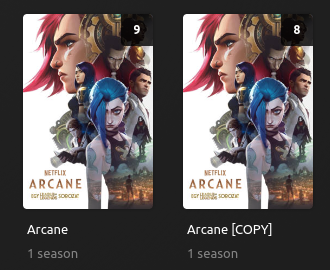
Series/Arcane (2021) [COPY] → (I wanted that because in this copy the media is hardsubbed)
Right now I have two separate, modified the second one title with [COPY] to know which one is the hardsubbed.
Afterwards, I watched one episode of COPY, and so far it has worked exactly as I wanted. However, in countinue watching, the original appears, and I can’t easily switch to the copied version.
The library view now look like this
Unwatched episode number are bit strange. Here in library view when I try to play the original, that starts the original E02 (which is good), but when I start the COPY version, that plays the E01 of COPY.
I’m sorry, I ended up writing a bit long, and I know this isn’t an everyday problem, but it would have been nice if I could watch series with multiple versions this way.
The two instances are still instances of the same series. Which means that the “watched” status is valid for either of them. Splitting will not give each series its own unique identifier. They are both linked (“matched”) to the same series in the metadata records.
If you have watched s01e01 in one of them, Plex will behave as if you watched s01e01 of both versions.
Yes I know, and that’s good. What I wanted to point out is in that case the continue watching isn’t work well, and there is some strange thing (like the remaining episode number in the last picture, which should be equal) and both should play the second episode (COPY right now start the first when I click to play)
I thinking you’re going way too deep and technical into it. See:
It happens on the home tab to TV Shows (don’t think I’ve seen the complaint with movies,) when you click a show to “continue watching,” if you were playing a show from your server, and you click continue watching it will pull from the Plex On-Demand service if available and start showing ads.
It does not happen when going to the shows splash screen or source options.
Maybe try letting an episode of that Wyatt Earp show go and then try the continue watching feature.
What might be important here is that your copy has to be considered INFERIOR to Plex, in order for the on-demand copy to be auto-played when you do “Continue Watching”.
The problem for us is that not everyone HAS 1080p or even 4K copies of all their shows, but will infinitely prefer their own copy to a “superior” online source that has ads in it.
Secondly, when someone watches a specific show in their library, they want Continue Watching to ALWAYS play the next file in the exact same series/folder, regardless of superior quality in any other library or server. This would fix the issue where people have made a COPY of a series with - say - hardcoded subtitles, and want to always resume that copy rather than the original or “default” version.
Yesterday, I got a very detailed education about the internals of how Continue Watching works.
As promised, I’m working through this:
So far:
I had to enable and let ALL my media (including my test libraries) sync to the cloud. (Account settings). It normally takes 30 minutes but I have my big test server with 950+ full series loaded there so waited some 3 hours for it to upload
I then pinned some test series which I was going to test. (Pinning is what drives Continue Watching). Notice I’ve pinned both NAS boxes above "Movies & Shows.
Given Wyatt Earp and Doc Martin are both on Plex, I am using them as my test case
Did a search to confirm all my ViewState Sync data is uploaded.
If this fails the way reported here, at some point, playback will switch from playing from my local machine (DS920 where I started) to playing from Plex.tv ?
All I know is what happened to me when I got unexpected ads. This is not a 100% repro case with a copy of the linux kernel compile options, though.
Plex’s free stuff was a pinned source at the time because I was still exploring it.
I watched an episode of a show, for which I had my own files.
I left Plex.
The next time I started Plex, on the Home screen, in Continue Watching, there were TWO poster icons for the show.
At the time I did not understand WHY there were two choices but I didn’t dig into it. I just selected one at random and clicked it.
An ad-supported version of my show started playing
If I had happened to click the other icon, I would surely have gone to the detail page for that episode, and clicked Resume, and viewed MY file.
Annoyed and wondering in what other contexts I might accidentally choose the wrong stream, I un-pinned Plex’s content and have never looked back at it.
If the Continue Watching ad ambush was fixed, I would re-pin Plex’s content and look at it sometimes.
This issue is keeping me from using the ad supported content entirely, because if it is not pinned it is out of sight and out of mind.
Having TWO options, which look THE SAME, in Continue Watching, one of which leads to ads, is BAD UX and leads to angry users.
I just want to say, don’t get tunnel vision and only focus on the “ads” issue. The root of the confusion is multiple of the same media can show up under continue watching depending on what is pinned to your sidebar.
If you have the same media in multiple libraries and they are all pinned to your sidebar, continue watching will show progress for each of those libraries. At least this you can somewhat mitigate by setting the library’s advanced setting visibility to “Exclude from home screen”.
If you and your friend both have the same media on your servers and you have both libraries pinned to your sidebar, continue watching will show progress for libraries on both servers (if you have watch state syncing enabled).
If you have media in your library that is also available from Plex’s VOD service and you have it pinned to your sidebar, continue watching will show progress for your library and Plex’s VOD.
It’s not an issue with Plex’s VOD service. It’s not Plex forcing ads onto users. This is how continue watching and the sidebar sources have been working for years. It was just manageable on a personal library level until Plex introduced their VOD service that caused this unintended side effect.
So again, don’t focus on the “ads”, but focus on how continue watching interacts with pinned sources in the sidebar and how this behaviour can be improved.
@morganj said they filed a related issue about this a few months ago, but for unpinned sources. I don’t know if that is relevant to this topic though.
The ordering of pinned items has everything to do with this.
– PLUS –
Where you started watching a particular show SEEMS to be where it will be remembered and remain that way unless you mark it all “Watched” or “Unwatched” and start over. (I am still experimenting with this)
Initially, Continue Watching apparently did have a problem not deduplicating. Now, It will deduplicate your shows so that you see only one reference.
@SwiftPanda16 appears to be correct in mitigating duplicates as well. This is where I’m at in my testing / investigating.
Important points:
As you watch a movie or episode, UNTIL COMPLETED, the progress remains solely on that server.
– DO NOT jump on me if you think you’ve seen otherwise because I THINK I saw something too but I’m not certain. It might have been me catching the server updating as I refreshed my Plex/web browser page too.
After you’ve finished the episode or movie is when the watched status updates in the cloud (Unwatched → Watched)


 )
)