Server Version#: Version 1.22.0.4163
Player Version#:Plex Media Server Logs_2021-03-23_12-45-19.zip (8.4 MB)
When I try to view a video that is encoded with 1080p VC1 it will do the following:
Web - “This server is not powerful enough to convert video”
iOS both iPad and iPhone - Plays immediately and plays correctly (Great!)
LG CX OLED - Client Version 5.11.1 , Platform Version 5.2.0 - “Playback Error, An unexpected playback problem occurred”
AppleTV 4th gen 64GB - tvOS 14.4 - “App cannot direct play this item. No direct play video profile exists for protocol http, with container mkv, and video codec vc1. Could not transcode because: Not enough CPU for conversion of this item.”
I am running Windows 10 Pro version 20H2 64-bit with an Intel i9-7900X CPU, 128GB, and a Nvidia RTX Titan connected via gigabit lan to all clients except the iOS devices.
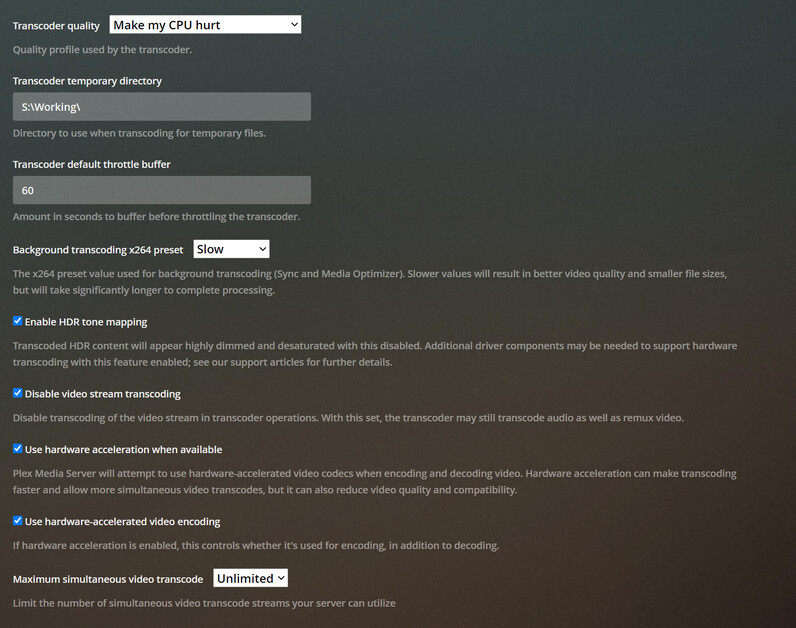
What am I doing wrong that causes this to work successfully on iOS over wifi but fails on all other devices? I assume my machine is more than powerful enough to handle transcoding. I have tried adjusting the transcoding settings as well as disabling and re-enabling direct play on the vairous devices. Any suggestion will be greatly appreciated. Thanks.
