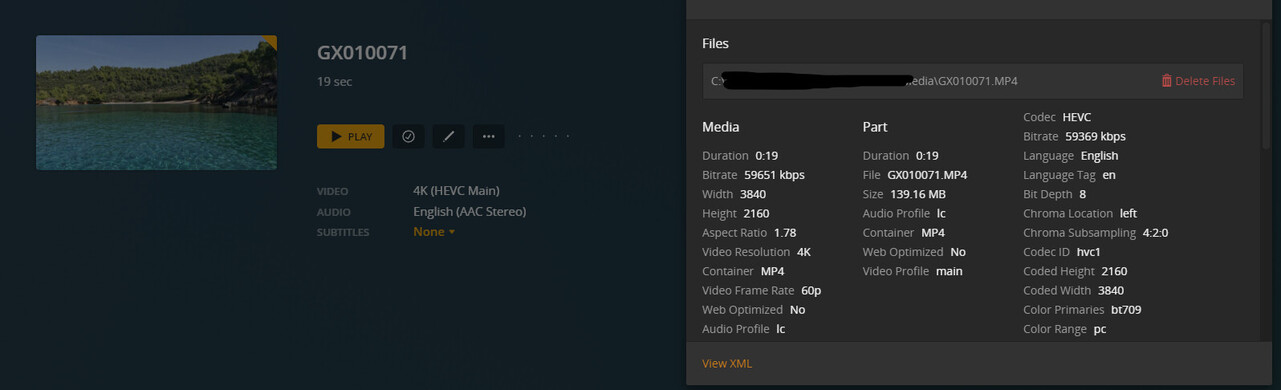
I have the server installed on a Ryzen 9 5950X, 32GB RAM, RTX 3080TI, ROG Strix B550-A Gaming motherboard and Samsung 970 Evo NVMe.
I get the message “This server is not powerful enough to convert video” when trying to play the files on the same server. The videos were recorded on a GoPro 10.
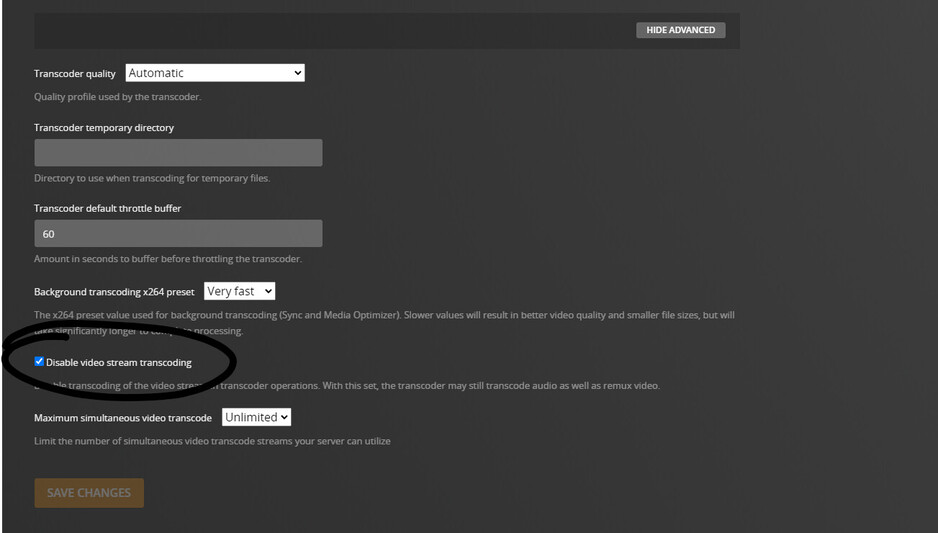
You’ll get that message if you have disabled transcoding on your server but the client cannot play the video as-is. Not only if the server is actually attempting to transcode but fails.
IIRC Plex have been asked to review the error message and make it more specific to the 1st use case. As of today it seems the client cannot distinguish the two cases and considers the server “rejecting” to transcode as “it’s not powerful enough”.
Not sure what player you mean by “the server” – if you’re referring to the web app… that’s generally the most restricted based on what browsers are capable to support; fwiw only very few will play even HEVC.
Even if you can play a video from a directly connected USB drive, there can still be many things causing the need for the file to be transcoded, e.g.
some tv manufacturers apply different restrictions with regards to codecs / media formats depending on if you’re using their native player or some 3rd party app (like Plex).
beyond media formats, the need to transcode can also be based on insufficient network bandwidth (causing Plex to attempt to reduce the average bitrate by transcoding/“optimizing” the file
files can play fine locally but still require transcoding in order to be streamed (IIRC files not being “web optimized” can be such a factor)
…
Edit:server logs should show why the server deems transcoding to be required.
That File also has a pretty high bit rate (nearly 60mbps). You’d probably need to have your TV hardwired on the lan and not on Wifi to direct play it, especially if your tv only does 2.4 Ghz band
The gigabit switch will not matter. The TV almost certainly doesn’t have gigabit. Even In 2022 it’s extremely rare for even a £5000 TV to have a gigabit port.