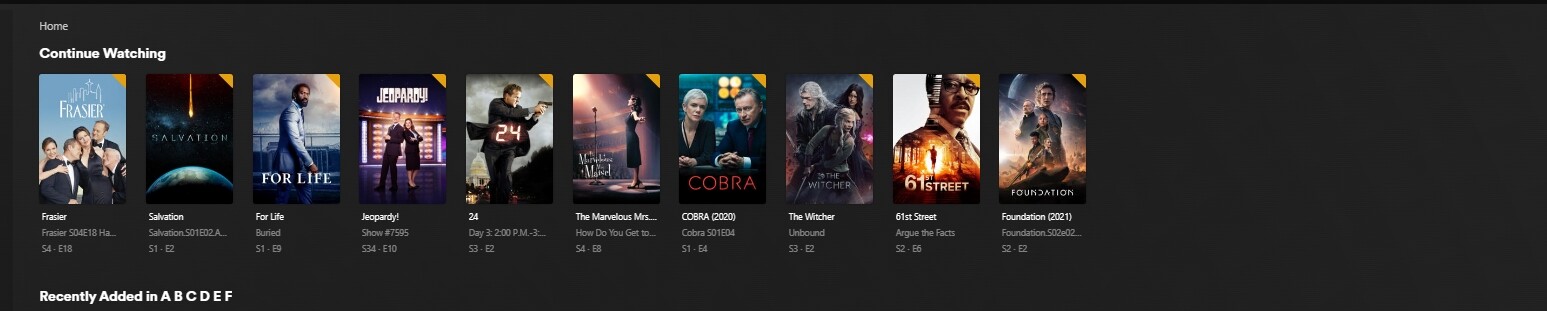
Server Version#: 1.32.6.7371
Player Version#: 4.108.0
I have noticed for quite some time that the tiles in the HOME listing do not seem to respond as they should when the files are updated or new shows added. It seems like a trivial problem but would be nice if it worked correctly.
When new shows are added that are continuing episodes of a show that is being watched the new episode tile shows up just fine. However, existing tiles on this line to the far right in the display are covered up rather than being moved over causing them to be lost (but still there) from the listing. A refresh of the tab brings them back, hence it is apparent they were just not moved out of the way but rather covered up.
Sorry Im not clear what is happening in those three images are they in sequence? I see the top two images have different things missing that is in the third ( WWDITS and Foundation). but not sure what you mean by “covered up”
Does it do the same at https://app.plex.tv which is a newer version of web app?
I guess you need to hummer me on this one, what difference would it make as to what the settings were? It should only show that number of tiles or less all the time, no? And should not require a refresh to get back to that number of tiles in the listing if there is less than that number? If that number is being ignored simply because I add an episode then that is another issue or is the source of this issue. no? I haven’t looked but I’m pretty sure it’s 16 because that is the number of open spaces where tiles could be displayed without being off the screen to the right which would require scrolling, someting I hate to do. Thanks.
Now I’m really concerned. If there is a newer player version why hasn’t my system done or asked to do an update? Is this something that has to be done manually? Even if I open that newer version I won’t know if there is a similar problem until I have a new episode to upload and with all the strikes in Hollywood etc that could be a long time now. Thanks.
When I click that link it opens a windows that looks just like the one I open every day. It shows version 4.113.2 which is newer? Is this thing being updated by the minutes? Hard to stay ahead. But, again, until I have a tile that will post to that line on it’s own I have no way to know if anything has changed. Will try and stay on top of this and see what shows up maybe later today, no have to be tomorrow maybe, nothing else new today.
I don’t know if anyone else is experiencing this but it is STILL an issue and is a constant problem every time any change is made to the HOME list. Any change to this list results in lost or covered tiles that can only be recovered by completely reloading/refreshing the entire windows tab. As stated originally, it is not a critical issue but it is one gigantic pain to have to constantly reload the tab to see what is actually there. Thanks.
I still not clear if it is happening with app.plex.tv which will always be newer. There is no real need to use the local one except for initial set up.
Went thru this last week and, yes, is a problem with all issues. Again, and as I have said before, using Edge and some seem to think that’s the problem but will not be going thru the hassle of catering to those who don’t like Microsoft. Edge it is and if no one wants to fix the problem I’ll just get in the habit of keeping track of the last tile in the list when a new reload is done and when it disappears, as it will, it’s time to reload again. Really should not be all that big a deal. Thanks.