Server Version#: 1.22.3.4392
Server Hardware: Win 10 PC with Nvidia Hardware transcoding
Player Version#: 3.13.14
Player Hardware: Tivo Mini VOX
I have been banging my head on this all week. I’ve read all the other posts about the crappy Plex client for Tivo and all the suggestions to just re-encode my DVD rips to a direct-stream compatible format. The problem is that my makemkv(mkv container,mpeg2video video codec,ac3 audio codec, vobsub subtitle) files are able to play just fine on my Tivo Plex client. There’s just one catch. I have to force the player to revert to local-only connection mode. under normal circumstances, the server attempts to transcode the video and apparently relay it through plex.tv. The client sits at buffering until playback fails. If I load up the client on the tivo and then disconnect the router from the modem and wait a few minutes, the client will connect directly to the server(online features menu items like Channels disappear). Once that happens, I can play any of my dvd rips just fine. They playback using hw transcode of the mpeg2video into h264 and direct stream of the audio. I can even turn on my vobsub soft CC and they work just fine as well. I’m posting this here because this is the closest thing to opening a support ticket with Plex that I could find. Also, If I load the tivo client URL from the server logs into firefox, I can bring up the web plex client that tivo loads and manage to get the same error in firefox. The url is https://plex.tv/web/tv/tivo?deviceType=4&launchPoint=1&launchType=2&partnerId=tivo%3Apt.4796#!/noop/visited
I can even get to the same settings menu as in Tivo! Instead of saying “Plex for TiVo 3.13.14”, it says “Plex for Smart TVs 3.13.14”. All the app needs to work correctly is an option to force local connections only. Once the local connection has been established by the app, The internet can be reconnected and the app will continue to work until it is restarted. Can someone from Plex please take a look at this?

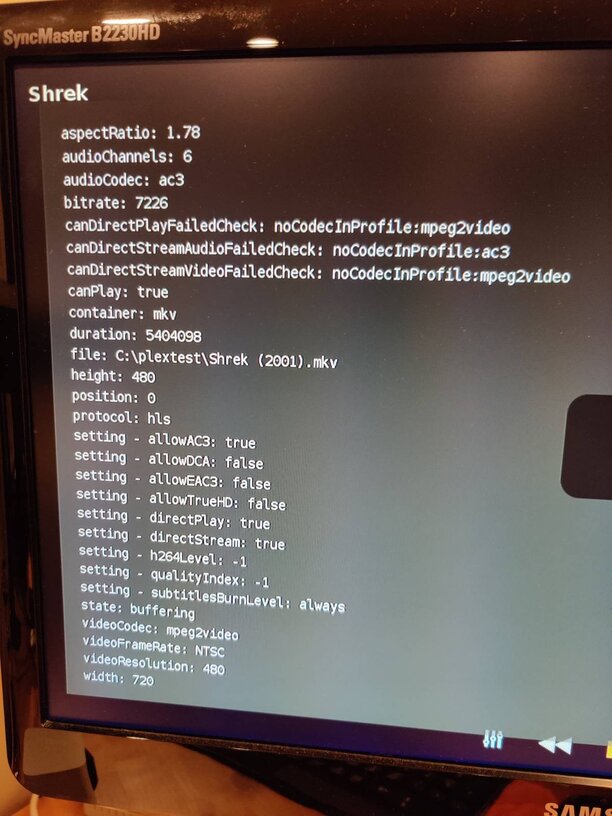


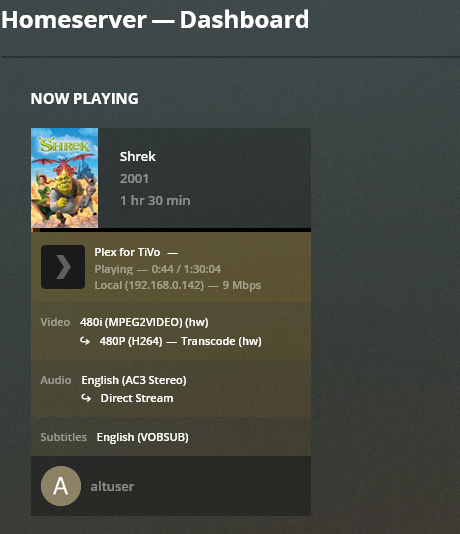
My guess is that the app cannot connect securely to your local server, which is very likely due to changes Plex made back at the end of 2020 to update security with our products. When the app has an internet connection, the preference is for the app to connect using a secured remote connection versus an insecure local connection. If your remote access isn’t setup properly, then it get routed through Plex.tv which then limits the bitrate of the video forcing a transcode. It seems like your server is then unable to handle this transcode and why you have the issue.
There should be a setting in the app to allow using an insecure connection. If not, then use the manual server setting to specifically tell the app to connect to your server using it’s local IP address.
Thank you for replying.
When I initially started troubleshooting this, I disabled remote access to try and force a local connection. Prior to that, Plex was reporting that I was successfully setup for remote access. Even after I disabled remote access, the client seemed to still be trying to connect remotely.
How can I tell if my server is fully able to handle the transcoding? I have hw transcoding enabled, but I don’t really notice a load on the video card when something is being transcoded. Maybe there is a setting I am missing somewhere?
I have secure connections set to “preferred” on the server and I did manually enter the server IP address in the TiVo client, but that didn’t seem to make any difference.
Thank you for taking the time to read and reply to my post. If I don’t get this sorted out, my WAF will take a big hit.
I was referring to a setting in the TV app.
I had set the “Allow fallback to insecure connections” to always on the client settings.
Ok, I found the cause/culprit and a temporary workaround. Your mention of insecure connections got me thinking. I remembered seeing some TLS errors in the logs. Turns out that the attempt to make a secure connection is failing with this error.
“CERT: incomplete TLS handshake: no shared cipher”
I set “Secure connections” to disabled and restarted the server and everything works perfectly. This is obviously not a good long term solution, but I don’t know what to do to resolve the error. Any ideas?
Bump.
The Plex for TiVo app is not longer supported so I doubt there will be a fix for this.
Why isn’t it supported anymore? Lots of us still use it!!!
The Plex app on those devices is our older version. Their OS cannot handle the newer version of our app. It’s a limitation of their OS.
The newest Tivo 4K device is actually an Android device and will run the Plex for Android app.
This topic was automatically closed 90 days after the last reply. New replies are no longer allowed.
