I don’t think so.
The Metal is a HPDL380 and it just got 2x new Xeon 2697 CPUs. Runs WinServ19. Plex is in it’s own Win10 VM on the server. Plex is set to run as a service and this system runs fantastic.
Tonight it got the upgraded CPUs.
Transcoding Blueray w/ subtitles was a 3-4 sec process, which I thought was good, now it’s under 2 seconds.
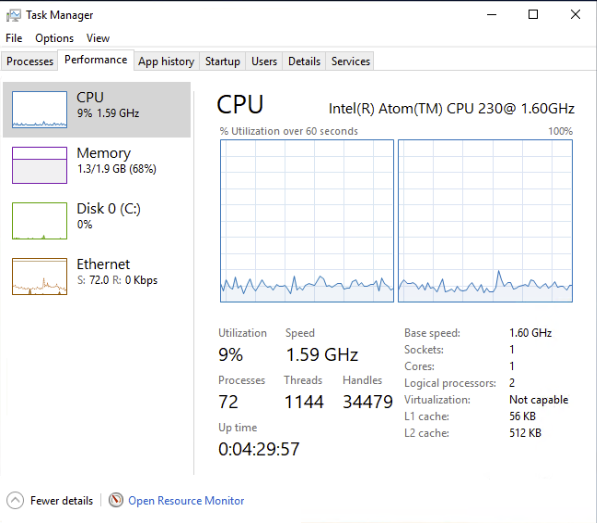
This screenshot is of it playing HD w/ subtitles to 4 different computers at the same time.

Now do the same with UHD 4K remuxes, with activated PGS subtitles and audio stream set to DTS HD MA ATMOS… 
2 Likes
Wish I had some 4k stuff. I suppose that’s next…
Plex doesn’t run well on horses at all.
But those super old CPUs do make for a lot of impressive looking graphs in task manager.
I raise you a Seahorse. 
Your system is pretty nice. Though… I can hear your rack-mount fans from afar. 

2 Likes
I solved all that by not having any 4K content. These 61 year-old eyes can’t tell the difference from the couch. 
1 Like
Oh, it’s time for glasses as the difference on a good OLED is spectacular 
I can’t hear my fans. For one, they are variable, for two, I built an insulated and AC server closet where all my computers are. I can hear it while it’s booting, but once it’s on and the fan management comes on it’s quiet. Then again, I’m old and a little deaf.
Super old CPU? not really for a file server, or a plex server apparently. It’s still plenty fast. I’d be fun to see how fast on my 9900k though.
It is old. It’s a Haswell CPU from 7 years ago.
A modern architecture with less cores and a new iGPU would be a better Plex server for a LOT less watts.
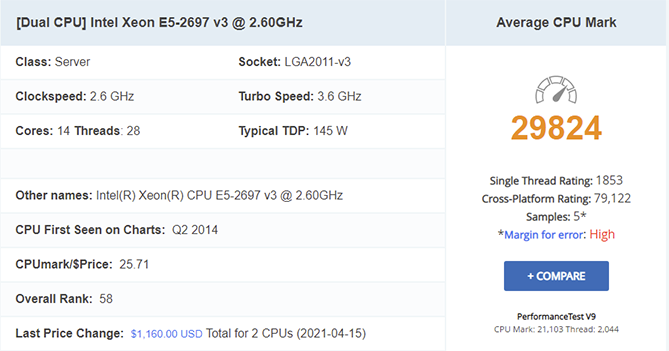
They may be old CPU’s but still a pretty impressive Benchmark for a Dual XEON !!
1 Like
- eyes aren’t that bad and
- don’t have a good OLED. Don’t even have a bad OLED for that matter. Just a regular Samsung 4K LED that looks great.
I’ve run some 4K stuff through it to A/B it with 1080 and I found I have to get about three feet or less from the screen to see any appreciable difference. Certainly not optimal viewing distance for a 60" TV. So 1080 is where I live.
Yea, it’s old, but not super old. I was on a 2620 which is a 6core 2.4ghz. Just got these 14core CPUs yesterday for $300 for 2. A new server starts at $4k, way I’d configure it, be around $6-7k. And that just isn’t in the cards these days.
Hey, I’m old too, just not super old. LOL.
The Intel 10400 at under $200 has been fantastic for me so far. Can have multiple 4k streams using HW transcoding and the CPU barely budges. Though as above user said, definitely doesn’t look as cool in task manager
definitely doesn’t look as cool in task manager
Sure doesn’t. Here’s a boring old Quadro banging away at a transcode with NVENC/NVDEC and a couple of CUDA filters running.
Definitely not as exciting as watch the dual E5-2680’s having at it.

dlrohwer, How do you like the P4000? what do you do for work? I have the M6000 (I think 1 gen older, no?) and do heavy CAD/FEA/etc
Yep, it was for CAD. That Quadro is from my old SolidWorks station. Moved to a Quadro RTX4000 so I could handle bigger assemblies.
It’s an interesting comparison between the P4000 and the M6000. Even though it’s older, your M6000 is a better overall card. You’ve got 3X the memory and more bandwidth. You’ve also got 2 dedicated NVENC chips to my 1.
The big advantage of the P4000 is that it has the newer gen NVENC engine that handles things like 10-bit H.265. People claim that the NVENC implementation in the Pascal and later series cards also produces much, much better looking results for H.264 and H.265 encodes. I’ve never tested it versus an older card so I can’t really say.
The RTX4000 really screams versus the P4000 on large assemblies so I’m sure that it’ll outclass the M6000 as well. Of course, my bank account and my wife also screamed when I bought it so you’d expect it to produce better results.
As for Plex, my server has a Quadro P400 for real-time transcoding. It’s a sweet combo with a lower-powered CPU. You can easily put out eight 1080p transcodes with a P400 and an old i7. The P400 may be useless for heavy-duty CAD, but it has the same NVENC chip and implementation as the P4000 so it breezes through transcodes with excellent looking results. At $120 the P400 is an awesome card for Plex.
Wait. You have transcoding being done on the GPU?? How did you do that?
I’m Solidworks too, but I’m done with them. Been doing SW since '95 and I’m switching over to Onshape.
I don’t have huge models, but the constraints are bringing a 9900k to it’s knees. It humps tho.
I am not really sure if you are asking about your CAD work or if you are talking about about Plex transcoding video using the GPU? If the latter, that is how people can run a dozen or more transcodes on a $50 8th or 9th gen intel CPU with an IGPU. The only thing that an underpowered CPU can run into is with things like audio transcoding, deinterlacing, and background transcoding tasks.
Byte My Bits on YouTube has some videos where he discovers that an Intel NUC can transcode more streams than his massive core count (I think Threadripper) server.
I was wondering how you get plex to transcode on the GPU. I’ve never seen that setting.
