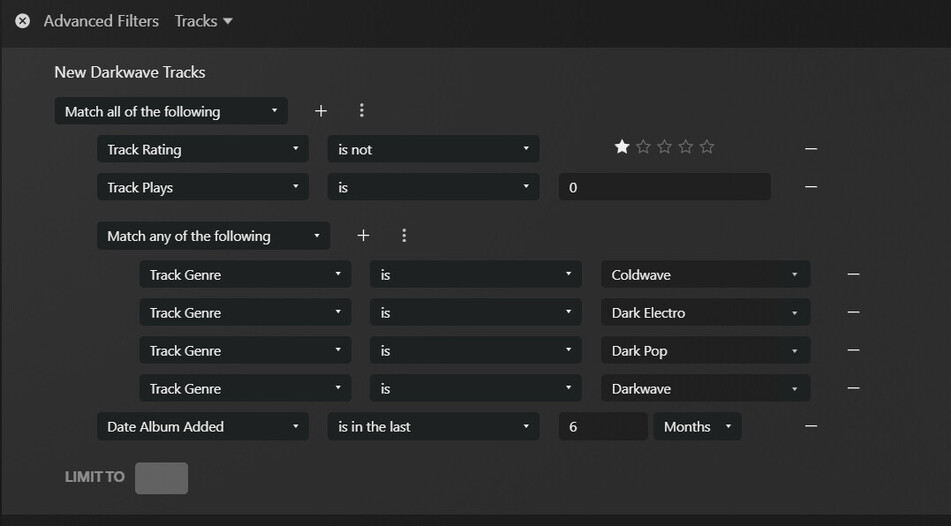
I have a playlist designed to show me music I have recently added within some related genres. Just now I added the Track Rating filter entry seen in this screen shot, and I did not get the expected results.
All of these tracks are currently UNRATED (zero stars), so I expected the “Track Rating IS NOT one star” filter to have no effect.
Instead, once I added the single star filter as seen here, all of the tracks were deleted from the playlist. In fact any number of stars greater than zero has the same effect: it knocks unrated tracks out of the playlist.
If I change the filter to “Track rating IS zero stars” then all the tracks come back into view. So why does “IS NOT one star” not matching a track with zero stars?
(My overall goal is to begin using a one star rating as a thumbs down, and update all my playlists to skip one star tracks.)
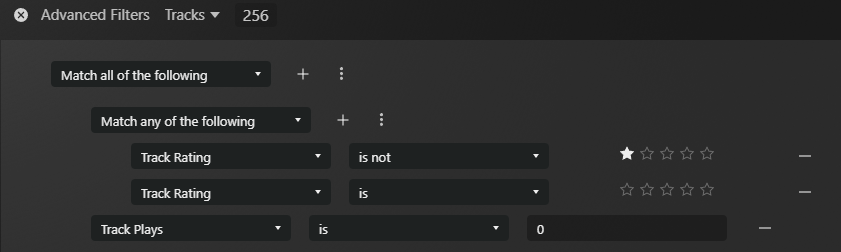
I’m seeing this as well (PMS 1.41.4.9399, web app 4.144.1). Definitely not the behavior I would expect either, but a workaround would be replace the single rating rule with a rule group that matches any of “track rating is not 1 star” and “track rating is 0 stars”:
The more I think about this, the more I believe the behavior is actually desirable. It provides a clean way of segregating unrated tracks from rated ones.
If this weren’t the case, comparing against any rating with “is not” and “is less than” would likely always include unrated tracks which I’d argue isn’t what many folks intend.
In its current form, you have to explicitly include unrated tracks. That seems reasonable, and even sensible, to me.
I understand that the comparisons don’t make it clear that this could possibly be the expected behavior. But I still think it’s potentially desirable behavior nonetheless.
At any rate, I agree with @DTR; a compound rule is likely going to be needed here to capture all the tracks that aren’t one-star or are unrated.
I agree that it is also desirable to test for unrated tracks, but in this specific case the filter is not doing what it says it does, in black and white; I’d still argue this should be fixed. In any case I am also glad to know I am not entirely crazy.
Regardless, the rule group workaround solves the immediate issue, good thinking @DTR.