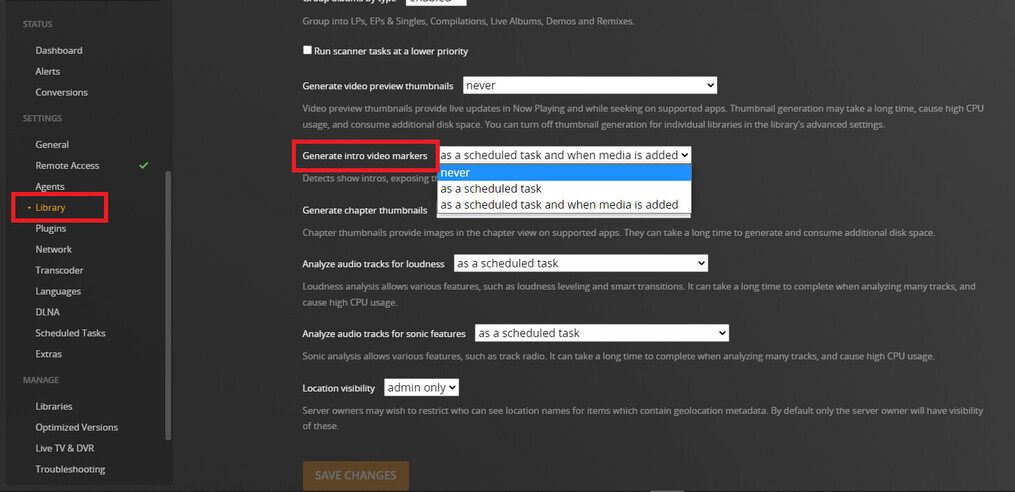
I have scheduled tasks set to run between 11am and 5pm only, however transcoder is constantly running and it appears to be looking for skip intros on TV series (I’m looking at Resource Monitor in Windows). It’s been running on the same series for weeks now (X-Files). According to Plex articles here (https://support.plex.tv/articles/skip-content/) there is supposed to be a way to switch it off, however on my system the option is not there to switch on/off.
I am a lifetime Plex Pass holder (I realize this function only works with PP).
The issues I’m really having with it are; it’s been constantly spinning up my 16TB HD’s all day for weeks now. (like 8 weeks) Why does it take so long on one series? It is perhaps not able to find what it’s looking for? If so, why doesn’t it timeout or something?
Why is the option not there for me to switch it off (as per the Plex Articles)?
Yeah, the logs are not really designed for users. Most people just drop the zip file here so someone can look at it for them
If you want to give it a shot, you can search for “corrupt” and “malformed”
That should tell you if you have any database corruption and you’ll have to repair it
It could as simple as one of those files having some kind of corruption. You may never know specifically, but if it stopped scanning I guess that’s a good sign.
You just want to make sure it doesn’t keep happening. It is a nice a feature so it’d be a waste to turn it off completely…but that’s up to you
It’s actually still running the process I just noticed (not supposed to be at this time of day). I can’t see anything in the logs. I just tried to drop the logs here below. Could you take a look please?
Well, the good news is, I don’t see any obvious corruption
The bad news is, my log reading abilities don’t get me much further than that lol
The only obvious error I see is this
ERROR - We got an error scanning in C:\Users\m_cha\Box Sync\My Music
WARN - Filesystem error (boost::filesystem::last_write_time: The system cannot find the path specified: "C:\Users\m_cha\Box Sync\My Music") during scanning: 3 in "C:\Users\m_cha\Box Sync\My Music"
If that doesn’t mean anything to you, you’ll have to wait for someone who knows exactly what they’re looking for