I have been AFK ( a new meeting and doing a lot of writing).
Try if you wish. you can always back down again.
I have been AFK ( a new meeting and doing a lot of writing).
Try if you wish. you can always back down again.
@ChuckPa
No problem, I appreciate you looking into it. I’m not seeing your other reply, but I don’t have a GPU installed, so no HW transcoding for me - it’s all CPU. None of the files I’m having issues with now were issues in the past, it’s mind boggling. Updating did fix issues with transcoding some files, but I’m still getting an error depending on what is needing to be transcoded and on what device.
I’ve had a couple of people notify me of issues throughout the day, but this is the most recent one. User mentioned a movie would only load to 33% then was stuck on Roku, usually I remove the pre-roll which fixes this issue, but there must be something else wrong if I’m STILL having issues after the recreating the database and libraries on top of the latest update.
At this point I’m convinced there’s something else wrong, maybe a driver or something but my system is as up-to-date as it can be… I’m at a loss. I’m also kinda stuck now because I can’t go back to 1.22.1 and don’t have any versions before this one and after that one…
If it matters system specs:
Ubuntu Linux 16.04.7
Linux 4.15.0-142-generic on x86_64
Intel(R) Xeon(R) Silver 4116 CPU @ 2.10GHz, 48 cores
So it doesn’t like your preroll.
In your logs I see
[chuck@lizum /tmp.525]$ grep peer x
Jun 15, 2021 18:57:22.400 [0x7ff4316c2b38] DEBUG - CERT: incomplete TLS handshake: Connection reset by peer
Jun 15, 2021 18:57:22.400 [0x7ff43169fb38] DEBUG - CERT: incomplete TLS handshake: Connection reset by peer
Jun 15, 2021 18:58:51.672 [0x7ff43169fb38] DEBUG - Failed to stream media, client probably disconnected after 3142893568 bytes: 104 - Connection reset by peer
Jun 15, 2021 18:59:57.375 [0x7ff4316c2b38] DEBUG - Failed to stream media, client probably disconnected after 99696640 bytes: 104 - Connection reset by peer
Jun 15, 2021 19:00:11.405 [0x7ff43169fb38] DEBUG - Failed to stream media, client probably disconnected after 12566528 bytes: 104 - Connection reset by peer
Jun 15, 2021 19:00:11.703 [0x7ff4316c2b38] DEBUG - Failed to stream media, client probably disconnected after 1474560 bytes: 104 - Connection reset by peer
[chuck@lizum /tmp.526]$
One of these comes from:
Jun 15, 2021 19:00:11.395 [0x7ff425390b38] DEBUG - Request: [192.168.0.116:58424 (Allowed Network (Subnet))] GET /library/metadata/48313 (67 live) TLS GZIP Signed-in Token (kazz3r24)
Jun 15, 2021 19:00:11.405 [0x7ff43169fb38] DEBUG - Failed to stream media, client probably disconnected after 12566528 bytes: 104 - Connection reset by peer
Jun 15, 2021 19:00:11.405 [0x7ff43169fb38] DEBUG - Completed after connection close: [142.183.100.210:51021] 206 GET /library/parts/94199/1622033649/file.mkv?Ac
What’s happening with certificates on your LAN? Do you have your own?
It seems like it’s specifically the Roku that doesn’t like the pre-roll, it seems fine on all other devices, and it has been optimized through Plex in the hopes that wouldn’t happen.
I’m using my own SSL certificates yes, if I access Plex from my LAN using it’s internal IP I get a warning about Plex’s certificate, which I expect.
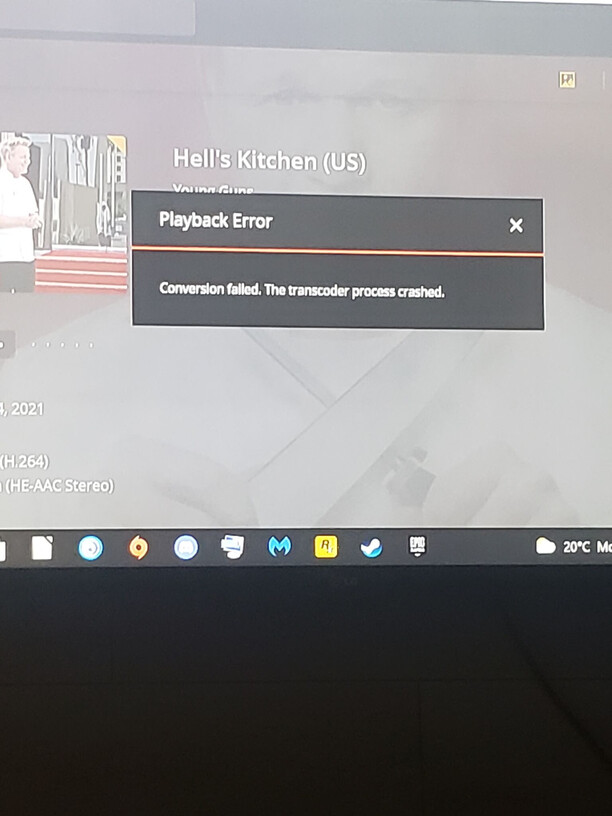
I heard from someone else earlier today that an episode they were trying to watch via Chrome didn’t work either. This was the image they sent me, that’s just H.264. I advised them to try through Plex for Windows where it played fine.
To resolve the certificate on the LAN, you have to:
*.domain.tld
plex.domain.tld,hostname must return the FQDN (Plex must see it)You’ll access your PMS server using HTTPS. and not HTTP.
Because your cert is recognized by Plex, it will accept the cert being offered then transition to its.
====
Roku
I can’t speak to that. Sorry.
I’ll double check the certificate setup, but is that what’s causing the issues?
I’ve only ever connected to the server using HTTP when I first set it up, other than that I strictly use HTTPS. If that is what’s causing my issue, I’m just wondering why it’s only biting me in the rear 2 years later? My setup never changes, only the version of Plex that’s installed.
I have my SSL certificate set up through Lets Encrypt, if I do an nslookup for my FQDN my IP does come back properly. I use PFSense on my router which is the DNS Master for my LAN it’s also configured for my domain. Fullchain is set up in Plex and the password is correct. LE won’t allow adding IP’s to certificates though, so unable to extend to LAN.
My servers hostname isn’t the full FQDN but the sub domain portion of it, but that hasn’t made a difference before.
I’ve just completely removed my cert and domain info from Plex, we’ll see if that makes any difference.
When it complains about CERT and TLS, then there won’t be a connection between server & player UNLESS you turn off all the auth and allow it to run HTTP
–PLUS–
You set Network to Secure = “Preferred” so it can fall back.
Given the Roku can do HTTPS on LAN,
Best advice is to fix the certificate or discontinue using it on the LAN.
That means you might need discontinue using it on the PMS host as well.
Currently on 1.23.3.4706 and still having the odd issue with Plex not wanting to transcode certain files.
The following logs are from me locally just trying to play an .avi file after someone reported a transcoder failed error.
In both the web player locally and through Plex’s web app it just spins loading and eventually spits out an error.
Because AVI files are fragile (they often need external index – IDX files), try this for me?
Take the file out, REMUX it to MKV.
Put the MKV in its place, rescan, analyze, and retest.
Yea, I was going to do that, I’ve removed the items from my library for now and will remux them overnight. I’ll keep you posted.
This remote WAN user was trying to use Chrome and Safari, Tautulli showed it was direct play, but they’re still getting a transcoding error. The avi files from before were sorted out after I remuxed them to h.264, but this isn’t making any sense. I’m on the latest beta. The file plays fine on my LAN via the browser.
I had a custom cert in the first log I attached and the cert was removed for the second set of logs. The cert is done properly according to all of the documentation I’ve seen on the web, even then it’s clearly not the issue if the issue happens whether the cert is present or not.
Is this a LOCAL or NETWORK mount?
/mnt/Beta/Transcode/Detection/59a17493-82b7-4e91-a2ec-24398010ceed
from
Jun 21, 2021 18:11:02.251 [0x7f783d362b38] INFO - [Transcoder]   aresample -> Stream #0:0 (flac)
Jun 21, 2021 18:11:02.251 [0x7f783b7cbb38] INFO - [Transcoder] Press [q] to stop, [?] for help
Jun 21, 2021 18:11:02.266 [0x7f783b6b3b38] WARN - [Transcoder] [flac @ 0x7fc371e674c0] encoding as 24 bits-per-sample
Jun 21, 2021 18:11:02.267 [0x7f783b5efb38] INFO - [Transcoder] Output #0, flac, to '/mnt/Beta/Transcode/Detection/59a17493-82b7-4e91-a2ec-24398010ceed':
Jun 21, 2021 18:11:02.267 [0x7f783b76ab38] INFO - [Transcoder]   Metadata:
Jun 21, 2021 18:11:02.267 [0x7f783bf9bb38] INFO - [Transcoder]     encoder         : Lavf58.27.104
Jun 21, 2021 18:11:02.268 [0x7f783b6d6b38] INFO - [Transcoder]     WAVEFORMATEXTENSIBLE_CHANNEL_MASK: 0x3f
Jun 21, 2021 18:11:02.268 [0x7f783d362b38] INFO - [Transcoder]     Stream #0:0: Audio: flac, 48000 Hz, 5.1, s32 (24 bit), 4096 kb/s (default)
Jun 21, 2021 18:11:02.268 [0x7f783b7cbb38] INFO - [Transcoder]     Metadata:
Jun 21, 2021 18:11:02.268 [0x7f783b6b3b38] INFO - [Transcoder]       encoder         : Lavc58.52.100 flac
Jun 21, 2021 18:11:02.338 [0x7f783b5efb38] DEBUG - Request: [127.0.0.1:57374 (Loopback)] PUT /activities/7067ee79-58a9-4811-be73-bb06388f5671?percentComplete=0 (48 live) GZIP Signed-in Token (kazz3r24)
Jun 21, 2021 18:11:02.338 [0x7f7847890b38] DEBUG - Completed: [127.0.0.1:57374] 200 PUT /activities/7067ee79-58a9-4811-be73-bb06388f5671?percentComplete=0 (48 live) GZIP 0ms 195 bytes (pipelined: 1)
Jun 21, 2021 18:11:02.338 [0x7f783b76ab38] DEBUG - Request: [127.0.0.1:57378 (Loopback)] GET /:/metadata/notify/cullTimeline?librarySectionID=5&sinceTime=1624312262 (48 live) GZIP Signed-in Token (kazz3r24)
That’s a local mount, it’s an nvme drive in one of my pcie slots.
thanks. would you mind setting the transcoder logging back to debug?
we don’t need the mind numbing “INFO” about the build and status, etc. That’s insane.
It should be the simple DEBUG as it gets launched which is more than enough for what we do here in the forum.
everything you’re showing me here is SCREAMING “App failure”.
I say this because there are no visible server-side errors.
It gets blocks, transcodes, then writes them out.
Then the app Stops.
Isn’t that what we got the last time I enabled debugging for the transcoder?
#!/bin/sh
Token="$(cat "/var/lib/plexmediaserver/Library/Application Support/Plex Media Server/Preferences.xml" | tail -1 | sed -e 's/.*PlexOnlineToken="//' | sed -e 's/".*//')"
curl http://127.0.0.1:32400/:/prefs/set\?TranscoderLogLevel=debug\&X-Plex-Token=$Token
echo Token=$Token
This is what I’m about to run
That would make sense, I just don’t understand why it’s happening - also means in my eyes there’s not much I can do about it other than tell them to use a different app right?
I’ll run that script and get logs after a service restart in the morning. There’s enough streams running currently that I don’t feel like being a complete d!ck.
Take your time.
When it’s possible , please get everyone to confirm they are on the latest versions of the apps.
Something is ringing stinky here and I suspect it’s app bugs.
If that’s true, we can get app logs and report them so it will get fixed.
At least I’m not the only one! I’ll get you the requested logs, and hopefully we can get this nipped in the bud!
I truly appreciated your time and help with this.
I’m hoping what you’re looking for is in here, if not let me know and I’ll try to get a fresh set of logs.