luke21
January 19, 2023, 1:07am
1
Server Version#: 1.30.1.6562
Having an interesting issue with hw transcoding and I can only seem to replicate the issue with 1080p files. Whenever I try to transcode a 1080p movie from it’s original quality to a lower quality the CPU is used to transcode the movie not the GPU.
The file is MKV H.264
I have been able to replicate the issue on both Linux (Pop OS) and Windows 10
Curious to know if anyone else can replicate, seems like a recent issue haven’t noticed it in the past
Server Specs:
Second Machine Specs:
Need DEBUG logs to know what’s happening (capture the start of a playback which fails).
Download the Logs from PMS
I suspect the Nvidia drivers being used is the issue.
luke21
January 19, 2023, 1:52am
3
Sorry was just capturing the logs, i have attached them. If I’m reading the transcoder logs correctly Plex does request hw accelerated transcode.Server Logs_2023-01-19_12-49-25.zip|attachment]
Did you change the tag from Server-Linux to Server-Windows?
Asking because I now see Server-Windows and you’ve shared Windows PMS logs.
Unfortunately, I’m the Linux guy and can’t help.
I do see where PMS isn’t finding a GPU. I don’t know how this is resolved on Windows ( I have a bare windows VM for the most rudimentary tasks )
Jan 19, 2023 06:07:28.303 [17340] DEBUG - [Universal] Using local file path instead of URL: \\?\Z:\TVShows\Ancient Apocalypse\Ancient.Apocalypse.S01.1080p.NF.WEB-DL.DDP5.1.x264.DUAL-alfaHD\Ancient.Apocalypse.S01E03.Sirius.Rising.1080p.NF.WEB-DL.DDP5.1.x264.DUAL-alfaHD\Ancient.Apocalypse.S01E03.Sirius.Rising.1080p.NF.WEB-DL.DDP5.1.x264.DUAL-alfaHD.mkv
Jan 19, 2023 06:07:28.303 [17340] DEBUG - TPU: hardware transcoding: final decoder: , final encoder:
Jan 19, 2023 06:07:28.304 [17340] VERBOSE - Sufficient disk space: 347.36MB source file, 232.25GB capacity, 177.02GB available on "C:\Users\Luke\AppData\Local\Plex Media Server\Cache\Transcode\Sessions"
Jan 19, 2023 06:07:28.304 [17340] DEBUG - [JobRunner] Job running: set "FFMPEG_EXTERNAL_LIBS=\\\\?\\C\:\\Users\\Luke\\AppData\\Local\\Plex\ Media\ Server\\Codecs\\acf6c67-4446-windows-x86_64\\" & set "X_PLEX_TOKEN=xxxxxxxxxxxxxxxxxxxx477f-a041-f02eff3c2e51" & "C:\Program Files\Plex\Plex Media Server\Plex Transcoder.exe" -codec:2 eac3_mf -analyzeduration 20000000 -probesize 20000000 -i "\\?\Z:\TVShows\Ancient Apocalypse\Ancient.Apocalypse.S01.1080p.NF.WEB-DL.DDP5.1.x264.DUAL-alfaHD\Ancient.Apocalypse.S01E03.Sirius.Rising.1080p.NF.WEB-DL.DDP5.1.x264.DUAL-alfaHD\Ancient.Apocalypse.S01E03.Sirius.Rising.1080p.NF.WEB-DL.DDP5.1.x264.DUAL-alfaHD.mkv" -filter_complex "[0:2] aresample=async=1:ochl='5.1':rematrix_maxval=0.000000dB:osr=48000[0]" -map [0] -metadata:s:0 language=eng -codec:0 flac -b:0 4096k -f flac -map_metadata -1 -map_chapters -1 -t 944.27200000000005 "C:\Users\Luke\AppData\Local\Plex Media Server\Cache\Transcode\Detection\f89229af-b322-4ceb-98df-e983004250ee" -y -nostats -loglevel quiet -loglevel_plex error -progressurl http://127.0.0.1:32400/video/:/transcode/session/1e04c53d-c769-4ee8-90f8-02da54a53801/3a51d2a7-f886-422b-b10f-33d025f29c81/progress
Jan 19, 2023 06:07:28.304 [17340] DEBUG - [JobRunner] In directory: "C:\Users\Luke\AppData\Local\Plex Media Server\Cache\Transcode\Sessions\plex-transcode-1e04c53d-c769-4ee8-90f8-02da54a53801-3a51d2a7-f886-422b-b10f-33d025f29c81"
Jan 19, 2023 06:07:28.307 [17340] DEBUG - [JobRunner] Jobs: Starting child process with pid 15024
luke21
January 19, 2023, 2:17am
5
I put both tags as I was able to replicate the issue on linux as well, but I have since deleted that OS and moved to windows to see if the issue was the same, but if its possible could you please get one of the windows guys to take a look
Will update tags as well
It is interesting that PMS can’t see a GPU, and its only for this video resolution, if I were to transcode to 720p there wouldn’t be an issue
I’ve sent a notification. They’ll be here
luke21
January 19, 2023, 2:37am
9
just adding a bit more info,
luke21
January 19, 2023, 10:25pm
10
Switched back to linux
Issue seems the same from looking at the below:
Logs from linux also attached:Server Logs_2023-01-20_09-23-29.zip|attachment]
Tags changed to linux, @ChuckPa
ChuckPa
January 19, 2023, 11:02pm
11
That CPU has no QSV
Intel® Core™ i9-10980XE Extreme Edition Processor (24.75M Cache, 3.00 GHz) quick reference with specifications, features, and technologies.
I’m not seeing any Nvidia GPUs either
I’m further going to ding you.
We don’t support Pop nor Mint.
luke21
January 19, 2023, 11:33pm
12
Alright didn’t know pop wasn’t supported, will switch to Ubuntu and see what happens, and is quick sync a must? if so looks like I will be upgrading
ChuckPa
January 19, 2023, 11:35pm
13
If you want hardware transcoding, you need SOMETHING with hardware support.
Quick Sync Video
A supported Nvidia GPU with you having installed the Nvidia drivers.
If you have a Nvidia card, confirm the OS can see it.
echo /sys/module/nvidia/drivers/pci:nvidia/*:*:*.*
tell me what it says
luke21
January 19, 2023, 11:40pm
14
This is returned:
PMS picks up the GPU if I transcode to 720p
luke21
January 19, 2023, 11:42pm
16
Nvidia RTX A4500
ChuckPa
January 19, 2023, 11:43pm
17
GULP
lol
that’ll get the job done.
Come over to Ubuntu 20.04.5 LTS
Install the 515.86.01 drivers and PMS 1.30.2
I think you’ll be pleasantly surprised.
luke21
January 19, 2023, 11:44pm
18
lol alright, will give that a shot and let you know, cheers
ChuckPa
January 19, 2023, 11:45pm
19
If you’re repartitioning ?
Make a ‘/’ partition (128 GB or so)
Make a /home to put PMS on
Now you’re OS independent
luke21
January 20, 2023, 2:35am
20
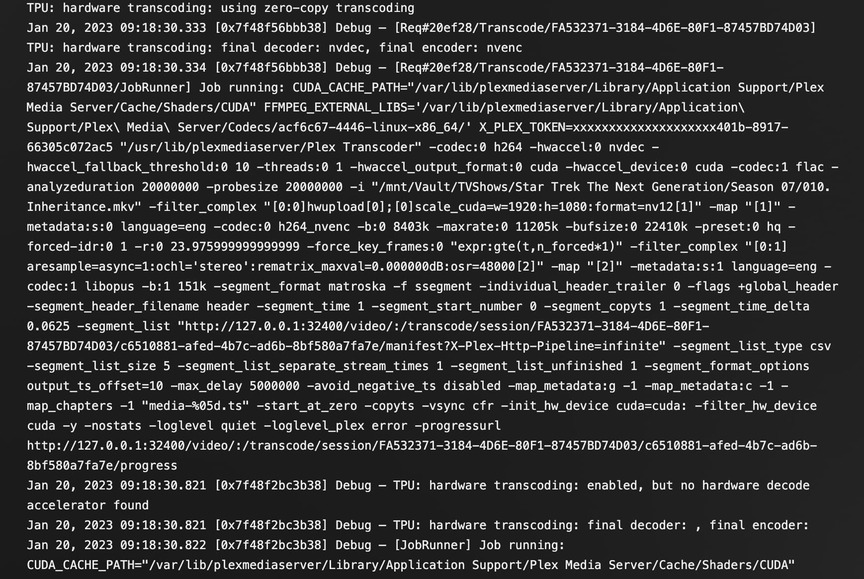
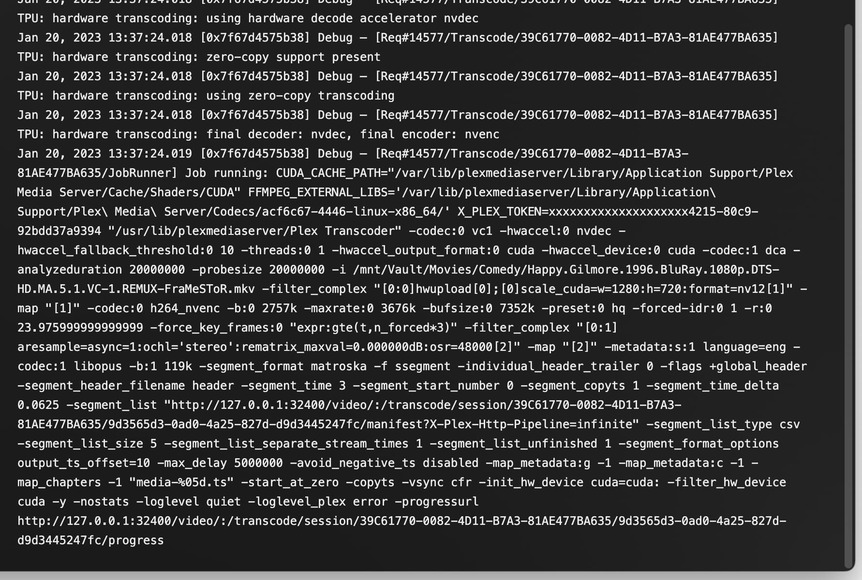
Installed Ubuntu 20.04 still having the same issue, Nvidia drivers are 515.86.01
@ChuckPa
this is the same video file but instead of transcoding from original 1080p to 8mb 1080p I’m transcoding to 720p and there is no issue.
Logs also attached for thisServer Logs_2023-01-20_13-39-50.zip|attachment]
ChuckPa
January 20, 2023, 3:00am
21
Try some of these. I know how they should be. They work on my P2200 without issue.