Server Version#: 1.21.0.3616
Player Version#: nvidia shield 2017 (8.4.2.19372) (but also happens with any client under the right conditions) Hardware:
MB: Supermicro A1SRi-2758f
CPU: Intel Atom C2758, 2.40GHz 8-core
Memory: 4x8GB Samsung DDR3L-1600MHz ECC Unbuffered
GPU: GTX 1660
GPU driver: 455.38
OS: Ubuntu 20.04.1 Server (also tried the previous 18.04, I upgraded to troubleshoot)
So here’s what happens. Whenever I end up in a scenario where the server is trying to Transcode 4k->4k, with HDR tone mapping and nvidia hardware acceleration enabled, the entire server crashes. it literally just powers off ungracefully. I know historically this kind of thing is caused by a hardware problem, but I cannot find an issue with the hardware at all and it only happens under these specific circumstances.
I first thought this might be an issue related to TrueHD audio being transcoded, but after many test cases, discovered it is only a catalyst, not the cause.
I’ll try to list all the situations and permutations i’ve attempted to test:
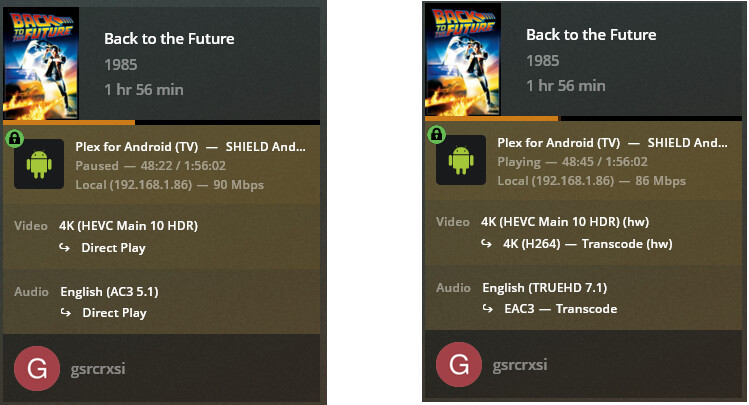
4k video + AC3 5.1 audio + HDR TM=ON + HWaccel=ON -> everything Direct Playing
4k video + TrueHD audio + HDR TM=ON + HWaccel=ON -> server attempts to transcode TrueHD->EAC3, which seems to force a video 4k->4k, and server crashes. needs to manually power back on.
4k video + TrueHD audio + HDR TM=OFF + HWaccel=ON -> video plays fine, transcoding 4kHDR->4kSDR on the GPU, also transcoding audio to EAC3 fine.
4k video + TrueHD audio + HDR TM=ON + HWaccel=OFF -> video plays, transcoding specs the same as in case #3, tone mapping working, but buffers a lot because the CPU is not powerful enough to transcode for real time playback.
now if i take case #2, and manually select a transcode down to 1080p (20Mbps for example), before enabling the TrueHD audio it works as it should with TrueHD audio being transcoded and no server crash. it plays at 1080p as instructed and tone mapping and nvidia hw accel both working as they should.
now i took another 4k file with DTS HD-MA audio + HDR TM=ON + HWaccel=ON. My client can direct play this audio so it’s not forcing the video to transcode and plays fine initially. but if i select “Convert Automatically” from the quality settings, it will attempt a 4k->4k video transcode at first and crash the server just like in scenario #2.
So it appears we have two issues.
First, there is some conflict happening with the specific situation of 4k to 4k video transcoding with HDR tone mapping and HW accel enabled which results in a full system halt.
Second, I can’t see why Plex is even trying to transcode the video component in these cases where it only needs to transcode the audio. I would avoid running into these 4k to 4k transcode situations if Plex only transcoded the audio and properly remuxed the video and audio streams like it should. I thought thats what “direct stream” was for? can anyone give a technical explanation of why Plex is not doing this? I know I’ve seen cases before where plex direct played the video and only transcoded audio and vice versa, but it doesnt seem to be happening on this new version.
did you look at the logs? i have debug logging enabled and verbose unchecked. So I’m confused why you needed to state that, I’ve already provided debug logs.
Did you skip over the fact that i have an nvidia GPU? I’m not trying to do HDR tone mapping on the non-existent iGPU. I provided very detailed scenarios of what’s happening. the cases where I tried HDR tone mapping (in addition to 4k transcoding) on the CPU, it DID work, and did not have this problem. but obviously I do not want to do this because the CPU is not powerful enough to handle this situation, which is exactly why I have the GTX 1660 doing hardware transcoding.
tone mapping works just fine on a 4k->1080p GPU transcode. no crashes.
tone mapping works just fine on a 4->4k or 4k->1080(or less) CPU transcode, but playback buffers because the CPU is not powerful enough.
the assertion that it’s a thermal limit is incorrect. the CPU runs very cool, right around 35C as its a 20W chip with active cooling. not to mention the system shuts down immediately, there is no time for temperatures to reach shut down limits. if the system doesnt reach a thermal limit while transcoding 4k AND applying tone mapping, then i doubt it will doing ONLY tonemapping while transcoding is on the GPU.
I’d love to hear your thoughts given this clarification.
Nov 25, 2020 15:32:43.292 [0x7f250b7fe700] DEBUG - [Transcode] [FFMPEG] - Loaded sym: cuvidDestroyVideoSource
Nov 25, 2020 15:32:43.292 [0x7f250b7fe700] DEBUG - [Transcode] [FFMPEG] - Loaded sym: cuvidSetVideoSourceState
Nov 25, 2020 15:32:43.292 [0x7f250b7fe700] DEBUG - [Transcode] [FFMPEG] - Loaded sym: cuvidGetVideoSourceState
Nov 25, 2020 15:32:43.292 [0x7f250b7fe700] DEBUG - [Transcode] [FFMPEG] - Loaded sym: cuvidGetSourceVideoFormat
Nov 25, 2020 15:32:43.293 [0x7f250b7fe700] DEBUG - [Transcode] [FFMPEG] - Loaded sym: cuvidGetSourceAudioFormat
Nov 25, 2020 15:32:43.293 [0x7f250b7fe700] DEBUG - [Transcode] [FFMPEG] - Loaded sym: cuvidCreateVideoParser
Nov 25, 2020 15:32:43.293 [0x7f250b7fe700] DEBUG - [Transcode] [FFMPEG] - Loaded sym: cuvidParseVideoData
Nov 25, 2020 15:32:43.293 [0x7f250b7fe700] DEBUG - [Transcode] [FFMPEG] - Loaded sym: cuvidDestroyVideoParser
Nov 25, 2020 15:32:43.319 [0x7f250b7fe700] DEBUG - [Transcode] Codecs: 10-bit HEVC test succeeded
Nov 25, 2020 15:32:43.383 [0x7f250b7fe700] DEBUG - [Transcode] Scaled up video bitrate to 184594Kbps based on 4.500000x fudge factor.
Nov 25, 2020 15:32:43.384 [0x7f250b7fe700] DEBUG - [Transcode] MDE: Cannot direct stream audio stream due to codec truehd when profile only allows eac3
Nov 25, 2020 15:32:43.384 [0x7f250b7fe700] DEBUG - [Transcode] MDE: Avengers: Endgame (2019): selected media 0 / 11745
Nov 25, 2020 15:32:43.384 [0x7f250b7fe700] DEBUG - [Transcode] Streaming Resource: Adding session 0x7f24ecafc8e0:322a78fea1837e11-com-plexapp-android which is using transcoder slot.  Used slots is now 1
Nov 25, 2020 15:32:43.384 [0x7f250b7fe700] DEBUG - [Transcode] Streaming Resource: Added session 0x7f24ecafc8e0:322a78fea1837e11-com-plexapp-android
Nov 25, 2020 15:32:43.384 [0x7f250b7fe700] DEBUG - [Transcode] Streaming Resource: Reached Decision id=6266 codes=(General=1001,Direct play not available; Conversion OK. Direct Play=3000,App cannot direct play this item. Direct play is disabled. Transcode=1001,Direct play not available; Conversion OK.) media=(id=11745 part=(id=13343 decision=transcode container=mkv protocol=hls streams=(Video=(id=39016 decision=transcode bitrate=184594 encoder=h264_nvenc width=3840 height=2160) Audio=(id=39017 decision=transcode bitrate=1032 encoder=eac3_eae channels=8 rate=48000))))
Nov 25, 2020 15:32:43.388 [0x7f2519d5d700] DEBUG - Completed: [192.168.1.86:59380] 200 GET /video/:/transcode/universal/decision?audioBoost=100&autoAdjustQuality=0&directPlay=0&directStream=1&directStreamAudio=1&fastSeek=1&hasMDE=1&location=lan&maxVideoBitrate=200000&mediaBufferSize=209664&mediaIndex=0&partIndex=0&path=%2Flibrary%2Fmetadata%2F6266&protocol=*&session=322a78fea1837e11-com-plexapp-android&subtitleSize=100&videoBitrate=200000&videoQuality=100&videoResolution=3840x2160 (12 live) TLS GZIP 1082ms 7271 bytes (pipelined: 5)
\00\00\00\00\00\00\00\00\00\00\00\00\00.............
This is the classic signature of a kernel driver faulting.
The nulls are written because the STDERR output handler asks for calloc() of one page (4k bytes).
What does your system journal / dmesg show ?
It should register the kernel panic.
The last I saw this type of failure was when VMware was tripping up on a faulty ethernet driver in Ubuntu 16.
Frankly, I can’t believe you’re even trying to do tone mapping in software (no iGPU acceleration via OpenCL). That’s a huge load.
“Frankly, I can’t believe you’re even trying to do tone mapping in software (no iGPU acceleration via OpenCL). That’s a huge load.”
I’M NOT. I only did this for testing to narrow down where the issue is coming from. it was a troubleshooting step ONLY. Usually I am doing the tone mapping and transcoding on the nvidia GPU. when it’s working, the load is actually quite low. only like 5-10% CPU utilization while playing a tone mapped 4k->1080p GPU transcode.
Ideally what I want to happen is no transcoding of the video at all if it doesnt need to, and only transcode the audio if it needs to. but still allow video transcoding when it needs to (disabling video stream transcoding doesnt force direct play, it just prevents playback at all when it tries to transcode). but this is second issue i listed in my OP.
I narrowed down what I believe to be the combination of settings that cause the issue.
4k->4k transcode + HDR tone map + nvida HW accel.
take any one of these out of the equation and the problem does not happen.
I dont see anything helpful in dmesg, kernlog, or syslog, but maybe you can spot something i cant.
i can do that, if you can instruct me how to do it. we’re getting into the territory where I don’t know these processes.
as an aside, your comment that it looks like a kernel driver issue made me think to look at the nvidia drivers as a potential culprit. i’ve wiped the nvidia drivers, and rolled back to 450.80.02 as a fresh install. will retest.
Edit: nope, nvidia driver doesn’t seem to be the issue. same exact behavior with the fresh driver. system shut down same as before.
in the meantime perhaps you can explain why Plex isnt direct streaming the video when the audio is transcoding? it can direct play the 4k content to my 4k capable device and tv, why force the video transcode when the audio transcodes? why isnt it remuxing the original video back in? I thought Plex had this functionality?
that would eliminate probably 99% of the times I expect to see this issue pop up. Since most of my 4k content also has some high quality audio track that might need to be transcoded. it would make a LOT more sense to just transcode the audio and then splice it back into the stream with the original 4k file, than trying to transcode 4k to 4k at a similar bitrate.
Nov 25, 2020 15:25:30.367 [0x7f25087f8700] DEBUG - [Transcode] Codecs: 10-bit HEVC test succeeded
Nov 25, 2020 15:25:30.429 [0x7f25087f8700] DEBUG - [Transcode] Scaled up video bitrate to 243585Kbps based on 4.500000x fudge factor.
Nov 25, 2020 15:25:30.429 [0x7f25087f8700] DEBUG - [Transcode] MDE: Interstellar (2014): Audio Direct Streaming is disabled, so video's audio stream will be transcoded
Nov 25, 2020 15:25:30.429 [0x7f25087f8700] DEBUG - [Transcode] MDE: Cannot direct stream audio stream due to profile or setting limitations
Nov 25, 2020 15:25:30.429 [0x7f25087f8700] DEBUG - [Transcode] MDE: Interstellar (2014): selected media 0 / 7371
Nov 25, 2020 15:25:30.430 [0x7f25087f8700] DEBUG - [Transcode] Streaming Resource: Calculated bandwidth of 256577kbps exceeds bandwidth limit. Changing decision parameters provided by client to fit bandwidth limit of 20000kbps
Nov 25, 2020 15:25:30.430 [0x7f25087f8700] DEBUG - [Transcode] Streaming Resource: Determining preferred transcode encoders through transcode only decision.
Nov 25, 2020 15:25:30.430 [0x7f25087f8700] DEBUG - [Transcode] Codecs: testing h264_nvenc (encoder)
Nov 25, 2020 15:25:30.430 [0x7f25087f8700] DEBUG - [Transcode] Codecs: hardware transcoding: testing API nvenc
Nov 25, 2020 15:25:30.430 [0x7f25087f8700] DEBUG - [Transcode] [FFMPEG] - Loaded lib: libcuda.so.1
Nov 25, 2020 15:25:30.430 [0x7f25087f8700] DEBUG - [Transcode] [FFMPEG] - Loaded sym: cuInit
Even though it’s scaled 4.5x (inbound bitrate) and somewhat confusing.
It is telling us the source is about 50-55 Mbps. Is that correct?
If so, 55 Mbps exceeds the 20 Mbps limit requested (set in the App settings)
there are examples in there that include times that i was playing with 20Mbps to make sure that everything worked when transcoding to 1080p (as i mentioned in my test cases). the times where it’s set to 20mbps are when it’s been set that way by me. otherwise i have the client set to play original/maximum.
but you should also be able to find some cases where I have selected original quality and was previously playing the file at full quality/bandwidth, and only changed the audio track, which triggered the video to transcode when it should not have. that is the basis for my question. why is a video transcode being forced just because the audio is transcoding when it should be direct playing?
look at some of the instances just before a system crash.
when i’m watching in Tautulli just before a crash or when setup with hw acccel disabled (so i can actually see what its trying to do) i see that it tries a 4k to 4k transcode at original quality. these are the times thats triggering the cash. the times when its limited to 1080p/20Mbps, everything is peachy.
Ahhh! You’ve explained that better than I previously understood. Thank you.
When direct playback isn’t possible, the MDE has to evaluate total bandwidth requirements.
It’s a shame because this is such a common scenario and video transcoding causes such a big hit to quality and performance.
But I understand - the estimator can’t KNOW that the video can be direct played, and a 50Mbps average stream may have 200Mbps transient spikes, further encouraging transcoding.
Interesting.
@gsrcrxsi, can you share an example of the scenario you’re mentioning? I’m curious if it matches the explanation @ChuckPa already gave.
example:
I have symmetrical gigabit internet service
Plex server-side stream limit set to original (no limit)
client = nvidia shield 2017, also set to stream with no limit and play original/maximum. it is also on the LAN with the server.
playing Avengers Endgame in 4k to my nvidia sheild with AC3 audio track selected, everything direct plays as it should. both audio and video are direct playing.
now if the only change i make is to select the TrueHD audio track (which is not supported by my hardware) Plex wants to transcode that, fine. but what’s not fine is that in this case it also decides to transcode the video with it. this is not desired. plex should be streaming the video and ONLY transcode the audio, not both.
Your log entries mention that transcoding is required for the HLS streaming protocol. Maybe there’s a non-obvious cascading effect - transcoding the audio obviously requires remuxing, and remuxing into HLS requires transcoding the video.
doesnt look like it has anything to do with HLS, but a few lines down you should see this:
no remuxable profile found, so video stream will be transcoded
so it seems to be a lack of a “remuxable profile” whatever that means. so uh, can you guys make that? what profile exactly is missing? seems like definitely a limitation in Plex, since the hardware can do it.
here you can see another example. with HDR tone mapping disabled to prevent the system from crashing. but you see direct play, then all transcode just from changing the audio.
is it because Plex decided to transcode the audio to EAC3 and there is no 4kHEVC+EAC3 combo available for muxing? if so, maybe plex could be a little smarter to choose an audio codec to convert to that can still be remuxed?
i followed this guide, but have been unable to get the dumps to work. neither the crashes from this plex issue, or a user induced kernel panic will generate the crash reports.
Please be advised, I am on priority for Synology to get that development work completed.
With Linux, there is more community here to help you in my absense whereas there is much less for Synology plus I have to complete the DSM 7 work so Plex will even run on it.
I totally wiped the drive, and reinstalled Ubuntu 20.04.1, and plex, and everything from a clean slate, trying to remove any software corruption that might exist.
the same problem persists. once it tries to get into the same situation the system just shuts off.
OK. I’ve solved the first issue. the hard system reboots seem to be an OCP trip from the PSU.
first, things that I tried before this, that are always good things to check, but were ultimately unsuccessful:
replaced the system SSD along with the data cable, as well as using a different SATA port on the motherboard, just to rule out any problems there.
checked the CPU watchdog BIOS setting and jumpers. I’ve had cases before where the watchdog was detecting an application hang and just suddenly rebooting the system and had to physically remove the jumper to stop it. I never had this issue before on this motherboard, but since I saw similar behavior before, it was worth a shot.
tried the linux headless drivers, which didnt work, but it seems the repo version of the nvidia drivers forces an install of the full gnome desktop, which I dont really want on this server. but these headless and server drivers dont seem to include the necessary components for nvenc to function and i was not getting any HW accel. will probably go back and just install the nvidia runfile to avoid having the gnome desktop installed.
now what appears to be the issue, and the cause. since I finally found the solution by trying a different PSU, the default PSU is a gold-rated 200W power suppy that came in the case. the whole server is in a small 1U rack mounted chassis. previously the whole system would only pull 50-60W from the wall, so I didnt think there wouldnt be enough power.
i decided to monitor the GPU power use with HDR tone mapping ONvsOFF. the GPU pulls significantly more power when doing 4k->4k + TM.
4k-4k + TM = GPU power hitting peaks of about 75-80W
4k-4k + no TM = GPU hitting peaks of about 40-45W
4k-1080 + TM = GPU hitting peaks of about 30-40W
this increase in power required seems to be just enough to trip the PSU’s OCP. this also explains why theres no trace of the issue in the OS, since it’s completely external.
I’ll have to swap in my spare 200W PSU for this chassis to see if its a faulty PSU or I just need to upgrade.
without a monitor, GPU will enter some kind of low power/suspended state, which seems to cause issues with HW transcoding.
as you discovered, installing gnome (or other desktop) can also work, as it seems force the gpu to stay on at a higher power level.
similarly, in windows, a hdmi dongle is required for headless servers, due to conflicts in the way windows implements application/service/driver security, and RDP.
oh one other thing, linux kernel 5.9 is not currently compatible with any nvidia drivers. you need to use 5.8 or earlier, until nvidia releases some drivers fully compatible with 5.9.