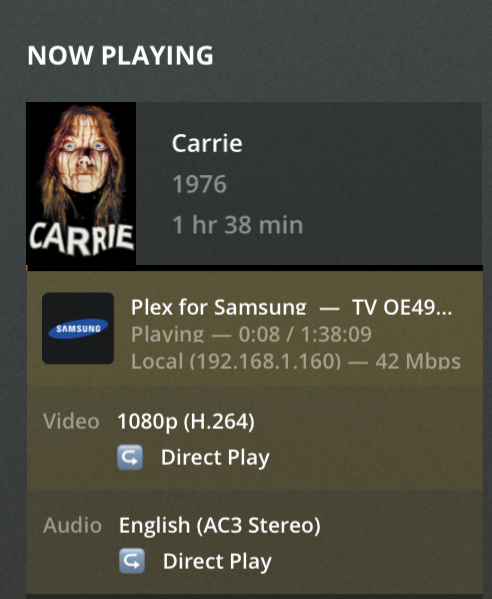
Subtitles are selected per film and are set to none, either way if subtitles were selected how do you explain selecting a different audio track stopping the transcoding of the video.
if the audio is transcoding (for whatever reason), and subtitles are enabled, then the video will be transcoded (this is a plex limitation, ostensibly to keep audio/video/subs in sync).
in the second picture, the audio is direct playing, so subtitles could be enabled assuming the tv supports them, and it should not affect the video.
that is why I asked, because the bottom of the screenshots are cut off, we could not see if subs were on or not.
as for why the video is transcoding when it should not be, I don’t have an answer, and that should be the focus of investigation.
the tv doesn’t support dts.
ok so, then dts is being transcoded.
subtitles are not enabled, so the video should be direct play.
I haven’t read the entire thread, but it would be good to have logs recreating the above example of audio/video transcoding without subtitles.
debug logs on
verbose logs off
recreate video problem
plex web > settings > troubleshooting > download logs > drop zip into reply
Can subtitles be on and you don’t see any ? I have checked and it says none, but wouldn’t you actually see them if they were on ?
Also the debug is that under the Plex web tab, debug level has three options, disabled, enabled, verbose, I’m guessing enabled is the option, then I should play the movie for 10 secs ? Then stop and download logs from the troubleshooting option ?
if subtitles were playing, the dashboard would indicate under the audio, like such

you need to check the server settings

for the cleanest logs…
- stop server
- start server, wait ~2 minutes
- start problem video/recreate problem
- play ~30 seconds
- stop video
- download logs via settings > troubleshooting > download logs > drop zip into reply
but, if your server is busy (other people streaming, or dvr recording, you don’t need to restart, unless you change the debug/verbose settings).
No defo no subtitles then, here is a log, had a look at the console while it was playing, noticed some red entries, which don’t appear on files that play ok.
Feb 20, 2020 21:04:45.018 [0x7ff1805cd700] DEBUG - MDE: Selected protocol dash; container: mp4
Feb 20, 2020 21:04:45.018 [0x7ff1805cd700] DEBUG - MDE: analyzing media item 21251
Feb 20, 2020 21:04:45.018 [0x7ff1805cd700] DEBUG - MDE: Carrie (1976): Direct Play is disabled
Feb 20, 2020 21:04:45.018 [0x7ff1805cd700] DEBUG - MDE: Carrie (1976): media must be transcoded in order to use the dash protocol
Feb 20, 2020 21:04:45.018 [0x7ff1805cd700] DEBUG - MDE: Carrie (1976): selected audio stream is not the first audio stream and direct play stream selection is not enabled
Feb 20, 2020 21:04:45.018 [0x7ff1805cd700] DEBUG - Carrie - video.bitrate limitation applies: 36034 > 20000
Feb 20, 2020 21:04:45.018 [0x7ff1805cd700] DEBUG - Carrie - video.bitrate limitation applies: 36034 > 20000
Feb 20, 2020 21:04:45.018 [0x7ff1805cd700] DEBUG - MDE: Carrie (1976): no remuxable profile found, so video stream will be transcoded
Feb 20, 2020 21:04:45.018 [0x7ff1805cd700] DEBUG - Carrie - video.bitrate limitation applies: 36034 > 20000
Feb 20, 2020 21:04:45.018 [0x7ff1805cd700] DEBUG - MDE: Cannot direct stream video stream due to profile or setting limitations
I suspect problem is
- file is mp4
- dts appears is not the first audio stream
- plex can’t remux the video and play secondary audio streams in mp4 container without transcoding
suggestions;
- remux the file so dts is first audio
- remux to mkv
All my files are made from my blu ray rips using mkv, so they can’t be mp4, plus why did they all work in 4.15.2 ? This whole issue only started in 4.19.2
Huh? bluray rips can certainly be other than mp4, MKV is one of the most common containers.
as far as why it worked in an older version, sorry I have no idea, maybe something was ‘fixed’, maybe something was ‘broken’.
google for ‘remux mp4 to mkv’
remux does not change quality, just the container.
edit:
ok sorry I mis-understood…
your files are already in mkv.
the log shows that plex needs to remux TO mp4 (for your tv).
also, there are these entries, which seem to indicate there is some kind of limit on the bitrate causing transcode…
Feb 20, 2020 21:04:45.018 [0x7ff1805cd700] DEBUG - Carrie - video.bitrate limitation applies: 36034 > 20000
Feb 20, 2020 21:04:45.018 [0x7ff1805cd700] DEBUG - Carrie - video.bitrate limitation applies: 36034 > 20000
Feb 20, 2020 21:04:45.018 [0x7ff1805cd700] DEBUG - MDE: Carrie (1976): no remuxable profile found, so video stream will be transcoded
Feb 20, 2020 21:04:45.018 [0x7ff1805cd700] DEBUG - Carrie - video.bitrate limitation applies: 36034 > 20000
In that image it shows 42 Mbps… is that correct for what your playing.
reason I ask in I see that happening when the other end is half that rate and it buffers…
just curious if thats happening here also?
But this is a mkv file, ripped in the same way all my blu rays are, they must of changed some thing, hopefully a dev can respond.
1 Like
the direct play is ~42meg
the transcoded is being limited to ~20meg
and yes karlos, probably need someone who can better interpret the logs
You know that for a fact!!!
So here is another movie, again it says it’s a mp4 when it’s a mkv file and it lists the 20mbps limit, my tv is set at the original setting so maybe that’s a bug, also what is this driver error.
0, 2020 22:44:36.206 [0x7ff0f7af2700] DEBUG - MDE: Selected protocol dash; container: mp4
Feb 20, 2020 22:44:36.206 [0x7ff0f7af2700] DEBUG - MDE: analyzing media item 21252
Feb 20, 2020 22:44:36.206 [0x7ff0f7af2700] DEBUG - MDE: Rise of the Footsoldier 4: Marbella (2019): Direct Play is disabled
Feb 20, 2020 22:44:36.206 [0x7ff0f7af2700] DEBUG - MDE: Rise of the Footsoldier 4: Marbella (2019): media must be transcoded in order to use the dash protocol
Feb 20, 2020 22:44:36.206 [0x7ff0f7af2700] DEBUG - Rise of the Footsoldier 4: Marbella - video.bitrate limitation applies: 28648 > 20000
Feb 20, 2020 22:44:36.206 [0x7ff0f7af2700] DEBUG - Rise of the Footsoldier 4: Marbella - video.bitrate limitation applies: 28648 > 20000
Feb 20, 2020 22:44:36.206 [0x7ff0f7af2700] DEBUG - MDE: Rise of the Footsoldier 4: Marbella (2019): no remuxable profile found, so video stream will be transcoded
Feb 20, 2020 22:44:36.207 [0x7ff0f7af2700] DEBUG - Rise of the Footsoldier 4: Marbella - video.bitrate limitation applies: 28648 > 20000
Feb 20, 2020 22:44:36.207 [0x7ff0f7af2700] DEBUG - MDE: Cannot direct stream video stream due to profile or setting limitations
Feb 20, 2020 22:44:36.207 [0x7ff0f7af2700] DEBUG - Codecs: testing h264 (decoder) with hwdevice vaapi
Feb 20, 2020 22:44:36.207 [0x7ff0f7af2700] DEBUG - Codecs: hardware transcoding: testing API vaapi
Feb 20, 2020 22:44:36.209 [0x7ff0f7af2700] ERROR - [FFMPEG] - libva: /mnt/HD/HD_a2/Nas_Prog/plexmediaserver/binaries/lib/dri/iHD_drv_video.so init failed
I don’t know about that error, maybe Plex will look into this…
That image shows you direct playing a 1080p H.264 with no audio transcoding so the container is being forwarded to the client. but at 42 Mbps seems an unusually high rate.
Most clients would be half that. most networks would have no problem handling that but could the client keep up?
Plex needs to look at this.
maybe @ChuckPa could take a look?
Well if you play 4K files I get bit rates at over 112mbps on many occasions, they still play fine in this version if you have ac3 audio,. This is my first ever issue with Plex, I think it’s a fantastic product, just something that’s has gone a little strange since, 4.15.2.
Here is Endgame 4K, 96mbps plays no problem, but only if it’s audio can play without transcoding, my Nas can’t transcode 4K.
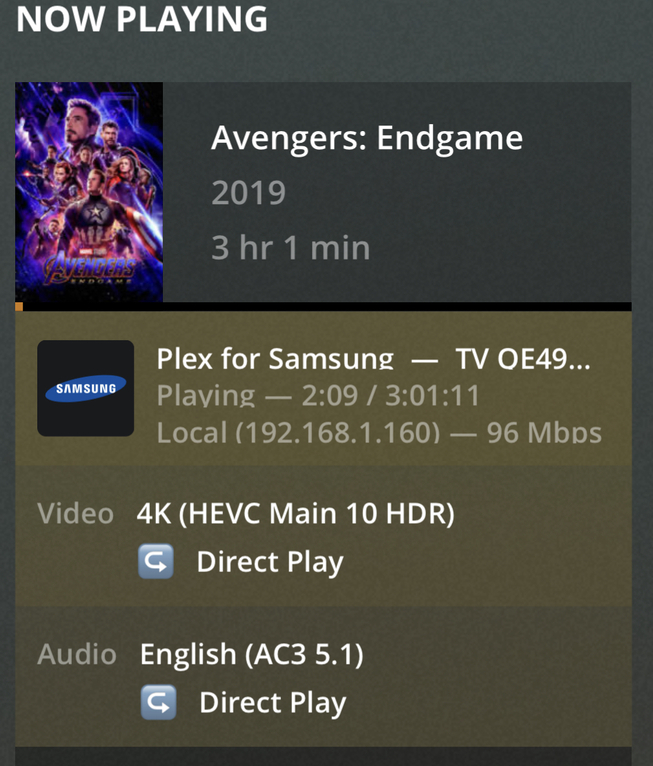
That video makes sense… it’s 4K and if you check the client setting it would be in the general area.
What I was seeing is a client at 20 Mbps and a dashboard showing 42 Mbps with a 1080p movie… Twice the rate. I was getting buffering, little cpu activity on the system and same thing if it required to transcode audio only… Thats why I asked…
I’ll see how this goes, Thanks for the info…
dave, the 42mbs 1080 movie was a direct play of a bluray remux (which are easily 30-60 mbs).
the other video was being transcoded DOWN to 20mbs.
plex can transcode down 1080 at several different bitrates.

It was not transcoding…
and on your client list the top for a 1080p movie is 20Mbps
done…