Server Version#: 1.21.1.3876
Player Version#: web player in Chrome
Hello everyone, I’m having trouble getting Quick Sync hardware transcoding enabled and functioning in Plex.
Plex version is 1.21.1.3876, server is Windows 10, 16gb DDR4, CPU as of this morning is a G6400, motherboard is a H410M-HDV. Just swapped out a J4105-ITX, stuck with ASRock for driver compatibility with the motherboard swap, definitely not my preferred brand. So I have two hardware options to play around with while troubleshooting right now.
Currently iGPU Multi Monitor is enabled in the BIOS. Virtualization and VT-d are disabled as a forum recommendation specifically for the J4105-ITX, supposedly Quick Sync wasn’t available if VT-d was enabled. I’m not sure that still applies for the new H410M-HDV.
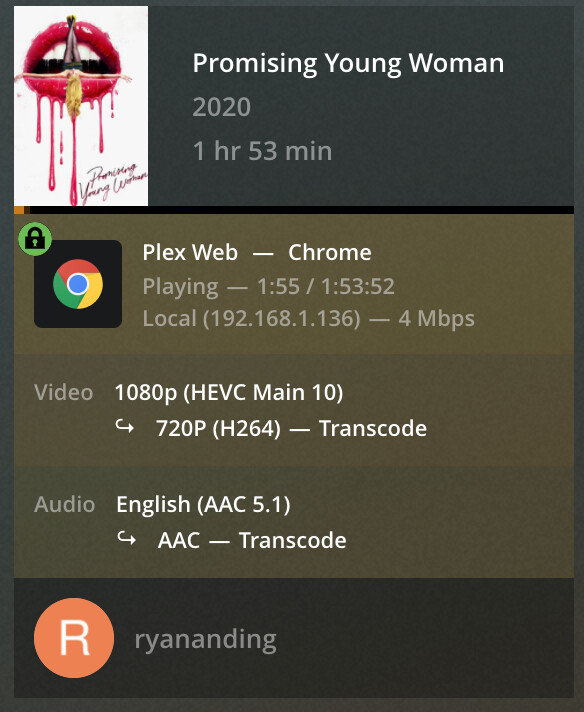
In Plex, Enable HDR Tone Mapping and Use Hardware Acceleration When Available are enabled. Enabling Hardware Accelerated Video Encoding causes video playback to buffer but never start playing, to be expected as this isn’t supported by Intel iGPUs according to all of you smart people. I don’t have any HDR content, so I would think that setting shouldn’t make a difference. The content I’ve been testing with is H265 1080p, lots of H264 1080p as well but haven’t been using that to test. Testing has been done with 720p 4mb transcodes in the web player in Chrome.
Regardless of Plex transcoder setting, I’ve seen the (hw) designation all of one time, and just today with the G6400, this over weeks of playing with this. With software transcoding on the J4105-ITX, even on the LAN, Plex would buffer every few minutes to the point that streaming from Plex wasn’t enjoyable. I haven’t had enough experience with the G6400 to comment on software transcoding yet.
If I could get Quick Sync hardware transcoding working with either hardware solution, I’d be happy. If I could get it working with the J4105-ITX and it could handle four 1080p streams consistently, I’d be even happier. I’m open to exchanging motherboards and moving up to a i3-10100, but from everything I’ve read, transcoding works great once Quick Sync is functioning, and even the J4105 should be able to handle a few simultaneous 1080p streams.