Just starting to try Plex after Emby because Emby has trouble playing a TV show that is currently recording. Although Plex seems easier to set up than Emby, I can’t get the DVR configured.
Select Live TV & DVR - good
setup Plex DVR - good
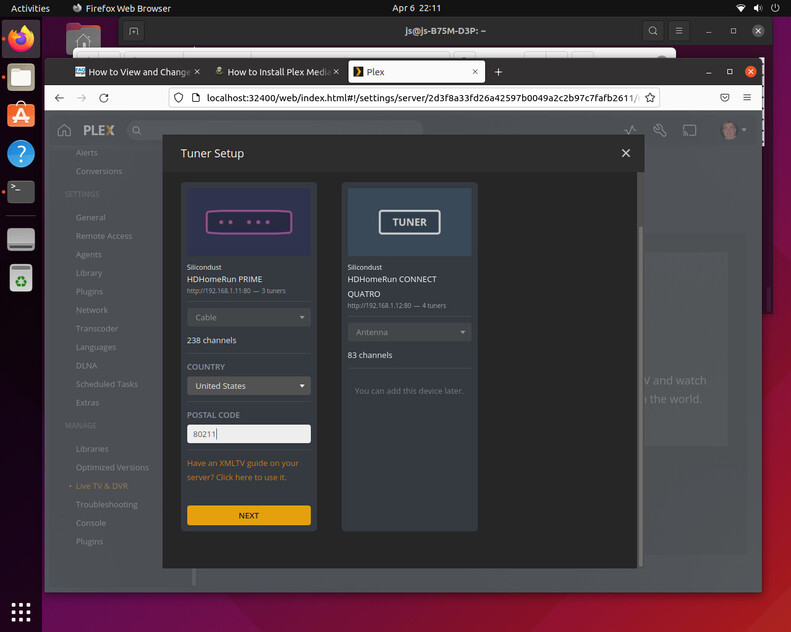
HDHomerun appears - good (detects “cable”, says 238 channels, USA, and I enter zip)
Tuner Setup - tells me that I can use XMLTV if not located in area covered by Plex DVR guide. I figure that I’m covered because I live in a big city (Denver)
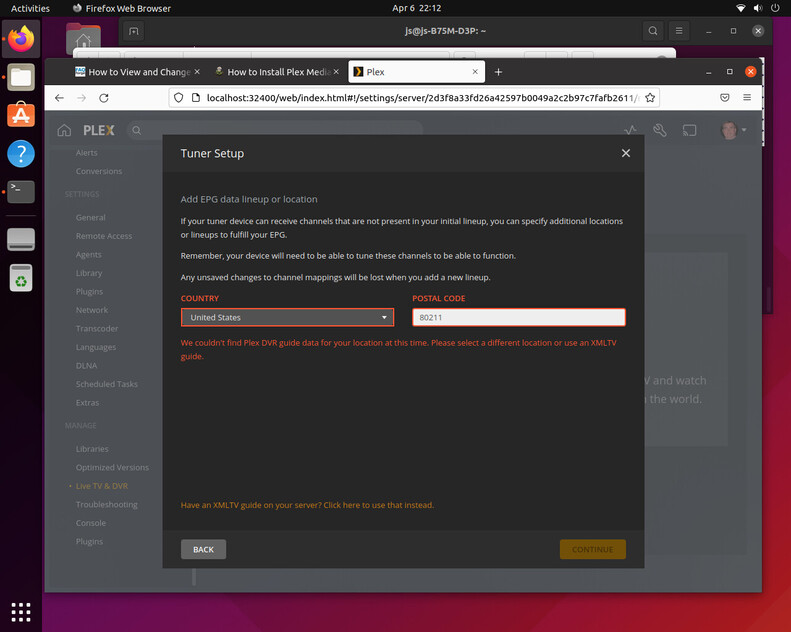
asks for path to xmltv guide (I don’t have one)
at bottom gives option to select location instead (I click that because surely Denver has a
DVR guide)
Tuner Setup - asks for zip again, then says “we couldn’t find Plex DVR guide”
Now I’m stuck because the setup guides don’t talk about this. Also I think I’m doing something wrong because it seems unlikely that Denver doesn’t have guide info.
Server Version#:
Player Version#:
Tuner Make/Model: HDHomeRun
Guide/Lineup name:
Using XMLTV?:
Channel number/Name:
Are you using the Plex hosted web browser client when setting up channels? (https://app.plex.tv)
Also check for database corruption and if you have tv.plex.providers.epg.cloud* files it is probably easier to stop Plex, delete the files and restart.
Tiebierius thanks. I clicked on the link and don’t see anything about setting up channels or DVR. Clicking live TV seems to take me to the default provided by Plex.
the tuner popped up with the 238 channels right away. Does it talk to the tuner configuration, and might there be something still there from the previous Emby installation?
Careful posting screenshots with the address bar showing, it contains sensitive server information.
HDHomerun’s do a channel scan that can be read by Plex, the Prime is controlled by the cablecard.
Was the Quatro already there and you are just trying to add the Prime?
First thing to try is use https://app.plex.tv/web instead of localhost. The version of the client bundled with the server (localhost) is missing some updated for dealing with tuner setup.
If that fails, use the Delete DVR to remove any tuners and cleanup the database then re-add the Prime to see if the EPG is can be matched.
If that fails, stop Plex server from running and locate the tv.plex.providers.epg.cloud* files and remove them then restart Plex and try again.
If that fails, under Live TV & DVR is Troubleshooting where you can download the logs and drag and drop them into a reply here. I suspect database corruption but should look at the logs first.
Thank you. I’ve had both tuners for a while and they were working with Emby. I’ve been trying to get at least one of them working with Plex but no luck with either as yet. Each says Plex DVR guide is unavailable. I thought maybe the Quatro would work because that should be able to snag an OTA guide. I’ll look at the things you suggest and report back.
I’ve had no trouble setting up my quatros in the Denver area in the 80015 zip code. I’ve set then up both with XML EPG files and the Plex provided EPG as it’s now set.
I’ve never had or used a hdhomerun prime though. I’d think it would work similar but don’t have first hand experience.
This is a long-shot, but I was having the exact same problem on a headless ubuntu install. I exported the Plex logs, and noticed in Plex Media Server.1.log I had a bunch of these errors:
EPG[tv.plex.providers.epg.cloud]: unable to retrieve service provider details
By pure luck, I noticed the created dates of the log files themselves were in the future. I realized I forgot to change timezone from UTC to America/Denver. Once I did that, I restarted the plexmediaserver service and tried again. Worked perfectly after that.
This took most of a day to figure out, so hopefully this helps someone.
Success. Still likely some work to do but I’m watching TV now. The computer has an SSD for the operating system and a 1.5T hard drive for storage that was still owned by the Emby group, so looks like I had improperly set up the library.
I’m guessing that I still have permissions issues and that the DVR will probably try to record to the SSD. Linux HD set up is always a pain.