I agree, there shouldn’t be. But something is not working right. Perhaps you can point me in the direction to troubleshoot this?
Just an FYI; I have the same issue on my desktop and laptop.
I agree, there shouldn’t be. But something is not working right. Perhaps you can point me in the direction to troubleshoot this?
Just an FYI; I have the same issue on my desktop and laptop.
can anyone else reproduce? can you provide a couple tracks as samples?
actually, to clarify—exactly which app are you using on the desktop, and what version?
Apologies, it seems these forum replies goes to junk mail. By “anyone else”, in what way do you mean that? I have the media server at home on a Raspberry Pi v4, and I have tried the following devices with my user login:
I have just installed the latest version of your desktop app and have the same issue:
https://www.plex.tv/en-gb/media-server-downloads/#plex-app
#### Plex for Windows
Windows 10 or later (64-bit only).
1.26.0.1531-92029e9e
December 21, 2020
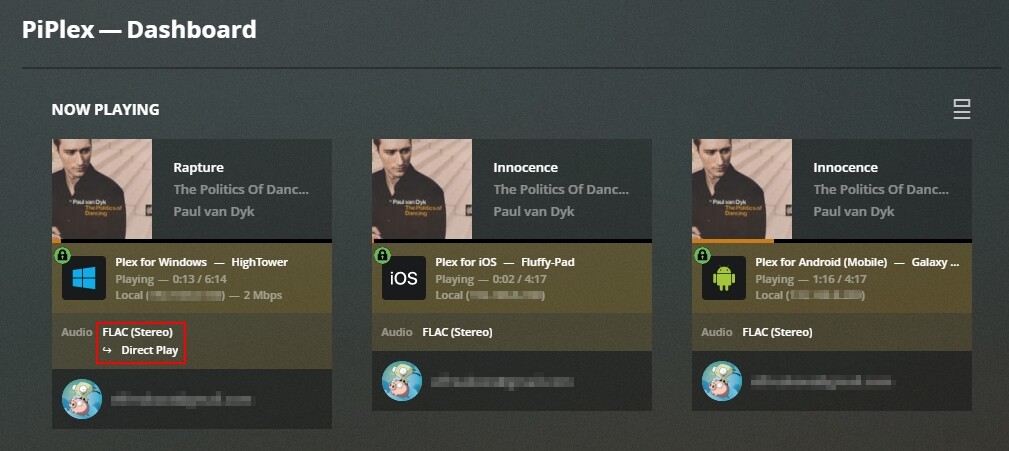
Any music that should be gapless is the same result, but as an example: Paul van Dyk - The Politics of Dancing
Not too sure if this is relevant, but as you can see from the screenshot, only the desktop app is running on Direct Play
Something interesting happens on this screen when I watch the playback. On both the Android and iPad when switching between screens the squares that show the playback for that particular device only flickers for a split second, showing the next song playing. However, the desktop device disappears for much longer, noticeably longer. Perhaps for a second or second and a half.
I am not too sure if that’s of valuable info, but it’s as if it needs to load longer. I will note that Android and iPad are on WiFi, whereas the desktop apps are on ethernet cable. I have a single router for which all devices connect to, so there shouldn’t be an issue.
i’ll pass this along, it might be a limitation of the player. plexamp on desktop is gapless.
I also don’t understand. I use the latest plexmediaserver on my network, and use the web player by opening the server’s URL in the browser.
I listen to dj mixes and there is a gap between songs. Most of the songs are FLAC, but I don’t see why that would change things.
Is there a setting somewhere (I could not find) to enable gapless playback ?
(Gapless = no pause between songs, and DJ song to song mix should sound as if it was just one continuous stream)
Very interested in this «setting for gapless playback» too, as noticed some cross-fadings in Plexamp (3.4.1) lately – not something I’m keen on when listening to a Symphony.
the web player does not support gapless playback.
the desktop Plex app does not support gapless playback.
you can disable Sweet Fades, but in general if you’re playing albums straight, it’ll automatically do that for you.
Well that’s just odd. How can a go fledged computer not support gapless playback, but a phone can? I think the developers need to put some engineering work into the desktop app to support some basic functionality. Can you get them to put it on their next sprint, please? @elan
nothing to do with technical capabilities; the desktop version needs to integrate the player from Plexamp. in the meantime, you can use its desktop version if gapless is important to you.
Hmmmm… it seems that I need to pay a monthly fee for a Plex Pass in order to use Plexamp, in order to use gapless playback on a desktop PC… which my phone does without a Plexpass. This seems a bit hapless to me 
Are you sure this is how it’s supposed to be?
I noticed my biggest issue is with mp3 files on the Windows app that are short (let’s say under a minute maybe). They are 100% gapless on other apps (they are my own V0 mp3 copied directly from the CD source). So the number of albums it impacts are minimal however I have some mixes that have short tracks and that ever so slight gap is noticeable for sure.
Edit: I went back and one album I know I had issues with had a “Length” tag which was copied from an old file (copied the album again as V0 instead of V2) and it seems to work smooth now that I have removed it.
It seems like gapless sometimes works for me, but other times (on the same album) there’s a subtle but noticeable blip between the two tracks.
I see things like this:
Feb 09, 2021 12:19:27.891 [0x00006ee4] INFO - BASS: Deleting gapless stream 0x80000058.
Feb 09, 2021 12:19:27.891 [0x00006ee4] INFO - BASS: Gaplessly transitioning to the next stream.
and this:
Feb 09, 2021 12:19:27.901 [Javascript] INFO - Discovery: Refresh based on track change.
Feb 09, 2021 12:19:27.902 [0x0000649c] INFO - Cache: Media was fully cached, just reading from disk.
Feb 09, 2021 12:19:27.902 [0x0000649c] INFO - BASS: Opened stream 15117 in 2 ms (paused: 1) with gain -6.8 dB, max 0 Kbps (picked mp3, 228 Kbps, actual 227 Kbps/sec).
Feb 09, 2021 12:19:27.902 [0x0000649c] INFO - BASS: Created a gapless source stream for 15117 (channel: 0x80000061) with sample rate of 44100 and 2 channels (paused: 1)
Feb 09, 2021 12:19:27.902 [0x0000649c] INFO - BASS: We're gaplessly connecting the two streams.
in the logs, which I guess means it should be working.
The tracks are from a DJ mix that I split myself using mp3splt and a CUE file, so I’m pretty certain the cuts are clean.
because the app doesn’t pre-buffer the next track, it’s just a matter of whether you can fetch data in time, which is vary somewhat randomly.
I thought it precaches tracks? I see this in my log:
Feb 09, 2021 13:10:45.084 [0x000034b4] INFO - PQCache: We have 15 items successfully precached after current.
are you talking about something different?
I suspect Elan means the app doesn’t start fetching the data from the cache ahead of time.
sorry, we’re talking about different apps in this thread, which is confusing.
Oh yeah, I should have mentioned that I’m using Plexamp. Sorry! Like I said, sometimes it works perfectly, other times it “nearly works” in that there’s a very small gap inbetween the tracks (barely noticeable, but it’s there)
if that’s the case, almost certainly an issue with the actual data in the files (especially if it’s consistent between two tracks), because the gaplessness itself is sample-accurate and we don’t introduce any space.