Hello ,
first my environment : 1) a computer under Windows 10, last version, and PLex Media server working 2) A Samsung TV serie 7000, updated last firmware with Plex. Both connected via ethernet cable.
I am trying to connect both and I do not succeed to add the plex server on my TV .
Two possibilities either “connect with your login” but then not possible to enter login and password or Add Server with IP address but then an error message:
“test failed, server is reachable but it returned “access denied”. connect with your plex account or turn “require authentification on local networks” off in it’s Media manager”
I do not find how to “off” authentification in Media manager
PLease help me.
Have a nice day papoujl@gmail.com
Determine the IP address of your tv device. (You should be able to glean it from the setup menu of your router.)
Use a PC or a tablet or even a phone and go to app.plex.tv
This is the web app, which you are using to set up and manmage your server.
In this app, click on the Setting icon at the top (3rd from right)
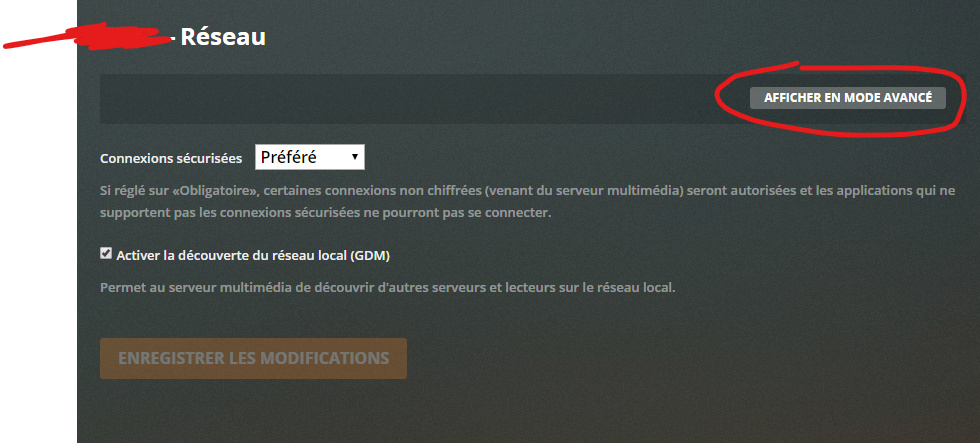
Now select Server - Settings - Network - ‘Show Advanced’ and put in the IP address of your TV into the field “List of IP addresses and networks that are allowed without auth”
If you can’t find your TV’s IP address, you need to allow the whole local network to access your server without authentication:
Go to Settings - Server - Remote Access and copy the IP address that is shown there as ‘Private’ e.g. 192.168.2.23.
Replace the number after the last dot by 0/24, so you get now e.g. 192.168.2.0/24.
Now put this into the above mentioned input field. Make sure to not enter any space characters!
Save the changes, then stop the server and restart it.
(The above procedure is correct for 90% of all domestic networks. If your network is using a different IP range, you probably also know the ‘netmask’ it is using, so you can modify the number after the slash accordingly.)
Hi,
thanks fr your help.
unfortunately it doesnot work!
I already enter in the parameters (by the way level is 4.20.1) without success.
Is it due to a french level? The only parameter which should like as the one you propose is (french ) Autoriser le recours aux connexions non sécurisées
“Autoriser cette application à établir des connexions non sécurisées au serveur Plex Média si les connexions sécurisées échouent” which I set to “always”. But it doesnot help me entering any TV address somewhere
Do you have any other tips to propose?
Have a nice day.
Hi @OttoKerner, I seem to be having much of the same issue as above, and am trying to use your advice, but don’t get the same settings you listed. When I click on the settings tab in the app, I never see anything about “Server” adjustments. Am I doing something wrong? I have the “show advanced” button pressed and have tried all of the tabs on the left. Any other idea?