Server Version#:1.4.28395 on Mac OS 12.7.4 Monterey
Player Version#: Sorry I dont know where to find that? I assume its the same?
I have just recently had none of my TV shows appearing in the Plex sidebar. I have a plexpass. It always used to work well until about two weeks ago. I am running Mac OS Monterey 12.7.4 with Plex ver 1.4.2.8395.
I have even rebuilt the TV Shows library to find the same issue of no TV shows appearing. Scanning finds them as it scans, but do not appear when choosing the TV Shows sidebar. I tried changing the scanning settings to TV Database or Plex database scanners but both now no longer show anything when finished scanning. Just the error “Something went wrong” “An unexpected error occured”. My other libraries (Movies and Music Videos) all continue to work correctly. Any ideas on how to fix the TV library to work again. Thanks
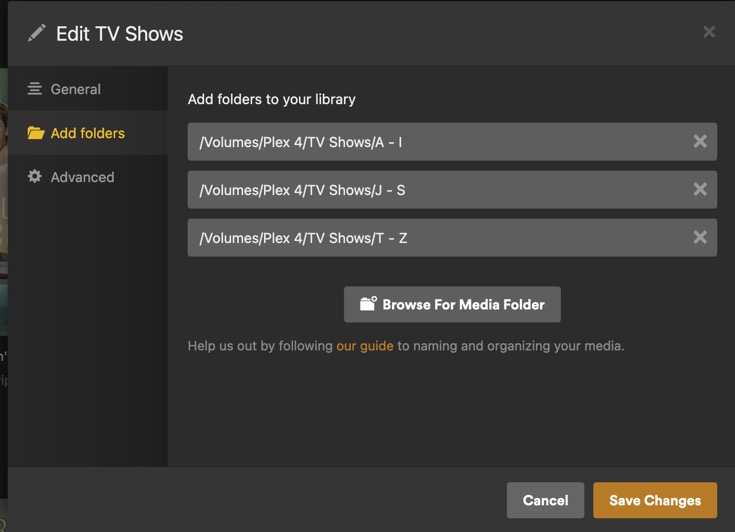
I put the TV show files into the breakdown folders as per your example, but whenever I open the TV Library to edit it to delete the old paths and add the new paths in Plex server settings it says it cannot be saved.
I even tried just to make a new TV Shows folder on the actual home computers drive with just one subfolder of shows in it, (to see if it was that external drive being the problem), but again it says it cannot be saved.
I guess theres the issue, as something must preventing it from saving/updating the paths but I cannot see what would. Maybe theres something in the TV library settings that is amiss? Heres the screenshot after I tried to tell the new path to go to home comp and new folder…
Thank you for the recommendation, I have just checked the permissions as you advised, but all seems to be ticked as permissable. I rebooted the computer from cold, turned on plex and tried to re-edit the TV library but still says it cant be saved. Weird as I can edit and change the other libraries and move and save files to the external drive without any issue. So I am back to square 1.
May 11, 2024 19:23:11.333 [0x70000f995000] DEBUG - Updating part with ID=2953271 [/Volumes/My Media-4TB/TV shows/Babylon_5/Babylon_5_Season_1/Babylon_5 S01E10 Believers.mp4]
May 11, 2024 19:23:11.333 [0x70000f995000] ERROR - SQLITE3:(nil), 11, database corruption at line 84326 of [a29f994989]
Hi again, I downloaded the folder and finally managed to get terminal to run it. Alas it appears the Database is rather buggered. I got a ton of lines like this…
Runtime error near line 397113: UNIQUE constraint failed: taggings.id (19) and this…
Runtime error near line 542474: UNIQUE constraint failed:fts4_metadata_titles_icu_docsize.docid (19)
I guess I should delete the failed database and start a whole new database by making Plex save new Plex Media libraries from scratch? Or is there a preferable way to do it? Do I simply delete all existing Plex files and re-download and install from completely new? (WIll this delete my PlexPass?) Thanks
It will not remove your account subscription of PlexPass, unless you delete your account. Once you recreate a instillation and sign in with your given credentials you good to continue with adding and linking your content…
But be warned there is a correct way to Delete your old Server instillation.
Hi, Thanks again for your time and advice, very much appreciated. My apologies for not getting back sooner, it was rather depressing and I couldn’t face it til now and I have a bit of time today too. Since the GitHub process was unable to fix the database, I will now go ahead and do the next step as youv’e mentioned. I was unaware simply deleting the old server could be the next issue, so thanks for pointing that out!. I will read the article you linked for me. Thanks again. Lets hope I have more luck with that and that’ll fix it finally…cheers
One thing I note, my movies collection doesn’t have the year release dates on them, just their names and what file type they are. How does one go about finding and changing this detail? Is there a quick way, else it will take me ages to hunt and edit each name and edit them singularly. Otherwise I may just leave the movies as they are as that always worked fine anyway.
In most cases the year may not be required. It’s more of best practice to limit possible non correct matches. So I would look at it when required to make a match, even better the titles ID. Advice, all new content add the Year of Release for your allocated region. Example: (2024)