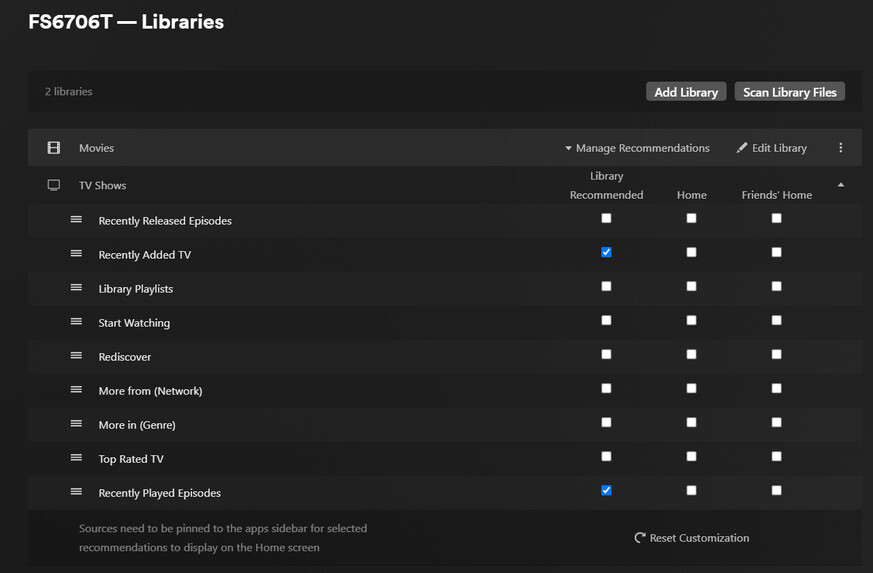
Server Version#: ANY currently 1.32.3.7162 but issue has persisted for the last 3 versions
Player Version#: ANY
My PLEX TV Libraries are not showing any Recently Added TV content??
I’ve removed and readded all Libraries
Deleted all versions of /Plug-in Support/Databases/com.plexapp.plugins.library.db and recreated. - per historical posts about same issue.
None of this seems to make any difference.
TV Library:
The complementary feature in Movies works without issues
Have you tried to reset customization at the bottom of your screen shot?
Do you have any other tv libraries working or not?
If you put a random file inside a newly created test tv library, does it show up ok?
I know sometimes certain library problems can be fixed if you go to
Settings → Debug → Restore Defaults
I’ve never seen it for this specific problem but it wouldn’t hurt to try it. All you have to do is repin your libraries afterward
I don’t really read logs but I can check for database corruption if you want to upload a set
I just been trying to reproduce but cannot. Do you have Merge recently added enabled?
Yeah I tried reset, no change
Only seems to happen when I pick TV Shows library type
Did not know about Settings → Debug → Restore Defaults but will get it a shot
I have tried with Merge on and off, doesn’t seem to matter
Actually I see version 7192 just got released
Will update to that tonight and see if issue persists
q. does it not show on any screen? like if you enabled for home screen
Updated to 7192- no change
Settings>Debug> Restore Defaults - no change
Reset Customization on library again - no change
Enabled “Recently Added TV” to Home screen - At fist no change, then remembered that I had Visibly excluded from Home Screen on Library. Set to Include in home screen and global search and then it showed up, but still not on the Recommended tab on the library itself 
Behavior is the same on any player.
Quick update: Well I dunno what I did but I started looking at things at the Agent level. I made some changes to test, which didn’t make any difference, so when I went to put them back Plex errored and said I couldn’t use that Agent combination. Which I thought was odd.
I ended up deleting the library again and readded (I think I used a different agent this time) and now Recently Added Shows are showing up.
I have another couple Libraries to add and wanna be sure that doing so doesn’t mess with the Agents in use. Not that is should, but I don’t think this issue should have happened in the first place sooo…standby
OK thank you for the update. So be aware if you are using the new agent you cannot use the older agents/scanners at all.
if you find something seems to not be matching with new agent. if you change the library agent to an old one just to fix that thing ( without reverting everything in library to old agent) then a library mixed with things matched with new and old agent will cause all sorts or problems.
I’m not saying you did that or that is the cause here since I personally don’t recall it ever affecting Recently Added.
Yep I added everything back and reshared to all accounts and still working normally 
I very well could have done that. I’m like really new to Plex. I think i’ve been using it just over a month is all
Which is the “new” agents/scanners? Everything is equally new to me
“Plex Movie” and “Plex TV Series” are the two new agents. If you change to them you will see the scanner also changes. They are built in the native code of server so they are much faster but also just work differently. The settings for them are all it the Advanced settings of the library itself.
Cool, these are what I’m using now.
Thx