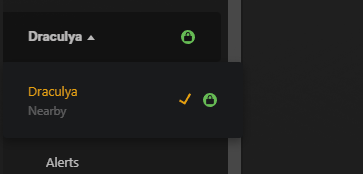
I have 3 servers, one running in windows, another as a docker in unRAID and another in Linux on a raspberry pi 5.
Always had access on my Windows machine to all servers since they’re attached to my plex login but now on the web I can only see and manage the Windows instance even though if I go to the player on my Apple TV and iPhone, all the servers are present with their libraries and accessible.
All the servers are on my LAN and if I type their IP address:32400, Plex Web asks for my login credentials..
Both have static IP addresses.
This only happened today, since until yesterday I had access via web to all of them.
Any help will be greatly appreciated.
Server Version#:1.40.2.8395-c67dce28e (unRAID)
Player Version#:
<If providing server logs please do NOT turn on verbose logging, only debug logging should be enabled>
If I go to the address http://server ip:32400 I’m asked for my credentials and can log in without issues but only the windows instance appears to be managed:
There should be another 2 servers, but nothing.
If I go to my Apple TV I can see them and playback without issues.
Normally I access Plex via the address https://app.plex.tv/desktop/.
Don’t know if it’s correlated but Tautulli of the unRAID server give me a error:
But the server in the raspberry PI 5 doesn’t have a tautulli instance.
If it was a network issue I should be able to see the servers that I own, but would get a warning triangle. which I did one time or when one of the servers was rebooting.
If it helps, I had this same iisse when I added the plex app of my LG tv, it was spinning and spinning, but after a few refreshes and starting again it worked.
I just removed the TV from the authorized clients.
It looked something like this? (but with your claim token – which expires after 5 minutes)
[chuck@lizum UserCredentialReset.2005]$ sudo !!
sudo ./UserCredentialReset.sh

          Plex Media Server user credential reset and reclaim tool (Ubuntu 22.04.4 LTS)

This utility will reset the server's credentials.
It will next reclaim the server for you using a Plex Claim token you provide from https://plex.tv/claim

Please enter Plex Claim Token copied from http://plex.tv/claim : claim-U8Hvsu23seVJ3zC_P3UZ
If that’s what you had and it did not claim, There is a DNS / network gateway problem.
The tool only requires ‘curl’ , a working DNS, ‘sed’ and a functional SSLv3 layer.
It should have reported that it claimed , showed your username and email address.
The only thing I can think of to force reclaiming this:
Stop the Plex container
Run the claim script, as root, in an Unraid command line window
with the -p "/mnt/appdata/......" (specify the path to where Preferences.xml exists as seen from the Unraid command line.
it should claim correctly.
If claiming is successful, Attempt to start Plex.
Let it run for 3-4 minutes, completely idle, then stop it.
From the command line, Go to where Plex keeps its logs and make me a full tar.gz of the logs directory and attach it here.
You stated that the 3 servers are in my account, and if so they are claimed by me.
I shouldn’t be trying to reclaim then again, I think.
Since unRAID is my main server for Plex, can I run on the pi?
I share my server with a friend and it has access to it, but can’t manage it since I didn’t gave permissions but iit can playback… I don’t understand why I can’t within my own network to manage it but can play anything with the players…
With 3 servers claimed onto your account, You can “reclaim” them.
Reclaiming them doesn’t create another server. It takes the login credentials and gets new. Specifically, it writes:
– New PlexOnlineToken
– New PlexOnlineMail
– New PlexOnlineUsername
By keeping the other “ID” values, the server’s identity isn’t changed.
We’re just forcing it to re-register (same ID) using your username & credentials.
After you do this, Control+F5 in the browser will force Plex/web to reload the list from Plex.tv
./UserCredentialReset.sh -p /mnt/user/appdata/Plex-Media-Server/Library/Application\ Support/Plex\ Media\ Server/
ERROR: Cannot access given Preferences file ‘/mnt/user/appdata/Plex-Media-Server/Library/Application Support/Plex Media Server/’.
Exiting.
this is the correct path and I’,m running as root since is the default user unRAID.
Changed the file permissions and ownership but still get the same error
root@Jemini:/mnt/user/appdata# ./UserCredentialReset.sh -p Plex-Media-Server/Library/Application\ Support/Plex\ Media\ Server/Preferences.xml

          Plex Media Server user credential reset and reclaim tool (User-Defined)

This utility will reset the server's credentials.
It will next reclaim the server for you using a Plex Claim token you provide from https://plex.tv/claim

Using given Preferences path:  'Plex-Media-Server/Library/Application Support/Plex Media Server/Preferences.xml'
Please enter Plex Claim Token copied from http://plex.tv/claim :
I was missing the name of the file, now:
root@Dracul:/mnt/user/Backups# ./UserCredentialReset.sh -p /mnt/darth/appdata/Plex-Media-Server/Library/Application\ Support/Plex\ Media\ Server/Preferences.xml
Plex Media Server user credential reset and reclaim tool (User-Defined)
This utility will reset the server’s credentials.
It will next reclaim the server for you using a Plex Claim token you provide from https://plex.tv/claim
Using given Preferences path: ‘/mnt/darth/appdata/Plex-Media-Server/Library/Application Support/Plex Media Server/Preferences.xml’
Please enter Plex Claim Token copied from http://plex.tv/claim :
afterward:
Clearing Preferences.xml
Getting new credentials from Plex.tv
ERROR: Could not get credentials from plex.tv (Error: 60)
restarted the container and plex followed plex setup but i can’t claim even pressing the button: